Internal Linking for AEO: How to Build Topic Hubs AI Engines Understand
Internal links tell search engines and AI systems which pages matter and how your topics connect. How to plan topic hubs, write useful anchor text, fix orphan pages and audit your internal links for AEO.
On this page
- Key takeaways
- Why internal links matter for AI search
- Topic hubs: the core structure
- Step 1: Map your topics
- Step 2: Strengthen the pillar pages
- Step 3: Link supporting pages to the pillar and to each other
- Step 4: Write descriptive anchor text
- Step 5: Connect guides to service pages
- Step 6: Find and fix orphan pages
- Step 7: Fix broken and outdated links
- Step 8: Use navigation, breadcrumbs and related links wisely
- Step 9: Link authors to their work
- Step 10: Build linking into your publishing process
- How internal linking connects to other AEO work
- Worked example: building an AEO topic hub
- How to audit your internal links
- Internal linking for different site types
- Using AI tools to find linking opportunities
- Internal links during site migrations and redesigns
- A quick internal linking checklist
- Linking to external sources
- How many links is too many?
- Common internal linking mistakes
- Measuring the effect
- Getting help
- Frequently asked questions
- Sources
Last updated: 4 November 2026
Quick answer: Internal linking for AEO means connecting the pages on your website so search engines and AI systems can find every important page, understand how your topics relate and see which pages are the main authority on each subject. Build topic hubs: one strong pillar page per core topic, linked to and from a set of supporting guides that answer specific questions. Use descriptive anchor text that says what the linked page covers, link service pages from relevant guides, fix orphan pages that nothing links to, and review links whenever you publish or refresh content. Good internal linking does not guarantee AI citations, but it makes your expertise far easier to discover and interpret.
Key takeaways
- Internal links help crawlers discover pages and help AI systems understand topic relationships and page importance.
- Topic hubs (pillar plus supporting pages) make your depth on a subject obvious.
- Descriptive anchor text is a clear signal of what a linked page is about.
- Service pages should be linked from the guides that answer related buyer questions.
- Orphan pages, broken links and links to outdated pages weaken the whole structure.
Why internal links matter for AI search
Internal links have always mattered for SEO. They help search engine crawlers discover pages, spread authority across a website and signal which pages are most important. In the age of AI search, their role extends further.
AI assistants such as ChatGPT search, Perplexity, Copilot and Google AI Overviews build answers from pages they find through crawling and search indexes. Before an assistant can cite your page, a crawler has to reach it, and a search system has to understand what it covers and how it relates to other pages. Internal links are one of the clearest signals you can give for both.
- Discovery. A page with no internal links pointing to it may be crawled rarely or not at all. AI search crawlers follow links just as search crawlers do.
- Context. A link from a pillar page on “AEO services” to a guide titled “how much AEO costs” tells machines that the guide is part of that topic.
- Importance. Pages that many relevant pages link to are signalled as central to that topic.
- Entity clarity. Consistent links between your service pages, about page, author pages and guides help AI systems connect your brand to the topics you cover. See entity SEO for AEO.
Google’s documentation on links notes that its systems use links to find pages and understand relevance, and recommends descriptive anchor text. Those principles apply equally to the search systems that feed AI answers.
Topic hubs: the core structure
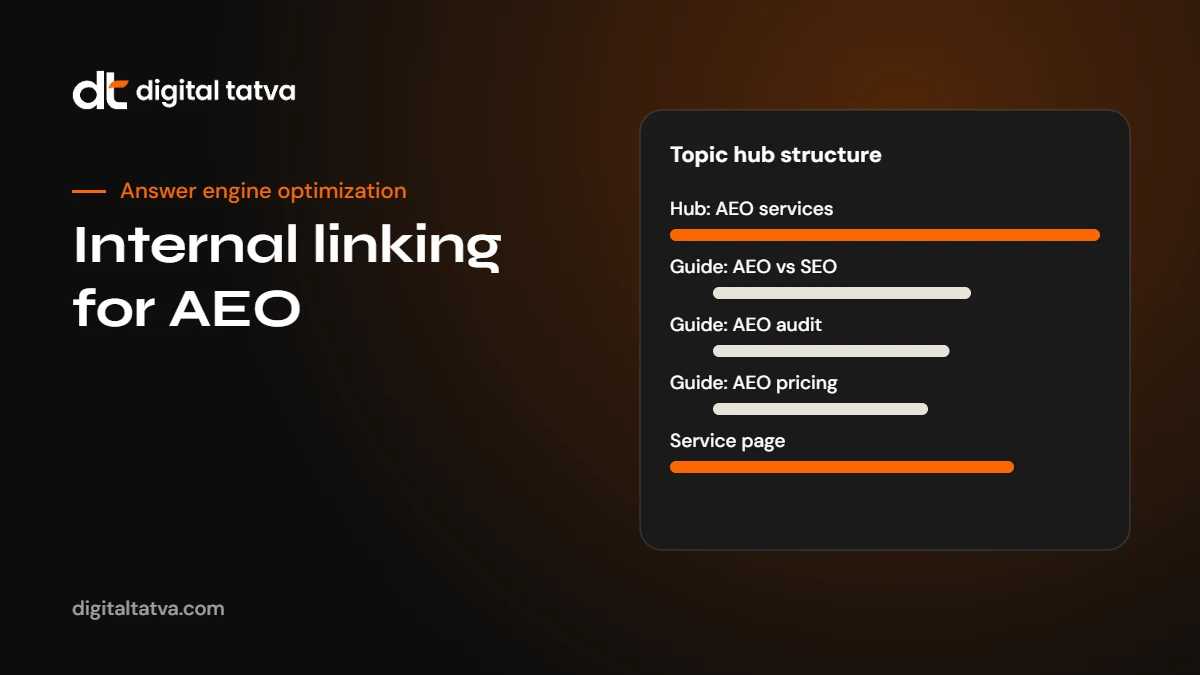
A topic hub (sometimes called a topic cluster) is a group of pages about one subject, organised around a central page.
- Pillar page: a broad, authoritative page on the core topic, such as “Answer Engine Optimization services” or “What is AEO?”. It covers the subject at a high level and links to every supporting page.
- Supporting pages: focused guides that answer specific questions within the topic, such as “AEO vs SEO”, “AEO pricing”, “how long AEO takes” or “AEO for healthcare”. Each links back to the pillar and to closely related supporting pages.
- Conversion pages: service, product or contact pages that the hub leads readers towards.
On this website, for example, the What is AEO guide and the AEO service page act as pillars, while guides such as AEO vs SEO, AEO pricing and how long AEO takes support them.
| Page type | Role | Links to | Linked from |
|---|---|---|---|
| Pillar | Defines the topic and your position | All supporting pages, main service page | Homepage, navigation, supporting pages |
| Supporting guide | Answers one specific question | Pillar, 2 to 4 related guides, relevant service page | Pillar, related guides, blog index |
| Service page | Explains what you offer | Pillar, key guides, contact or audit page | Pillar, relevant guides, navigation |
| Author page | Shows expertise | Articles by the author | Every article by the author |
Step 1: Map your topics
Start by listing the topics you want AI engines to associate with your brand. For most businesses, this means three to eight core topics tied to what you sell. For each topic, list:
- The pillar page that should represent it, or note that you need to create one.
- Every existing page that covers a part of the topic.
- Buyer questions that have no page yet. Our guide to AEO prompt research helps you find them.
- The service or product page the topic should lead to.
A crawler export of all your URLs, titles and current internal links makes this much faster. See the best SEO crawlers for AI search readiness.
Step 2: Strengthen the pillar pages
A pillar page should be the most complete, clearly structured page on its topic. Before linking everything to it, make sure it deserves the role:
- A direct answer or definition at the top.
- Sections covering the main sub-questions, each with a short answer and a link to the detailed guide.
- Clear navigation within the page, such as a table of contents.
- Links to the relevant service pages and a clear next step for readers.
- Regular updates. See how to refresh content for AEO.
Step 3: Link supporting pages to the pillar and to each other
Every supporting page should link back to its pillar, ideally early in the content where the topic is introduced. Supporting pages should also link to two to four closely related guides where the link genuinely helps the reader. For example, a guide on AEO for healthcare should naturally link to guides on schema markup, author pages and local AEO, because readers of the first will need the others.
Avoid linking every page to every other page. Too many links dilute the signal and make pages harder to read. Link where a reader would reasonably want to go next.
Step 4: Write descriptive anchor text
Anchor text is the clickable text of a link. It is one of the clearest signals of what the linked page covers.
| Weak anchor | Better anchor |
|---|---|
| click here | our technical AEO checklist |
| read more | how to track AI traffic in GA4 |
| this article | the guide to schema markup for AEO |
| our services | AI search visibility tracking |
Good anchors are short, natural and specific. Vary them slightly across pages rather than repeating the exact same phrase everywhere, but always make it clear what the reader will find.
Step 5: Connect guides to service pages
Many websites have strong blog content and separate service pages, with few links between them. That breaks the path from question to solution and weakens the signal that your business offers the service.
- In each guide, link to the most relevant service page where it naturally fits, usually when the guide describes work that the service delivers.
- On each service page, link to the guides that explain the problem and the process, so buyers and AI systems see your depth.
- Use the service name in the anchor text, for example “our technical AEO service“.
Step 6: Find and fix orphan pages
An orphan page is a page that no other page on your site links to. It may be in your sitemap, but crawlers treat it as less important, and readers rarely find it. Common causes include campaign landing pages, old blog posts that dropped off the blog index and pages created without being added to navigation.
- Export all URLs from your sitemap.
- Crawl your site and export all URLs that are linked internally.
- Compare the two lists. Pages in the sitemap but not linked are orphans.
- For each orphan, decide: link it from relevant pages, merge it into another page, or retire and redirect it.
Step 7: Fix broken and outdated links
- Broken links (pages returning 404) waste crawl effort and frustrate readers. Update or remove them.
- Redirect chains slow crawling. Update links to point directly to the final URL.
- Links to outdated pages can send AI systems to old information. Point links to your current, best page on the topic.
- Links to noindexed pages are usually a sign of confusion. Either make the page indexable or stop linking to it from content.
Step 8: Use navigation, breadcrumbs and related links wisely
Site-wide navigation, breadcrumbs and “related posts” modules all create internal links.
- Main navigation should include your core service and pillar pages.
- Breadcrumbs help on blogs and large sites by showing the page’s place in the structure. Mark them up with BreadcrumbList schema.
- Related posts modules help, but they are usually automated and generic. They do not replace hand-placed contextual links inside the text.
- Footer links to important pages are fine, but contextual links within content usually carry clearer topical meaning.
Step 9: Link authors to their work
Expertise signals matter for AI answers, especially in sensitive topics. Each article should link to its author’s profile page, and each profile should list the author’s articles. This creates a clear connection between people and topics. See author pages and expertise signals.
Step 10: Build linking into your publishing process
Internal linking fails when it is treated as a one-off project. Make it part of every publish and refresh:
- Before publishing, add links from the new page to its pillar, two to four related guides and the relevant service page.
- After publishing, add links to the new page from its pillar and from two or three older related pages.
- When refreshing a page, review its outgoing links and update any that point to outdated content.
- Once a quarter, run an orphan and broken link check.
How internal linking connects to other AEO work
Internal links are one part of a broader set of signals. They work best alongside:
- Crawler access: AI crawlers must be allowed to reach your pages. Check with our free AI visibility checker.
- Content in HTML: links inside JavaScript that crawlers cannot render may not be followed. See can AI crawlers read JavaScript?
- Answer-first content: clear pages give links something worth pointing to. See answer-first content.
- Structured data: schema clarifies page types and relationships. See schema markup for AEO.
- External mentions: links and mentions from other websites confirm your authority. See brand mentions for AEO.
Worked example: building an AEO topic hub
Here is how a consultancy might organise its AEO content. This mirrors how we structure our own site.
- Pillar: “What is AEO? Answer engine optimization explained” links to every guide below and to the AEO service page.
- Strategy guides: AEO strategy, AEO KPIs, how long AEO takes, AEO reporting template. Each links back to the pillar and to one another where helpful.
- Technical guides: technical AEO checklist, robots.txt for AI crawlers, JavaScript rendering, schema markup. Each links to the technical AEO service page.
- Industry guides: AEO for healthcare, real estate, education, hotels, manufacturers and professional services. Each links to the pillar, to relevant technical guides and to the audit page.
- Conversion pages: AEO service page and the audit request page, linked from the pillar and from guides at natural points.
The result is a structure where a crawler or AI system arriving at any page can easily reach the rest of the topic, and where the relationships between pages are explicit.
How to audit your internal links
- Crawl the site and export internal links with anchor text and status codes.
- Check inlinks to key pages. Pillars and service pages should have many relevant internal links.
- Find orphans by comparing your sitemap with crawled URLs.
- List broken links and redirects and fix them.
- Review anchor text for vague phrases like “click here”.
- Check click depth. Important pages should be reachable within three clicks of the homepage.
- Sample content links on your top 20 pages to see whether they link to the right pillar and service pages.
Internal linking for different site types
Service businesses
Most service businesses have a handful of service pages and a blog. The most common gap is that blog posts never link to services, and service pages never link to the guides that prove expertise. Make every service page the hub for its own topic: link out to three to six guides that explain the problem, the process and the costs, and link back from each guide to the service.
Ecommerce stores
Stores have category pages, product pages and often buying guides. Link buying guides to the relevant categories and best-selling products; link category pages to the buying guide that helps shoppers choose; and link related products to each other where it genuinely helps, such as accessories or alternatives. Avoid filter and sort URLs creating thousands of near-duplicate internal links. See AEO for ecommerce.
Local and multi-location businesses
Create one page per location with its own details, and link each location page from a locations hub. Link location pages to the services offered there and to local guides. Keep the main navigation simple and use the hub to reach individual locations.
B2B and SaaS
B2B sites often have product pages, solution pages by industry, use case pages, documentation and a blog. Map how buyers move from problem to solution and link along that path: problem guides link to use case pages, use case pages link to the product and to case studies, and documentation links back to product pages. See AEO for B2B and AEO for SaaS.
Using AI tools to find linking opportunities
AI assistants can speed up internal linking on large sites:
- Export a list of your URLs and titles, then ask: “For this new article about [topic], suggest the five most relevant existing pages to link to and a natural anchor text for each.”
- Paste an article and your list of service pages, and ask where in the text a link to each service would fit naturally.
- Ask for a topic map of your existing posts grouped into clusters, then check whether each cluster has a clear pillar.
Review every suggestion. AI can propose links that look relevant but do not help the reader.
Internal links during site migrations and redesigns
Redesigns and CMS migrations are when internal linking most often breaks. Menus change, URLs change, old posts lose their links and related-post modules disappear. Before a migration, export every internal link and its anchor text. After launch, crawl the new site, compare, and fix lost links to important pages. Redirect every changed URL permanently and update internal links to point to the new URLs directly, rather than relying on redirects. Then run the free AI visibility checker to confirm AI crawlers can still reach and read the site.
A quick internal linking checklist
- Each core topic has one clear pillar page.
- Every supporting guide links to its pillar and to two to four related guides.
- Guides link to the relevant service page where it fits naturally.
- Service pages link to the guides that explain the problem and process.
- Anchor text is descriptive; no “click here”.
- No orphan pages among important content.
- No broken links or redirect chains in content.
- Authors are linked to and from their articles.
- Important pages are within three clicks of the homepage.
- New posts are linked from older related posts within a week of publishing.
Linking to external sources
Internal links are not the only links that matter on a page. Linking out to primary sources such as official documentation, regulators and research makes your content more trustworthy and helps readers verify claims. Keep external links relevant and up to date, and open them in a new tab where that helps the reader return to your page.
How many links is too many?
There is no magic number, but readability is a good guide. A 2,500-word guide with 15 to 25 contextual links to genuinely related pages is usually fine. A 500-word page with 40 links is not. Ask whether each link answers a question the reader is likely to have at that point in the text. If not, remove it.
Common internal linking mistakes
- Linking only through navigation and automated related posts.
- Using the same generic anchor text everywhere.
- Never linking blog content to service pages.
- Leaving old posts linked to outdated or retired pages.
- Adding dozens of links to one page, diluting meaning and readability.
- Creating several competing pages on the same topic without a clear pillar.
- Hiding important links inside scripts or images.
Measuring the effect
Internal linking changes rarely produce instant results, but over a few months you should see:
- Faster indexing of new and refreshed pages.
- More impressions for supporting guides and pillars in Search Console.
- More of your pages cited for tracked prompts.
- More readers moving from guides to service and contact pages.
Track these alongside your other AEO metrics using our AEO reporting template.
Getting help
For large sites, internal linking is easiest to fix as part of a wider content and technical review. Digital Tatva’s content optimization and technical SEO services include topic mapping and internal link audits. If you want to start with a full picture of your AI visibility, request an AEO audit.
Frequently asked questions
Does internal linking help AI search visibility?
It helps indirectly but importantly. Internal links help crawlers find your pages and help search systems understand how topics relate and which pages matter most, which supports the search results AI answers draw on.
How many internal links should a page have?
There is no fixed number. Link where it genuinely helps the reader: usually to the pillar page, a few closely related guides and the relevant service page. Avoid stuffing pages with links.
What is a topic hub?
A topic hub is a group of pages on one subject, organised around a pillar page that links to supporting guides, with each guide linking back to the pillar and to related guides.
What anchor text should I use?
Use short, descriptive phrases that tell readers and machines what the linked page covers, such as “technical AEO checklist” rather than “click here”.
What is an orphan page?
An orphan page is a page no other page on your site links to. It is harder for crawlers and readers to find and is often treated as less important.
Should I link blog posts to service pages?
Yes, where it fits naturally. Linking guides to the related service page connects the buyer’s question to your solution and reinforces that your business offers that service.
Sources
- Link best practices for Google, Google Search Central
- Breadcrumb structured data, Google Search Central
- AI features and your website, Google Search Central
Product details, prices and features are checked at the time of writing and can change. Sources are linked in the text so you can check them yourself.
How does your brand appear in AI answers?
We test the questions your buyers ask across the major AI assistants and search engines, then show you what to fix first.
Get an AI Visibility Audit