The New AI Training Opt-Out in robots.txt: What the Shared Token Means for Your Website
Google, Microsoft, OpenAI and Anthropic are backing one shared robots.txt token for opting out of AI training. Here is what the __usage_ai-training rule does, what it does not do, the dates that matter and how to decide whether to use it.
On this page
- Key takeaways
- What changed in October 2026
- How the shared token works
- Usage preference versus crawl rule
- What each company has said
- What this does not change
- Should your business opt out of AI training?
- How to add the token: step by step
- A complete example robots.txt
- Common mistakes to avoid
- How this fits into AI visibility work
- Questions to ask your developer or agency
- What to watch next
- Real-world scenarios
- How to check that companies are honouring your preference
- Frequently asked questions
- Sources
Last updated: 4 November 2026
Quick answer: A new proposal lets website owners tell AI companies, in one place, that they do not want their content used to train AI models. You add a group to robots.txt with the special user agent __usage_ai-training and a Disallow rule for the paths you want excluded. Google, Microsoft, OpenAI and Anthropic have said they will support it, with Google targeting early 2027 and Microsoft honouring it from 1 February 2027. It is a usage preference, not a crawl block: it does not stop search crawlers, does not remove you from Google Search or AI Overviews and does not affect rankings. It is still an individual Internet-Draft, not an official IETF standard.
Key takeaways
- The shared token
__usage_ai-trainingexpresses one preference: “do not use this content to train AI models”. - It sits in robots.txt but works differently from normal rules. It does not stop any crawler from fetching your pages.
- The wildcard user agent
*and company-specific tokens such as GPTBot do not count as this preference. - Google treats an opt-out as the same as disallowing Google-Extended. AI Overviews and AI Mode are still governed by Googlebot and Search Console settings.
- Blocking training does not hurt search visibility, but it is a business decision with trade-offs for brand knowledge in AI models.
What changed in October 2026
For two years, website owners who wanted to keep their content out of AI training had to learn a long list of crawler names. GPTBot for OpenAI, Google-Extended for Google’s Gemini models, ClaudeBot for Anthropic, Applebot-Extended for Apple, CCBot for Common Crawl and many more. Each company published its own token, each with slightly different meaning, and new ones appeared every few months. Our guide to AI crawlers and robots.txt lists the main ones, and keeping such a list up to date is a job in itself.
On 30 October 2026, an individual Internet-Draft titled “draft-kelley-aipref-training-preference-signal-00” was submitted to the IETF by Kevin Kelley of Anthropic. It proposes a single, shared way to express one preference: that content should not be used for AI model training. Around the same time, Google, Microsoft, OpenAI and Anthropic each said they would support the signal. That is the news: not a new crawler, but one shared word that several of the largest AI developers say they will read.
It is important to be precise about the status. An individual Internet-Draft is a proposal. It has not been adopted by an IETF working group, it is not endorsed by the IETF and the draft itself expires on 3 May 2027 unless it is updated or adopted. Support from the companies is real, but it is a commitment by each company, not a legal or technical obligation for the whole industry.
How the shared token works
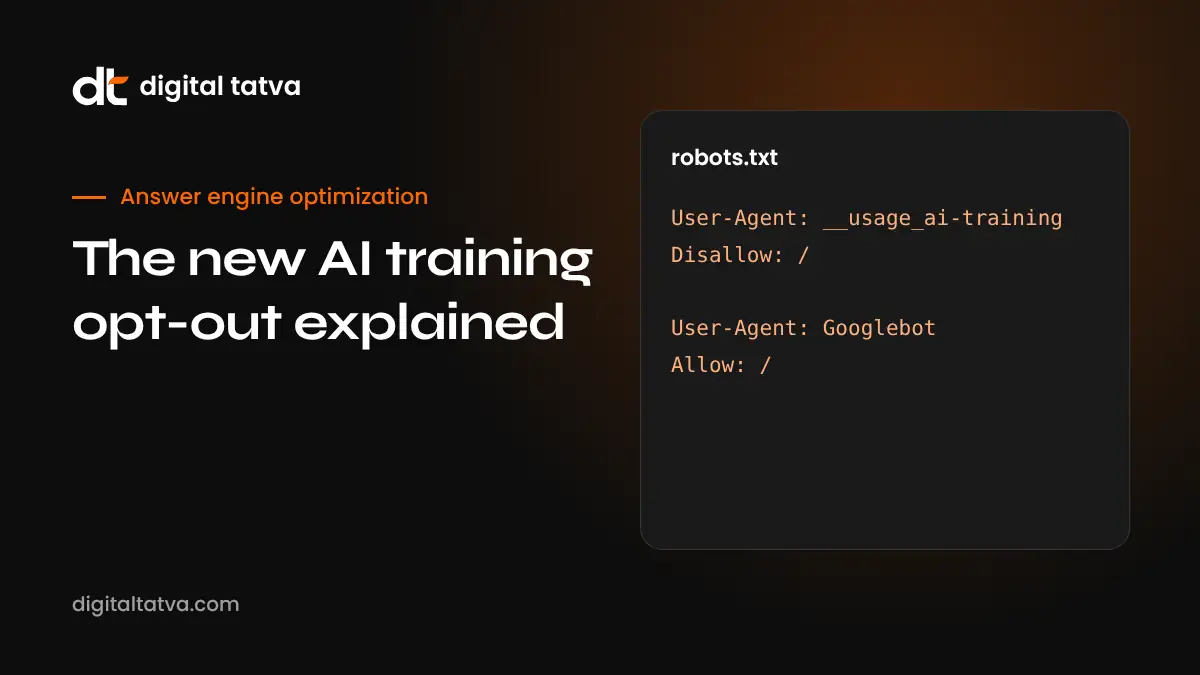
The proposal reuses the robots.txt file because almost every website already has one and every major crawler already reads it. It introduces a reserved user agent name, __usage_ai-training. The two underscores at the start mark it as something different from a real crawler name. No bot calls itself __usage_ai-training. Instead, participating companies read the rules in that group and apply them as a usage preference across their systems.
A simple example that opts the whole site out of AI training, while keeping a press kit available for training, looks like this:
User-Agent: __usage_ai-training
Disallow: /
Allow: /press-kit/
The rules follow normal robots.txt path matching. Disallow means “do not use content at these paths for AI training”. Allow carves out exceptions. If you have no __usage_ai-training group at all, you have not expressed this preference, and each company falls back to its own existing rules and tokens.
What does not count as the preference
- The wildcard group. A
User-Agent: *group with Disallow rules is a crawl rule for all bots. It is not read as an AI training preference under this proposal. - Company tokens. Blocking GPTBot, ClaudeBot or Google-Extended still works under each company’s own policy, but those rules are not the shared preference. The shared token is separate.
- Meta tags on their own. The proposal is about robots.txt. Some companies also read page-level signals, which are covered below, but those are their own mechanisms.
Usage preference versus crawl rule
This is the part most people misunderstand, so it is worth slowing down. A normal robots.txt rule controls crawling: whether a bot is allowed to fetch a URL at all. The new token controls usage: what a company may do with content it has, whether it fetched the page itself or obtained it another way.
| Question | Normal crawl rule (e.g. User-Agent: GPTBot) | Shared usage preference (__usage_ai-training) |
|---|---|---|
| What it controls | Whether one named bot may fetch your URLs | Whether your content may be used for AI model training |
| Who reads it | The one bot named | Every company that has committed to the signal |
| Stops fetching? | Yes, for that bot | No |
| Affects search ranking? | Can, if you block a search crawler | No |
| Covers content collected by others? | No | Intended to, for participating companies |
| Status | Long-established practice (RFC 9309) | Individual Internet-Draft, supported by named companies |
Because it is not a crawl rule, adding the token will not make your pages disappear from Google, Bing, ChatGPT search or Perplexity. Search crawlers such as Googlebot, Bingbot, OAI-SearchBot and PerplexityBot keep reading your pages exactly as before. That is the main reason the change matters for answer engine optimisation: you can now separate the training question from the visibility question cleanly.
What each company has said
Here is a summary of the public positions at the time of writing. Dates and details can change, so check each company’s documentation before relying on them.
| Company | Position | Timing | Notes |
|---|---|---|---|
| Will support the shared token | Targeted for early 2027 | Treats an opt-out as the same as disallowing Google-Extended | |
| Microsoft (Bing) | Will honour the preference | From 1 February 2027 | Bing Webmaster Tools transition opens 15 December 2026 |
| OpenAI | Joining | “Coming months” | Existing GPTBot rules continue to apply |
| Anthropic | Implementing | Not dated publicly | Author of the Internet-Draft |
| Meta, Amazon, Apple | No public commitment yet | Unknown | Keep using their own tokens where they exist |
Google in detail
Google has said it will treat a __usage_ai-training opt-out the same way it treats a Disallow for Google-Extended. Google-Extended is the product token that controls whether content is used to improve Gemini models. Google has also clarified that Google-Extended covers use in the Gemini app and grounding in Vertex AI. It does not control Google Search features. AI Overviews and AI Mode are part of Search, governed by Googlebot and by the controls Google offers in Search Console. If you want to understand how those features choose sources, see our guide to AI Overviews optimisation.
In practice this means that for Google, the shared token is a simpler way to say what Google-Extended already says. If you already block Google-Extended, nothing changes for Google. If you never blocked it, adding the shared token will have the same effect once Google’s support goes live.
Microsoft in detail
Microsoft’s announcement is the most detailed. Bing will honour the shared preference from 1 February 2027. A transition in Bing Webmaster Tools opens on 15 December 2026. Microsoft also said that after 1 March 2027, it will stop reading the old NoArchive and NoCache directives as training or grounding preferences. Many publishers used those directives as an indirect way to limit how Bing and Copilot used their content, so this is a real change for them.
For grounding, which is when Copilot fetches a page to answer a live question, Microsoft points to page-level settings with three values: Allow, Disallow and DisallowExtended. These can be set in a meta tag or an HTTP header, for example:
<meta name="Bingbot" content="ai-training:disallow">

X-Robots-Tag: Bingbot: ai-training:disallow
If your site relied on NoArchive or NoCache for this purpose, plan to review those tags before March 2027. Test any change in Bing Webmaster Tools first.
OpenAI and Anthropic
OpenAI has said it is joining and will support the signal “in the coming months”. Until then, OpenAI’s existing documentation still applies: GPTBot is the training crawler, while OAI-SearchBot and ChatGPT-User are used for search and user-requested fetches. Anthropic, whose engineer wrote the draft, has said it is implementing support. Its existing ClaudeBot rules continue to apply alongside the shared token.
What this does not change
- Search visibility. Adding the token does not remove you from Google Search, AI Overviews, AI Mode, Bing, Copilot answers, ChatGPT search or Perplexity.
- Rankings. Google and Microsoft have both said a training preference is not a ranking signal.
- Models already trained. A preference applies going forward. It does not remove your content from models that were trained before you set it.
- Companies that have not committed. Bots from companies that have not adopted the signal will ignore it. Keep company-specific rules for those you care about.
- Bad actors. robots.txt has always been voluntary. Scrapers that ignore it today will ignore this too. If unwanted crawling is a problem, you need server or CDN controls, not only robots.txt.
Careful: Do not confuse training with search. Blocking OAI-SearchBot, PerplexityBot, Googlebot or Bingbot to “stop AI” will remove you from AI answers and search results. The shared token is the safer way to express a training preference because it leaves search crawling alone.
Should your business opt out of AI training?
There is no single right answer. It depends on what your content is, how you make money and how much you value being “known” by AI models. Here is how we think about it with clients.
Reasons to opt out
- Your content is your product: paid research, original journalism, courses, recipes, stock imagery or proprietary data.
- You license content and want to keep training rights for commercial negotiation.
- Legal, regulatory or contractual reasons require you to limit reuse.
- Your brand policy is to control how your work is used, as a matter of principle.
Reasons to allow training
- You are a service business, local business or brand that wants AI models to “know” your name, category and offer, even without live search.
- Your public pages are marketing material whose job is to spread.
- You want product facts, pricing ranges and positioning to appear accurately in model knowledge, not only in live search answers.
Model knowledge and live retrieval are different things. When ChatGPT or Gemini answers from its training data, it draws on what it learned. When it searches the web, it uses search crawlers and your current pages. Opting out of training mainly affects the first. For many service businesses, being part of model knowledge is helpful for entity recognition, while for many publishers the value of the content outweighs that benefit.
A middle path
Because the token supports Allow and Disallow paths, you can opt out selectively. A common pattern is to exclude premium or original content while allowing pages that describe who you are and what you sell.
User-Agent: __usage_ai-training
Disallow: /research/
Disallow: /members/
Disallow: /courses/
Allow: /about/
Allow: /services/
Allow: /press-kit/
This keeps your brand facts available while protecting the content that makes you money.
How to add the token: step by step
- Decide your policy. Agree internally whether you want a full opt-out, a partial opt-out or no opt-out. Write down which folders contain valuable content.
- Open your robots.txt. It lives at yourdomain.com/robots.txt. In WordPress, most SEO plugins have a robots.txt editor; on Shopify use the robots.txt.liquid template; on Webflow use the site settings.
- Back it up. Copy the current file before editing. A typo in robots.txt can block search crawlers.
- Add a separate group starting with
User-Agent: __usage_ai-training, followed by your Disallow and Allow rules. Do not merge it into theUser-Agent: *group. - Keep your search crawler rules. Check that Googlebot, Bingbot, OAI-SearchBot and PerplexityBot are still allowed where you want them.
- Keep company tokens for non-participants. If you want to limit training by companies that have not committed, keep their specific rules, for example Applebot-Extended or CCBot.
- Test the file. Use the robots.txt report in Google Search Console and the robots.txt tester in Bing Webmaster Tools. Then run our free AI visibility checker to confirm search crawlers are not blocked.
- Record the change. Note the date and the reason in your change log. When support goes live at each company, you will want to know when your preference was set.
A complete example robots.txt
This example is for a consultancy that wants to stay fully visible in search and AI answers, keep its service pages available for model training, and exclude its paid templates.
# Search crawlers: allowed
User-Agent: *
Disallow: /wp-admin/
Allow: /wp-admin/admin-ajax.php

# Shared AI training preference
User-Agent: __usage_ai-training
Disallow: /templates/
Disallow: /client-portal/
Allow: /

# Company token for a non-participating trainer
User-Agent: CCBot
Disallow: /templates/

Sitemap: https://www.example.com/sitemap.xml
Notice that nothing here blocks Googlebot, Bingbot, OAI-SearchBot or PerplexityBot. The training preference is expressed separately and narrowly.
Common mistakes to avoid
- Putting the rule under User-Agent: *. That blocks crawling for everyone and does not express the training preference.
- Misspelling the token. It must be exactly
__usage_ai-training, with two underscores at the start. - Assuming it removes past training. It does not. It is a preference for future use.
- Deleting company-specific rules too early. Until a company’s support is live, its own token is what it reads.
- Forgetting subdomains. robots.txt applies per host. A blog on blog.example.com needs its own file.
- Blocking at the CDN by accident. Some CDN “block AI bots” switches also block AI search crawlers. Check what each switch actually does.
How this fits into AI visibility work
At Digital Tatva, we treat AI visibility in layers. The first layer is whether engines can read your site: crawler access, rendering, indexing and structured data. That is the “Readable” foundation in our five elements framework. Training preferences sit next to that layer. They do not change whether engines can read you for live answers, but they do shape what models know about you over time.
For most of our clients, the practical decision looks like this: keep every search and retrieval crawler allowed, make sure the firewall does not block them, and decide training on a folder-by-folder basis. Then measure what happens in AI answers, using the approach in our AEO reporting template.
Questions to ask your developer or agency
- Which crawlers does our robots.txt allow and block today, and why?
- Does our CDN or security plugin block any AI search crawlers?
- Do we use NoArchive or NoCache anywhere, and do we need to replace them before March 2027?
- Which folders contain content we would not want used for training?
- Who will check each company’s documentation when support goes live?
What to watch next
- The Internet-Draft. Watch whether it is updated, adopted by a working group or allowed to expire on 3 May 2027.
- Google’s launch. Google has targeted early 2027. Look for an update in Google Search Central documentation.
- Bing Webmaster Tools. The transition opens 15 December 2026, before the 1 February 2027 start.
- OpenAI’s documentation. Look for the shared token in OpenAI’s crawler page.
- Other companies. Meta, Amazon and Apple have not committed. Their decisions will decide whether one token is truly enough.
Real-world scenarios
These short examples show how different businesses might decide. They are illustrations, not client results.
A regional news publisher
Original reporting is the product, and the publisher is negotiating licensing deals. A full opt-out makes sense, with an Allow for the about page and contact details so AI models still know who the publisher is. Search crawlers stay allowed so articles keep appearing in Google, Discover and AI answers with links.
A B2B software company
The company wants ChatGPT and Gemini to describe its product correctly, even when they answer without searching. It allows training for product, pricing and documentation pages, and opts out only for customer-only knowledge base articles behind a login, which crawlers should not reach anyway.
A local clinic
The clinic’s pages are marketing material. Being part of model knowledge helps patients who ask AI assistants for recommendations. It sets no opt-out and focuses its effort on accurate listings and reviews instead.
An online course creator
Course content is the business. The creator opts out for /courses/ and /lessons/, allows the sales pages and blog, and keeps company-specific rules for crawlers that have not committed to the shared signal.
How to check that companies are honouring your preference
A preference is only useful if it is respected, and you cannot see inside a company’s training pipeline. What you can do is keep good records and watch the signals that are visible to you.
- Keep dated copies of robots.txt. Save a copy each time you change it, so you can show when a preference was in place.
- Review server logs. Look at which user agents fetch your pages and how often. A training crawler that keeps fetching blocked paths under its own token is worth reporting to that company.
- Read each company’s documentation when support launches. Google, Microsoft and OpenAI usually explain how to verify their crawlers by IP range or reverse DNS.
- Use webmaster tools. Bing Webmaster Tools and Google Search Console are the most likely places for new controls and reports to appear.
If you believe a company is ignoring your preference, contact it through its published webmaster or publisher channel with dates, URLs and log extracts.
Frequently asked questions
What is the __usage_ai-training token?
It is a reserved user agent name proposed for robots.txt. Rules under it express whether content may be used to train AI models. Participating companies read it as a usage preference rather than as instructions for one crawler.
Will adding it remove my site from Google AI Overviews?
No. Google treats it like a Google-Extended opt-out, which covers Gemini model training, the Gemini app and Vertex AI grounding. AI Overviews and AI Mode are governed by Googlebot and Search Console settings.
Is it an official standard?
Not yet. It is an individual Internet-Draft submitted on 30 October 2026. It is not endorsed by the IETF and expires on 3 May 2027 unless updated. Support comes from commitments by individual companies.
Does it affect my rankings?
No. Google and Microsoft have said a training preference is not a ranking factor. Blocking search crawlers would affect visibility, which is why the shared token is kept separate from crawl rules.
Can I still block GPTBot or ClaudeBot directly?
Yes. Company-specific tokens keep working under each company’s own policy. Many sites will keep both during the transition.
Does it remove my content from models that are already trained?
No. It is a preference for future use. It does not undo past training.
Sources
- A simpler way to control AI training, Google Search Central Blog
- Google AI training control coverage, Search Engine Roundtable
- Google, Microsoft, OpenAI and Anthropic back one AI training opt-out, PPC Land
- RFC 9309: Robots Exclusion Protocol, RFC Editor
- Google’s common crawlers, Google Search Central
Product details, prices and features are checked at the time of writing and can change. Sources are linked in the text so you can check them yourself.
How does your brand appear in AI answers?
We test the questions your buyers ask across the major AI assistants and search engines, then show you what to fix first.
Get an AI Visibility Audit