
AI Crawlers and robots.txt: Which Bots to Allow for AEO in 2026
Which AI crawlers decide whether you appear in ChatGPT, Claude, Perplexity and Google AI answers, which ones only collect training data, and a robots.txt you can copy.
On this page
- Key takeaways
- The AI crawlers that matter, and what each one does
- Search crawlers: allow these if you want to be cited
- Training crawlers: a separate business decision
- User-triggered fetchers
- A robots.txt you can start from
- Check the layers robots.txt does not control
- How to audit AI crawler access step by step
- Special cases
- Frequently asked questions
- Sources
Last updated: 30 October 2026
Quick answer: Allow the search crawlers if you want to appear in AI answers: OAI-SearchBot for ChatGPT search, Claude-SearchBot for Claude, PerplexityBot for Perplexity, and Googlebot and Bingbot for Google AI Overviews and Copilot. Training crawlers such as GPTBot, ClaudeBot and Google-Extended are a separate choice: blocking them keeps your content out of model training but does not remove you from those search features.
Most AI companies now run two kinds of bot. One collects pages to train future models. The other fetches pages so the assistant can answer a question today and link to its source. Mixing them up is one of the most common reasons we find brands missing from AI answers during an AEO audit: a site blocks “all AI bots” to protect its content and, without meaning to, removes itself from the answers its buyers read.
Key takeaways
- Search and answer crawlers decide whether you can be cited. Training crawlers do not.
- Blocking GPTBot does not remove you from ChatGPT search. Blocking OAI-SearchBot does.
- User-triggered fetchers such as ChatGPT-User and Perplexity-User may not follow robots.txt at all.
- Check your CDN and firewall too: many block AI bots by default, whatever robots.txt says.
- Changes can take around 24 hours to be picked up.
The AI crawlers that matter, and what each one does
| Company | User agent | What it does | Affects AI answers? |
|---|---|---|---|
| OpenAI | OAI-SearchBot | Finds pages to show and link in ChatGPT search | Yes |
| OpenAI | GPTBot | Collects content that may train OpenAI models | No, training only |
| OpenAI | ChatGPT-User | Visits a page when a user asks ChatGPT to | Per request; robots.txt may not apply |
| Anthropic | Claude-SearchBot | Indexes pages to improve Claude search answers | Yes |
| Anthropic | ClaudeBot | Collects content that may train Claude models | No, training only |
| Anthropic | Claude-User | Fetches a page when a Claude user needs it | Yes, for user-directed search |
| Perplexity | PerplexityBot | Surfaces and links sites in Perplexity results | Yes |
| Perplexity | Perplexity-User | Visits a page to answer a specific question | Per request; generally ignores robots.txt |
| Googlebot | Crawls for Search, including AI Overviews and AI Mode | Yes | |
| Google-Extended | A control token for Gemini apps and Vertex AI use | Not Google Search | |
| Microsoft | Bingbot | Crawls for Bing, which grounds Copilot answers | Yes |
Search crawlers: allow these if you want to be cited
OpenAI says sites that opt out of OAI-SearchBot will not be shown in ChatGPT search answers, though they can still appear as plain navigational links. Anthropic says blocking Claude-SearchBot stops it indexing your content for search and may reduce your visibility in Claude. Perplexity says PerplexityBot is used to surface and link websites in its results and is not used to train foundation models. Google uses ordinary Googlebot for AI Overviews and AI Mode: if a page is indexed and eligible to show a snippet, it can be used.
For most businesses that want to be found, the decision here is simple: allow them, and make sure nothing else on your stack is quietly blocking them.
Training crawlers: a separate business decision
GPTBot, ClaudeBot and the Google-Extended token control whether your content may be used to train or ground models. Publishers with paid content or licensing deals often block them, and that is a legitimate choice. It does not, on the vendors’ own documentation, remove you from the search features above. Decide it on commercial grounds, not as an AEO tactic.
User-triggered fetchers
When someone pastes your URL into ChatGPT or asks Perplexity to read a page, the visit comes from ChatGPT-User or Perplexity-User. Because a person asked for it, OpenAI says robots.txt rules may not apply, and Perplexity says its user agent generally ignores them. If you need to restrict these visits, it has to happen at the server or firewall, not in robots.txt.
A robots.txt you can start from
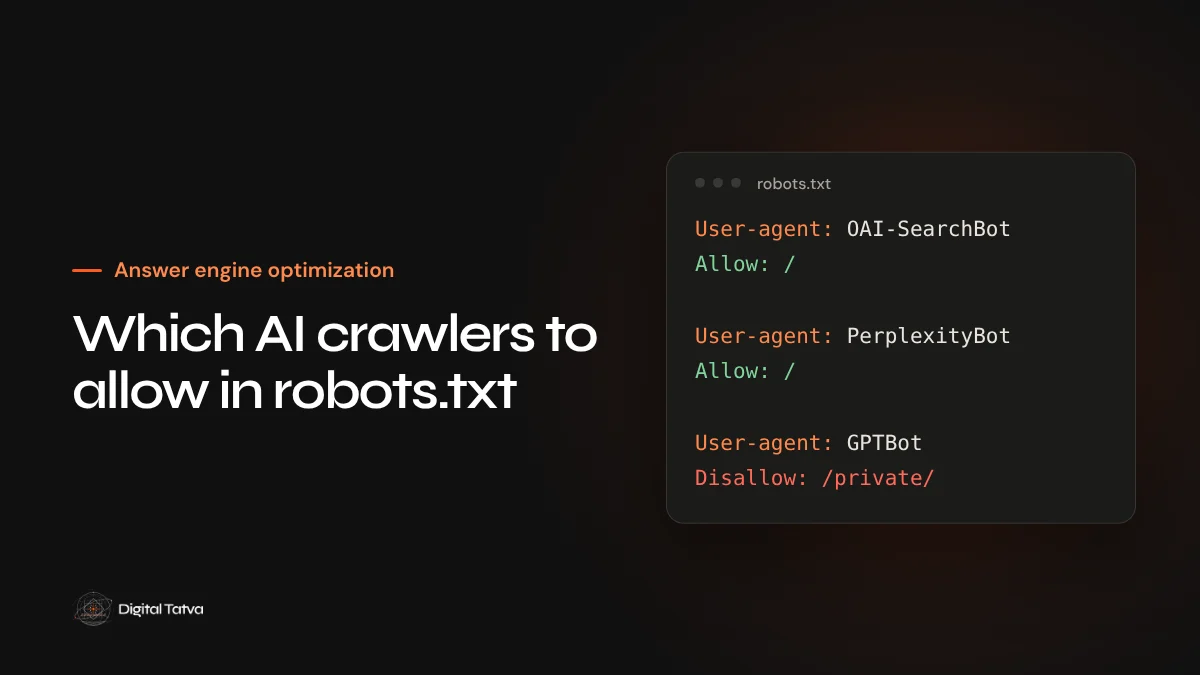
This version allows every search and answer crawler and leaves training crawlers allowed too. Remove the comment marks on the last block if you decide to opt out of training.
User-agent: OAI-SearchBot
Allow: /

User-agent: Claude-SearchBot
Allow: /

User-agent: PerplexityBot
Allow: /

User-agent: Googlebot
Allow: /

User-agent: Bingbot
Allow: /

# Optional: opt out of model training
# User-agent: GPTBot
# Disallow: /
# User-agent: ClaudeBot
# Disallow: /
# User-agent: Google-Extended
# Disallow: /

Sitemap: https://www.example.com/sitemap.xml
Check the layers robots.txt does not control
- CDN bot settings. Several CDNs now offer one-click AI bot blocking. Make sure it is not blocking search crawlers you want.
- Firewall and rate limits. Aggressive rules can return 403 or 429 errors to legitimate bots. Allow the IP ranges OpenAI, Anthropic and Perplexity publish.
- Server logs. Search your logs for each user agent and confirm they receive 200 responses on your key pages.
- Rendering. Access is only half the job. If your content needs JavaScript to appear, most AI crawlers will not see it. See our guide to JavaScript and AI crawlers.
How to audit AI crawler access step by step
A robots.txt file is only a request. What a crawler actually receives depends on several layers between it and your page, and each can say no. A proper check works through them in order.
- Read the live file. Open yoursite.com/robots.txt in a browser, not the copy in your CMS. Look for blanket rules such as
User-agent: *withDisallow: /, and for rules added by plugins or hosting panels. - Test each user agent. Use a robots.txt testing tool or request a key page with each bot’s user agent and confirm the response is 200, not 403, 429 or a challenge page.
- Review CDN and security settings. Look for “AI scrapers”, “bot fight” or “block AI crawlers” options. Many are switched on by default for new zones.
- Check server logs for a month. Group requests by user agent. If OAI-SearchBot, Claude-SearchBot or PerplexityBot never appear, something upstream is stopping them, or they have not found your pages.
- Confirm the sitemap is listed. A Sitemap line in robots.txt helps every crawler find your important pages quickly.
- Write down your policy. Record which bots you allow and why, so the next developer or plugin update does not undo it.
Special cases
- Staging and preview sites. Keep these blocked to every crawler, and make sure the block is not copied to production when the site launches.
- Paywalled or members’ content. You can allow search crawlers on public summary pages while keeping full content behind login.
- Multiple domains and subdomains. Each host has its own robots.txt. A blog on a subdomain needs its own rules.
- Apple and others. Applebot powers Siri and Spotlight suggestions, and Applebot-Extended is Apple’s control for model training. The same search versus training logic applies.
Not sure what your site is blocking? Our Technical AEO service checks crawler access, logs and rendering.
Frequently asked questions
Does blocking GPTBot remove my site from ChatGPT?
No. GPTBot is OpenAI’s training crawler. ChatGPT search uses OAI-SearchBot. Block OAI-SearchBot and you will not be shown in ChatGPT search answers; block only GPTBot and you can still appear.
Does Google-Extended affect AI Overviews?
No. AI Overviews and AI Mode are part of Google Search and use Googlebot. Google-Extended controls use of your content for Gemini apps and Vertex AI.
How long do robots.txt changes take to apply?
OpenAI and Perplexity both say changes can take about 24 hours to be reflected.
Should I block AI crawlers to protect my content?
Block training crawlers if you have a commercial reason to. Keep search and answer crawlers allowed if you want to be recommended in AI answers.
Sources
- Overview of OpenAI crawlers, OpenAI
- Does Anthropic crawl data from the web, and how can site owners block the crawler?, Anthropic
- Perplexity crawlers, Perplexity
- AI features and your website, Google Search Central
Product details, prices and features are checked at the time of writing and can change. Sources are linked in the text so you can check them yourself.
How does your brand appear in AI answers?
We test the questions your buyers ask across the major AI assistants and search engines, then show you what to fix first.
Get an AI Visibility Audit