How to Check if an Image, Video or Audio Clip Is AI-Made with SynthID Detector
Google DeepMind's SynthID Detector is now available worldwide in English. Here is how to use it to check images, video and audio, what a result really means, its limits and how businesses can build it into content and brand safety checks.
On this page
- Key takeaways
- What SynthID is
- What is new: the Detector for everyone
- How to check content with SynthID Detector
- How to read the results
- Where SynthID fits with other checks
- Why businesses should care
- A simple verification policy for teams
- For your own AI-made content
- Examples of when to use the Detector
- Limits you should know
- How this connects to search and AI visibility
- Quick checklist
- SynthID, Content Credentials and labels: how they fit together
- Training your team in 30 minutes
- Special care for finance and HR teams
- What publishers and media teams should add
- Common myths about AI detection
- Using SynthID in Search, Chrome and the Gemini app
- A note on privacy and confidential files
- Frequently asked questions
- Sources
Last updated: 4 November 2026
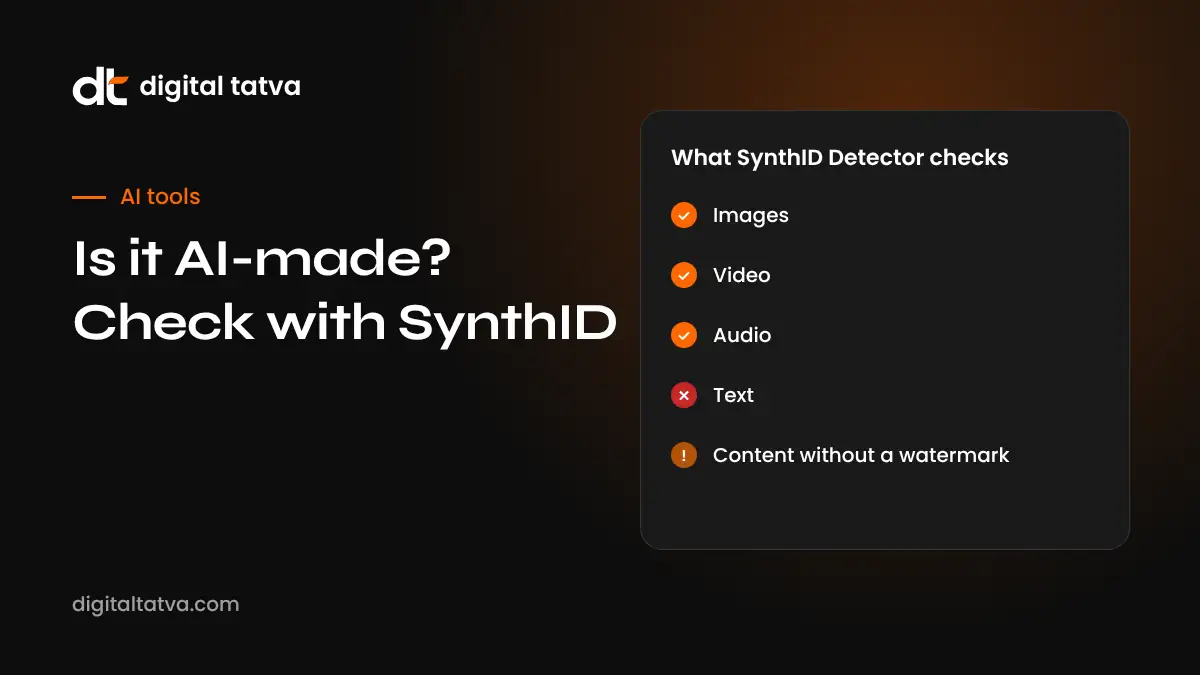
Quick answer: SynthID Detector is a free tool from Google DeepMind, available worldwide in English at synthid.com, that checks whether an image, video or audio file carries a SynthID watermark. SynthID is an invisible watermark added to content made with Google’s AI tools and, through partnerships, by companies including OpenAI, NVIDIA, Kakao and Apple. You upload or paste the content, and the Detector reports whether it found a watermark. It is also built into Google Search, Chrome and the Gemini app. Its key limit: it can only detect content that was watermarked. A “not found” result does not prove something is real.
Key takeaways
- SynthID Detector checks for a specific invisible watermark, not for general signs of AI.
- It covers images, video and audio, and has been opened to everyone in English.
- A positive result is strong evidence the content came from a participating AI tool.
- A negative result only means no SynthID watermark was found. The content may still be AI-made by another tool.
- Businesses should use it as one step in a verification routine, alongside source checks and reverse image search.
What SynthID is
SynthID is a watermarking technology developed by Google DeepMind and first launched in 2023. When an AI tool that uses SynthID creates an image, a video or an audio clip, it embeds a signal into the content itself. The signal is designed to be invisible to people and to survive common changes such as resizing, compression, cropping and some edits. A watermark that sits in the file’s metadata can be stripped easily. A watermark woven into the pixels or sound waves is much harder to remove.
According to Google DeepMind, more than 180 billion images and videos and more than 240,000 years of audio have been watermarked with SynthID. That scale is why a public detector matters: a large share of AI-generated media now carries this signal.
What is new: the Detector for everyone
In a post dated 7 October 2026 and updated on 29 October, Pushmeet Kohli of Google DeepMind announced that SynthID Detector is available globally in English. Key points from the announcement:
| Feature | Detail |
|---|---|
| Where to use it | synthid.com, plus Google Search, Chrome and the Gemini app |
| Content types | Images, video and audio |
| Language | English, available globally |
| Whose content it can identify | Google’s AI tools and partners, including OpenAI, NVIDIA, Kakao and Apple |
| Usage | More than 1 million requests a day, according to Google |
| Main limit | Only detects content that carries a SynthID watermark |
The partner list matters. Earlier, SynthID mainly helped with content from Google’s own tools. With partners such as OpenAI and Apple adopting the watermark, a single check now covers a much wider share of mainstream AI media.
How to check content with SynthID Detector
- Go to synthid.com in your browser. You can also use the built-in options in the Gemini app, Chrome or Google Search where available.
- Choose what you are checking: an image, a video or an audio clip.
- Upload the file or paste a link, depending on the options shown. Use the highest quality version you can find, ideally the original file rather than a screenshot.
- Run the check and wait for the result. Longer videos and audio may take a little longer.
- Read the result carefully. The Detector reports whether it found a SynthID watermark. For some media, it may indicate which parts carry the watermark.
- Record what you found with the date, the file and the result, especially if you are checking content for a business decision.
Tip: If a file has been heavily edited, screen-recorded or re-photographed, the watermark may be weaker. Always try to get the earliest, cleanest copy before checking.
How to read the results
Watermark found
This is strong evidence the content was created or edited with an AI tool that uses SynthID. It does not tell you who made it, why or whether it is harmful. An AI-made product photo for an online shop is very different from a fake video of a public figure. Context still matters.
Watermark found in part of the content
Some content mixes real and AI-generated parts: a real photo with an AI-generated background, or a real recording with an AI-generated section. A partial result suggests editing with AI. Look closely at the parts flagged.
No watermark found
This is the result people most often misread. It only means the Detector did not find SynthID. The content could be:
- genuine, made by a camera or microphone;
- made by an AI tool that does not use SynthID;
- made by a participating tool, but altered enough to weaken the watermark;
- a screenshot or recording of AI content that lost the signal.
Important: Never present “no SynthID watermark found” as proof that something is real. Say “no watermark detected” and continue with other checks.
Where SynthID fits with other checks
No single tool can prove whether content is real. A good verification routine combines several methods.
| Method | What it tells you | Limits |
|---|---|---|
| SynthID Detector | Whether a SynthID watermark is present | Only covers watermarked content |
| Content Credentials (C2PA) | Attached provenance record showing how a file was made and edited | Easily lost when files are re-saved or shared |
| Reverse image search | Where else an image has appeared, and when | New content has no history |
| Source checking | Who first published it and whether they are credible | Takes time and judgement |
| Visual and audio inspection | Odd details, mismatched lighting, unnatural speech | Modern AI often looks and sounds convincing |
| AI detection classifiers | A probability that content is AI-made | Can be wrong in both directions |
For text, which needs different methods, see our comparison of AI detectors. For video and voice scams, our guide on how to spot deepfake scams covers warning signs that tools cannot catch alone.
Why businesses should care
Brand safety
Fake images and videos of brands and their leaders are increasingly common: a fake product recall notice, a doctored image of a store, or a cloned voice of a founder asking staff to move money. Being able to check quickly whether a viral clip carries an AI watermark helps your team respond with facts rather than guesses.
Marketing honesty
Many marketing teams use AI to create images and videos. That is fine, but customers increasingly expect to know. SynthID watermarks in your own AI-made content support transparency. If you work with agencies or freelancers, you can check delivered visuals and ask for disclosure where AI was used.
User-generated content and reviews
Marketplaces, review platforms and community sites receive photos and videos from users. AI-made “proof” photos for fake reviews or false damage claims are a real problem. Checking suspicious submissions is a practical use of the Detector.
Trust in AI search
AI engines are building trust signals into how they choose sources. Brands that are open about how their content is made, and that avoid passing off AI images as real customer photos, protect the trust that AI and human readers place in them. That trust is part of what we call the “Trusted” element in our five elements of AI visibility.
A simple verification policy for teams
If your team handles media that could affect your reputation, write down a short process. Here is a template you can adapt.
- Pause before sharing. Do not repost or respond to a surprising image, video or audio clip until it has been checked.
- Find the original. Locate the first source and the highest quality version.
- Run SynthID Detector. Record the result with the date.
- Check Content Credentials if the file or platform shows them.
- Run a reverse image search on key frames or images.
- Check the source. Who posted it first, and do they have a reason to mislead?
- Escalate if needed. For anything involving money requests, legal claims or safety, involve a manager and, where relevant, legal or security teams.
- Respond with what you know. If you make a public statement, describe your findings accurately: “no SynthID watermark detected” is not the same as “verified real”.
For your own AI-made content
If your business creates images or video with AI, a few habits will keep you on the right side of customers and platforms.
- Know which tools watermark. Content from Google’s AI tools and from partners using SynthID will usually carry the watermark.
- Do not try to remove watermarks. Stripping provenance signals can breach platform rules and damage trust if discovered.
- Label AI imagery where it matters, especially in ads, product pages and anything that could be taken as a real photo of a real event.
- Use real photos for proof. Customer testimonials, before-and-after images and store photos should be genuine.
- Keep records. Save the prompts, tools and dates used for important AI-made assets.
If you are choosing tools, our roundup of AI image generators notes which ones add provenance signals.
Examples of when to use the Detector
These scenarios are illustrations to show how the tool fits into real work.
A viral photo of your store
A photo circulates showing your shop with a “closing down” banner. Your team runs it through SynthID Detector and finds a watermark. You now have a concrete fact to share with customers and the platform hosting it, along with a real photo of your open store taken the same day.
A voice note from the “CEO”
Finance receives a voice message that sounds like the founder, asking for an urgent payment. The team checks the audio and finds no SynthID watermark. That does not clear it. They follow the payment policy, call the founder on a known number and discover it was a scam made with a tool that does not watermark.
Supplier product images
A new supplier sends product images for your online catalogue. The Detector finds watermarks in several. You ask the supplier for real photos of actual stock, because customers expect product images to show what they will receive.
A news-style video about your industry
A video spreads claiming a new government rule affects your sector. The visuals carry a SynthID watermark. You check official sources, confirm no such rule exists and avoid spreading misinformation to your customers.
Limits you should know
- Coverage is not universal. Many AI tools, including some open-source models, do not add SynthID.
- Strong edits can weaken the watermark. Heavy compression, repeated screen recording or major edits may reduce detection.
- English only for now. The interface is available globally in English.
- It does not judge intent. The Detector tells you about origin, not whether the content is harmful or misleading.
- Privacy. Think before uploading sensitive or confidential files to any online service, and check the tool’s terms.
How this connects to search and AI visibility
Google has built SynthID checks into Search and Chrome. As AI-generated media grows, search engines and AI assistants are likely to give more weight to clear provenance. For brands, that points to two practical steps. First, use genuine media where authenticity matters, and label AI-made visuals honestly. Second, keep your official channels, such as your website, verified social profiles and press page, up to date, so that when a fake circulates, engines and people can find the real version quickly. Our guide on fixing wrong AI answers about your brand covers how to make your official facts easy for AI to find.
Quick checklist
- Bookmark synthid.com for your social, PR and finance teams.
- Add “check provenance” to your crisis response plan.
- Teach staff that “no watermark found” is not proof of authenticity.
- Combine SynthID with reverse image search and source checks.
- Label your own AI-made marketing media where customers could be misled.
- Keep an up-to-date press page with official images and statements.
SynthID, Content Credentials and labels: how they fit together
Several provenance systems now exist side by side, and people often confuse them. Understanding the difference helps you choose the right check.
| System | How it works | Strength | Weakness |
|---|---|---|---|
| SynthID watermark | Invisible signal embedded in pixels, frames or audio | Survives many edits and re-saves | Only present if the tool added it |
| Content Credentials (C2PA) | Signed record attached to the file describing its history | Detailed: tool, edits, author | Often stripped by social platforms and screenshots |
| Platform labels | “Made with AI” tags shown by social networks | Visible to every viewer | Depend on detection or self-disclosure |
| Self-disclosure | Creator states AI was used | Simple and honest | Relies on good faith |
The systems complement each other. A file might carry a SynthID watermark, a Content Credentials record and a platform label all at once. When one is missing, another may still be there. That is why a good routine checks more than one.
Training your team in 30 minutes
Most verification failures come from people sharing too quickly, not from missing tools. A short session can make a real difference.
- Show two real examples of AI-made images that fooled people, and explain why they were convincing.
- Demonstrate SynthID Detector live on one watermarked file and one genuine photo.
- Explain “not found” clearly. Make sure everyone understands it is not proof of authenticity.
- Walk through the policy above: pause, find the original, check, confirm the source, escalate.
- Agree who decides on public responses, so staff know whom to contact.
- Share a one-page checklist in the team chat or intranet.
Repeat the session every six months, because tools and scams both change quickly.
Special care for finance and HR teams
Voice cloning and fake video calls target people who can move money or change records. Detection tools help, but process matters more.
- Never approve payments on voice or video alone. Confirm through a known number or a second approver.
- Use code words for urgent requests between senior staff.
- Check unusual audio with SynthID Detector, but treat a “not found” result as neutral.
- Verify job candidates carefully in remote hiring, where fake video interviews have been reported.
- Report incidents to your bank and, in India, to the national cybercrime reporting portal where appropriate.
What publishers and media teams should add
If you publish news, reviews or user-submitted media, provenance checks protect your credibility, which is also what AI engines rely on when deciding which sources to trust.
- Add a provenance check step to your editorial workflow for any image or video from outside sources.
- Keep records of checks for content that could be disputed.
- Label AI-generated illustrations clearly in captions.
- Publish a short policy on how you use and verify AI media, and link to it from your about page.
- Correct quickly and visibly if something you published turns out to be AI-made.
Clear editorial policies are one of the trust signals we look for in our AI visibility audit, because they help both readers and AI engines understand that your content is reliable.
Common myths about AI detection
- “Detectors can spot any AI content.” No tool can. Watermark detectors find watermarks; classifiers estimate probabilities and make mistakes.
- “If it looks real, it is real.” Modern image and voice models can be very convincing. Looks are not evidence.
- “Watermarks can always be removed.” SynthID is designed to resist common edits. Heavy changes can weaken it, but casual reposting usually does not.
- “Only bad actors use AI media.” Most AI media is ordinary marketing, art and entertainment. Origin alone does not make something harmful.
Using SynthID in Search, Chrome and the Gemini app
Google has built SynthID checks into products people already use, which makes verification faster than visiting a separate website every time.
- Gemini app: you can share an image, video or audio file and ask whether it carries a SynthID watermark. This is handy on a phone when someone forwards you a suspicious clip.
- Chrome: check images you find while browsing without downloading and re-uploading them, where the feature is available.
- Google Search: image results and image search tools can show provenance information for some images, alongside “about this image” details such as when an image was first seen.
Features roll out gradually and can differ by country and device. If you do not see an option, use synthid.com directly. Whichever route you use, the meaning of the result is the same: a watermark found is strong evidence of AI origin, and no watermark found is not proof of authenticity.
A note on privacy and confidential files
Before uploading anything to an online checker, think about what the file contains. Customer photos, internal recordings, legal evidence and unreleased product images may be sensitive. Read the service’s terms, check your company policy and, where possible, use a copy that excludes unnecessary personal details. For legal disputes, ask your lawyer how evidence should be handled before you upload it anywhere.
Frequently asked questions
What is SynthID Detector?
It is a free tool from Google DeepMind that checks whether an image, video or audio file contains a SynthID watermark, an invisible signal added to content made with participating AI tools.
Is SynthID Detector free?
Yes. It is available at synthid.com and is built into Google Search, Chrome and the Gemini app.
Can it detect content made with ChatGPT or other tools?
It can detect content from Google’s tools and from partners that use SynthID, which Google says include OpenAI, NVIDIA, Kakao and Apple. It cannot detect content from tools that do not add the watermark.
If no watermark is found, is the content real?
Not necessarily. It only means no SynthID watermark was detected. The content may be made by another AI tool or altered. Use other checks too.
Can a SynthID watermark be removed?
It is designed to survive common edits such as resizing and compression, but heavy changes may weaken it. Trying to remove watermarks can breach platform rules.
How should a business use it?
Use it as one step in a verification routine for surprising or high-risk media, alongside source checks and reverse image search, and record your findings.
Sources
- SynthID Detector announcement, Google
- Google AI updates, October 2026, Google
- SynthID, Google DeepMind
- Coalition for Content Provenance and Authenticity, C2PA
Product details, prices and features are checked at the time of writing and can change. Sources are linked in the text so you can check them yourself.
How does your brand appear in AI answers?
We test the questions your buyers ask across the major AI assistants and search engines, then show you what to fix first.
Get an AI Visibility Audit