What to Do When ChatGPT or Google AI Gets Your Brand Wrong
AI assistants sometimes quote old prices, wrong addresses, closed branches or a competitor's facts as yours. A step-by-step process to find the source of the error, correct it and check that the fix sticks.
On this page
- Key takeaways
- Why AI assistants get brands wrong
- Common types of AI errors about businesses
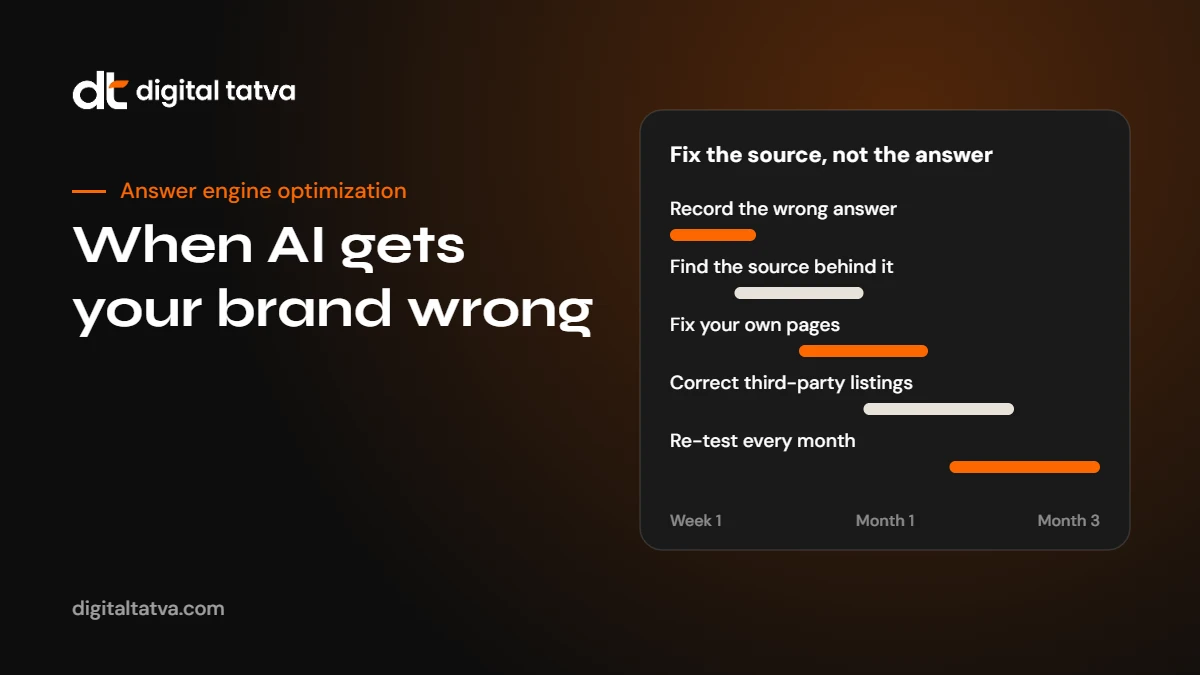
- Step 1: Record the error precisely
- Step 2: Find the source of the error
- Step 3: Fix your own website first
- Step 4: Fix third-party sources
- Step 5: Use the feedback tools
- Step 6: Strengthen the correct signals
- Step 7: Re-test on a schedule
- Special case: confusion with another company
- Special case: negative or outdated reputation claims
- Special case: hallucinated facts
- How to prevent errors in the future
- A worked example
- Training data versus live search: what you can and cannot change
- An error log template
- Who should own AI accuracy in your company
- What not to do
- When to get help
- Frequently asked questions
- Sources
Last updated: 4 November 2026
Quick answer: When an AI assistant gets your brand wrong, you usually cannot edit the answer directly. You fix it by correcting the information the AI relies on. Record the wrong answer with the exact prompt and date, look at the sources it cites or would likely use, correct the error on your own website first, then fix outdated third-party listings, profiles and articles. Use the feedback tools in ChatGPT, Gemini and Google to report clear factual errors. Then re-test the same prompts every few weeks. Most errors trace back to an outdated page, an inconsistent listing or confusion with a similarly named company.
Key takeaways
- AI errors about brands are common: old prices, wrong locations, discontinued products, mixed-up companies and outdated leadership.
- You cannot change the answer itself; you change the sources the answer is built from.
- Your own website must state the correct facts clearly, consistently and in a crawlable format.
- Third-party listings, directories and old articles are the most common source of persistent errors.
- Errors from live search can change within weeks; errors from training data may persist until models are updated.
Why AI assistants get brands wrong
AI assistants such as ChatGPT, Gemini, Perplexity and Copilot, along with Google AI Overviews and AI Mode, generate answers from two broad sources. The first is the model’s training data: a large snapshot of the web and other text taken at some point in the past. The second is live retrieval: the assistant searches the web, reads current pages and summarises them. Many answers mix both.
Both can go wrong for a brand.
- Outdated training data. The model learned about your company when you had a different address, product range, pricing or CEO. Without fresh retrieval, it repeats the old facts.
- Outdated web pages. An old page on your own site, a 2022 press release or a directory listing you forgot about still shows the old information, and live search finds it.
- Inconsistent sources. Your website says one thing, Google Business Profile another and a marketplace a third. The AI picks one or blends them.
- Entity confusion. Another company with a similar name, a former partner or a franchise in another city gets mixed up with you.
- Thin information. If there is very little about you online, the AI may fill gaps with plausible but wrong details, often called hallucination.
- Misread pages. Information in images, PDFs or scripts may be misread or missed, so the AI relies on worse sources.
Understanding which of these is behind an error tells you how to fix it. That is why the first step is careful recording, not panic.
Common types of AI errors about businesses
| Error | Example | Usual source |
|---|---|---|
| Old prices | “Plans start at 499 a month” when they now start at 999 | Old pricing pages, comparison sites, cached articles |
| Wrong location | Lists a branch you closed in 2024 | Directories, old Google listings, news articles |
| Discontinued products | Recommends a product you no longer sell | Old product pages, marketplace listings, reviews |
| Wrong services | Says you offer services you never provided | Thin information, confusion with similar businesses |
| Wrong people | Names a former CEO or founder | Old press releases, profiles, Wikipedia-style sources |
| Mixed identity | Combines your reviews with another company’s | Similar names, shared addresses, franchise confusion |
| Negative or false claims | Repeats an old complaint as current | Forums, review sites, news coverage |
Step 1: Record the error precisely
Before you change anything, document the problem. AI answers vary from session to session, so a single screenshot is not enough evidence of a pattern.
- Write down the exact prompt. The wording matters. “What does Example Ltd charge?” and “Example Ltd pricing 2026” can produce different answers.
- Note the engine, mode and date. ChatGPT with search on or off, Gemini, Perplexity, Copilot, Google AI Overviews or AI Mode.
- Repeat it. Run the prompt two or three times, ideally in a logged-out or private session, to see if the error is consistent.
- Save the cited sources. Many engines show links. Copy every URL.
- Screenshot the answer. Useful for your records and for feedback reports.
- Test related prompts. If the price is wrong, check whether the plan names, features and locations are also wrong.
Our guide on how to check if ChatGPT recommends your brand explains how to run unbiased tests.
Step 2: Find the source of the error
With your record in hand, work out where the wrong information comes from.
If sources are cited
Open each cited page. Often you will find the wrong fact right there: an old directory listing, a 2023 blog post comparing your prices, or a page on your own site you forgot to update.
If no sources are cited
Search the web for the wrong fact itself. If an assistant says you have an office in Pune that closed two years ago, search for your company name with “Pune”. Check:
- Your own website, including old blog posts, landing pages, PDFs and archived pages still live on the server.
- Google Business Profile and other map listings, including duplicate or old listings.
- Directories, marketplaces and review platforms.
- Social media profiles and bios.
- Press releases and news articles.
- Comparison and “best of” articles that mention you.
- Forums and community discussions.
If the fact appears nowhere
If you cannot find the wrong information anywhere, the AI may be filling a gap with a guess or confusing you with another entity. The fix then is to publish more clear, consistent facts about yourself, and to make your identity unmistakable. See entity SEO for AEO.
Step 3: Fix your own website first
Your website is the source you control completely and the one AI engines should treat as authoritative about your own facts. Make sure:
- The correct facts are stated clearly in text. Current prices, plans, locations, opening hours, products and leadership should appear on relevant pages in plain HTML, not only in images or PDFs.
- Old pages are updated or redirected. If a product is discontinued, either update its page to say so and point to the replacement, or redirect it. Do not leave old pages live with outdated details.
- Dates are visible. Pricing and policy pages should show when they were last updated.
- Your About page is complete. Founding year, founders, leadership, locations, what you do and what you do not do. A clear “About” page is one of the most important pages for AI accuracy.
- Organization schema is accurate. Name, logo, address, contact details and sameAs links to your official profiles. See schema markup for AEO.
- AI crawlers can access the pages. Check robots.txt and firewall rules with our free AI visibility checker and the guide to AI crawlers and robots.txt.
Tip: For a common error, add a short, direct statement that corrects it. For example: “Example Ltd closed its Pune office in March 2024. We serve Pune clients from our Mumbai office.” Plain statements like this give AI engines a clear, current fact to use.
Step 4: Fix third-party sources
Third-party listings are often the reason errors persist. Work through them in order of influence.
- Google Business Profile. Correct details, mark closed locations as permanently closed, remove duplicates and update hours.
- Major directories and marketplaces in your industry. Update or claim each listing.
- Review platforms. Update business details; reply to outdated reviews with a polite factual note where appropriate.
- Social profiles. LinkedIn, Facebook, Instagram, X and YouTube bios should match your website.
- Data aggregators that feed many directories, where they exist in your market.
- Articles and comparisons. Email the publisher with the correct facts and a source. Many editors will update a comparison when you provide current, verifiable information.
- Wikipedia and Wikidata, if your organisation has entries. Follow their rules strictly: do not edit your own article directly where it creates a conflict of interest; propose changes on the talk page with reliable sources. See Wikipedia and Wikidata for AEO.
Our list of review and listing sites for AEO helps you find listings you may have forgotten.
Step 5: Use the feedback tools
AI products let users report problems with answers. Feedback does not guarantee a change, but it is worth using for clear factual errors.
- ChatGPT: use the thumbs-down button on a response and explain the error.
- Gemini: use the thumbs-down or report options on the response.
- Google AI Overviews and AI Mode: use the feedback option on the AI result to report inaccurate information.
- Perplexity and Copilot: use the feedback controls on the answer.
- Google Business Profile: suggest edits or manage the profile directly for map-related errors.
Keep feedback factual: what is wrong, what is correct and where the correct information is published.
Step 6: Strengthen the correct signals
Fixing errors removes wrong signals. To make the correct information win, add strong, consistent signals that confirm it.
- Publish a clear update. A news post or press release about a real change, such as a new pricing structure, a relocation or a new CEO, creates a dated public record.
- Earn coverage. A mention in a trade publication or local news site with the correct facts is strong confirmation. See brand mentions for AEO.
- Answer the question directly. If people ask AI “Is Example Ltd still operating in Pune?”, publish an FAQ that answers it.
- Use consistent wording. Describe your business in the same one-line way everywhere.
Step 7: Re-test on a schedule
After making changes, wait for engines to recrawl. Live-search answers can reflect changes within days or weeks. Answers based more on a model’s training data may not change until a new model version is released, which you cannot control. Re-test your recorded prompts:
- Two to three weeks after fixing your website and major listings.
- Again after six to eight weeks.
- Then monthly as part of your regular AEO measurement.
Use the same prompts, engines and settings each time so you can compare fairly. Our AEO reporting template includes an “errors” section for exactly this.
Special case: confusion with another company
Entity confusion is one of the hardest errors to fix. If an AI mixes your company with another that has a similar name, you need to make the distinction obvious.
- Use your full, distinctive name consistently, including any suffix such as “Pvt Ltd” or the city where it helps.
- State clearly on your About page who you are, where you are based and, if necessary, that you are not affiliated with the similarly named company.
- Add sameAs links in your Organization schema to your official profiles only.
- Make sure your profiles do not link to or follow the other company in ways that suggest a connection.
- Build distinct third-party signals: industry listings, coverage and reviews that clearly refer to you.
Special case: negative or outdated reputation claims
Sometimes AI assistants repeat old complaints, a past controversy or a negative review theme as if it were current. You cannot remove legitimate criticism, and you should not try to hide it. You can make sure the full, current picture is visible.
- Address the issue openly on your website if it is widely known: what happened, what changed and when.
- Reply to old reviews with factual updates where the problem has been fixed.
- Earn recent reviews and coverage that reflect your current service.
- For false or defamatory claims, seek legal advice; do not argue in forums.
Special case: hallucinated facts
If an AI invents something with no source, such as a product you never made or an award you never won, the most effective fix is to reduce the information gap. Publish clear, specific pages about what you do and do not offer, make your About page thorough and build a few strong third-party profiles. The more reliable information exists about you, the less the AI needs to guess.
How to prevent errors in the future
- Keep a single source of truth. Maintain an internal fact sheet with your official name, description, address, phone, hours, leadership, prices and product list.
- Update everywhere at once. When something changes, update your website, Google Business Profile, directories and social profiles on the same day.
- Retire old pages properly. Redirect or update; do not leave outdated pages live.
- Date important pages. Pricing, policies and leadership pages should show a last updated date.
- Monitor monthly. Include accuracy checks in your regular AI visibility tracking. See AI share of voice and the best AI visibility tools.
- Run a full audit yearly. Our AI visibility audit checklist covers what to check.
A worked example
Here is an illustration of the process. A coaching institute, which we will call Example Academy, finds that ChatGPT says its fees are 80,000 a year and that it has a branch in Vadodara. In reality, fees are now 1.1 lakh and the Vadodara branch closed in 2024.
- Record: the team runs five fee and location prompts in ChatGPT, Gemini, Perplexity and Google. Three engines repeat the old fee; two mention Vadodara.
- Trace: cited sources include an education portal listing from 2023 and an old “fees” PDF still live on the institute’s site. The Vadodara branch still has an unclaimed map listing.
- Fix own site: the PDF is replaced with an HTML fees page dated October 2026, and the locations page states that Vadodara students are served from the Ahmedabad centre and online.
- Fix third parties: the portal listing is updated, and the old map listing is marked permanently closed.
- Feedback: the team reports the wrong fee in ChatGPT and Google AI Overviews.
- Re-test: after three weeks, two engines show the new fee; after two months, the Vadodara mention has disappeared from most answers.
The details vary, but the pattern is the same: record, trace, fix the source, confirm, re-test.
Training data versus live search: what you can and cannot change
It helps to understand why some errors disappear quickly and others linger.
| Where the answer comes from | How to tell | How fast fixes show |
|---|---|---|
| Live web search | The answer cites current web pages; it changes when you rephrase with “2026” or “latest” | Days to weeks after sources are fixed and recrawled |
| Model training data | No sources shown; the answer stays the same even with search turned off | Often not until a newer model version is released |
| A mix of both | Some facts are cited, others are not | Cited facts change sooner; uncited ones lag |
You cannot retrain a model, but you can make sure that whenever the assistant does search, the current, correct facts are the easiest ones to find. Over time, as models are updated with newer data, a consistent, well-documented web presence also improves what the model itself learns about you.
An error log template
Keep a simple shared log so nothing is forgotten and you can show progress to your team or clients. Suggested columns:
- Date found
- Prompt used
- Engine and mode
- Wrong statement, quoted exactly
- Correct fact, with link to where it is published
- Likely source of the error
- Actions taken and dates
- Feedback submitted: yes or no
- Re-test dates and results
- Status: open, improving or resolved
Our AEO reporting template includes an accuracy section that uses the same structure, so errors can be reported monthly alongside visibility.
Who should own AI accuracy in your company
AI accuracy often falls between teams: marketing owns the website, operations owns locations, sales owns pricing and nobody owns the directories. Assign one person to own the brand fact sheet and the error log, with a simple rule that any change to prices, locations, services or leadership is sent to them on the day it happens.
What not to do
- Do not flood the web with duplicate pages repeating the correct fact. One clear, authoritative page plus consistent listings is better than dozens of thin pages.
- Do not post fake reviews or articles to drown out an error. It breaches platform rules and creates new problems.
- Do not hide information with noindex unless you truly want it out of search. Hiding your own pricing page, for example, leaves AI with only third-party sources.
- Do not argue with users in public forums about what an AI said. Fix the sources instead.
- Do not judge success on one chat. Answers vary; track a set of prompts over time.
When to get help
If errors are spread across many engines, if they involve confusion with another company, or if they affect reputation, a structured audit helps. Digital Tatva traces the sources behind AI answers about your brand and gives you a prioritised fix list. Read what our audit includes or request one here. We do not promise to control what AI says, because no one can, but we do help you fix what feeds it.
Frequently asked questions
Can I ask ChatGPT to change what it says about my company?
Not directly. You can report errors using the feedback tools, but lasting changes come from correcting the sources AI relies on, starting with your own website and major listings.
How long does it take for AI to correct wrong information?
Answers based on live search can change within days or weeks after sources are fixed and recrawled. Answers based on a model’s training data may persist until a newer model is released.
Why does Google AI Overviews show old information?
Usually because an outdated page, listing or article still ranks for the query. Fix or update that source, make sure your current page is clear and crawlable, and use the feedback option on the AI result.
What if AI confuses my company with another one?
Make your identity distinct: use your full name consistently, clarify on your About page, add accurate Organization schema with sameAs links to your own profiles, and build third-party signals that clearly refer to you.
Should I delete old pages with outdated information?
Update them to show current facts, or redirect them to the current page. Leaving outdated pages live is one of the most common causes of AI errors.
Can a lawyer force AI companies to correct false claims?
For serious false or defamatory claims, legal advice is appropriate and some AI providers have processes for such requests. For ordinary factual errors, fixing sources is faster and more reliable.
Sources
- AI features and your website, Google Search Central
- Overview of OpenAI crawlers, OpenAI
- Guidelines for representing your business on Google, Google Business Profile Help
Product details, prices and features are checked at the time of writing and can change. Sources are linked in the text so you can check them yourself.
How does your brand appear in AI answers?
We test the questions your buyers ask across the major AI assistants and search engines, then show you what to fix first.
Get an AI Visibility Audit