Query Fan-Out Explained: How Google AI Mode Really Searches
Query fan-out is how Google AI Mode and other AI search engines turn one question into many searches. Learn how it works, why it changes keyword strategy, and how to build content that gets pulled into fan-out results.
On this page
- Key takeaways
- What is query fan-out?
- A simple example of query fan-out
- Why query fan-out changes keyword strategy
- How to find the sub-questions AI will fan out to
- How to structure content for query fan-out
- One big page or many small pages?
- Query fan-out and local businesses
- Query fan-out and ecommerce
- Common mistakes with query fan-out
- How to measure whether fan-out is working for you
- A query fan-out content checklist
- Fan-out beyond Google: ChatGPT, Perplexity and Copilot
- Deep Search and research modes: fan-out at scale
- A worked example: rewriting a page for fan-out
- A simple fan-out content map
- Query fan-out for B2B and SaaS
- How Digital Tatva can help
- Fan-out and conversational follow-ups
- Fan-out and freshness
- Frequently asked questions
Last updated: 13 November 2026
Quick answer: Query fan-out is a technique where an AI search engine takes one question, breaks it into several related sub-questions, runs searches for each one at the same time, and then combines the best results into a single answer. Google uses it in AI Mode and AI Overviews, and other AI search tools such as ChatGPT search and Perplexity work in a similar way. For businesses, it means you are no longer competing for one keyword. You are competing to be the best answer to a whole set of related questions, so content that covers a topic thoroughly, with clear sections for each sub-question, has a much better chance of being used.
Key takeaways
- One question typed into AI Mode can trigger many separate searches behind the scenes.
- Google described query fan-out when it launched AI Mode, and its Deep Search feature takes the idea further with even more searches.
- Pages can be cited for a sub-question even if they do not rank for the main query.
- Covering the follow-up questions around a topic matters more than targeting a single phrase.
- Clear headings and self-contained sections make it easy for fan-out results to match your content.
What is query fan-out?
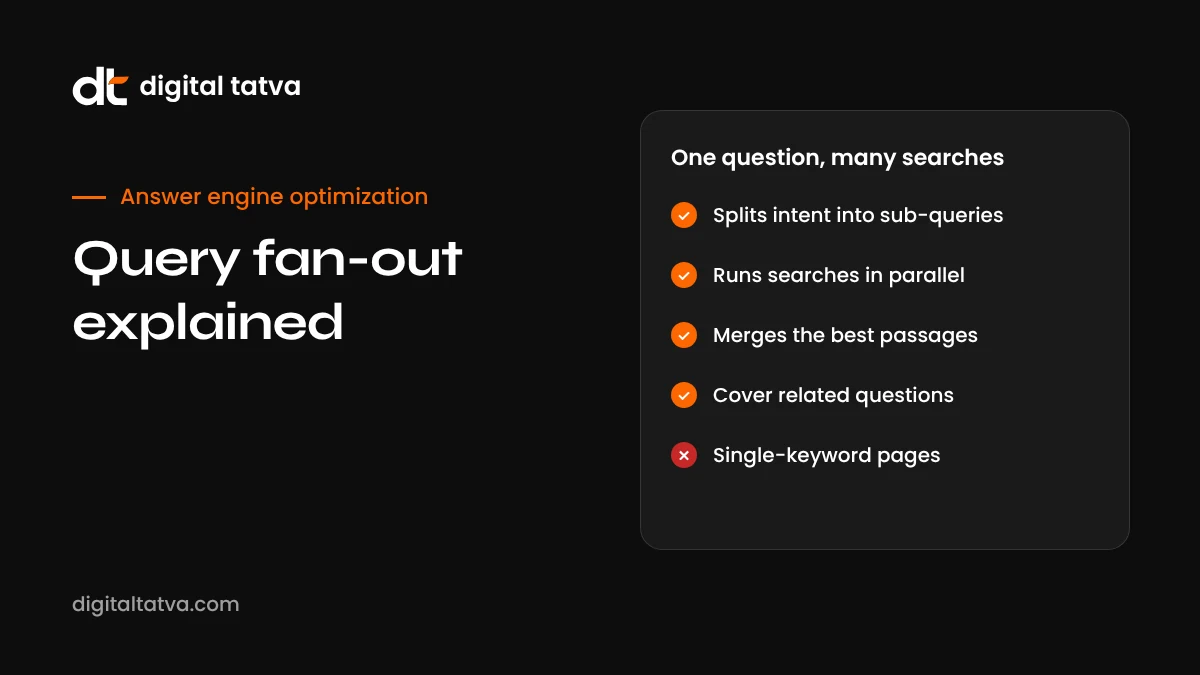
When you type a question into Google AI Mode, it does not simply run that exact phrase as one search. A language model first reads your question, works out the different things you probably want to know, and generates a set of related searches. Those searches run in parallel across Google’s index. The results are pooled, the most useful passages are selected, and the model writes one answer that pulls everything together.
Google introduced the term publicly when it launched AI Mode. It explained that AI Mode uses a query fan-out technique to break a question into subtopics and issue multiple queries simultaneously, which lets it go deeper than a traditional search. Its Deep Search option applies the same idea at a larger scale, running many more searches to build a detailed, cited report.
Other AI search engines do something similar even if they use different names. ChatGPT often shows that it is searching for several things at once. Perplexity’s Pro and research modes visibly run multiple searches. The principle is the same: one question, many searches, one synthesised answer. Our guide to how AI search engines work puts fan-out in context with the other steps.
A simple example of query fan-out
Imagine someone asks Google AI Mode: “Is it worth buying an electric scooter for a 15 km daily commute in Bengaluru?”
A fan-out process might generate searches like these:
| Sub-question | Why the AI asks it |
|---|---|
| electric scooter real-world range India | Checks whether 30 km a day is comfortable |
| electric scooter running cost per km vs petrol | Answers the “worth it” money question |
| best electric scooters 2026 India | Finds candidate models to mention |
| electric scooter charging at apartment Bengaluru | Addresses a common practical worry |
| EV subsidy Karnataka 2026 | Checks for local incentives |
| electric scooter battery life and replacement cost | Covers long-term ownership |
| electric scooter reviews monsoon performance | Local weather concern |
The final answer might cite a cost comparison article, a manufacturer’s range page, a news story about subsidies, a forum thread about charging in apartments and a review site. None of those pages needed to rank for the original long question. Each one simply had the best answer to one piece of it.
Why query fan-out changes keyword strategy
Traditional SEO trained us to think one page, one keyword. Query fan-out breaks that model in three important ways.
1. You can win without ranking for the head term
A small business might never rank on page one for “best electric scooter”. But it could have the clearest page on “electric scooter charging in apartment buildings”. When fan-out generates that sub-question, the smaller site’s passage can be selected and cited.
2. Thin, single-angle pages lose ground
A page that only repeats the main keyword and offers little depth gives the system few useful passages. A page that answers the main question and five related ones offers many chances to match.
3. Topic coverage beats keyword coverage
The question shifts from “which keyword should this page target?” to “which questions does someone researching this topic need answered, and do we answer them well?” That is the heart of topical authority in AI search.
How to find the sub-questions AI will fan out to
You cannot see Google’s internal fan-out queries directly, but you can predict them well. These methods work:
- Read the AI answers themselves. Ask your target questions in AI Mode, ChatGPT and Perplexity. The headings and points in each answer reveal the sub-topics the system thought were relevant.
- Look at the cited sources. Each citation tells you which sub-question that page answered. Note the topics you see repeatedly.
- Use People Also Ask. Google’s PAA boxes are a strong signal of the follow-up questions people have. Our guide to People Also Ask optimization shows how to mine them.
- Check search suggestions and related searches. Autocomplete and the related searches at the bottom of Google results show common angles.
- Talk to sales and support. The questions customers ask before buying are often exactly what fan-out generates.
- Ask an AI to brainstorm. Prompt ChatGPT or Gemini: “List the 15 most important sub-questions someone would need answered to decide X.” Then validate the list against real data.
Our full process is in the guide to AEO prompt research.
How to structure content for query fan-out
Once you know the sub-questions, structure matters as much as coverage. The system needs to match each sub-question to a specific passage quickly.
Use question-style headings
Headings like “How much does it cost to charge an electric scooter?” map directly to sub-queries. Vague headings like “Costs” are weaker.
Answer first, then explain
Start each section with one to three sentences that answer the sub-question completely. Then add detail, examples and nuance. This makes the opening passage quotable on its own. See our answer-first content guide.
Keep sections self-contained
Avoid passages that depend on earlier sections to make sense. “As mentioned above” and “this” without a clear subject make a passage hard to use out of context. Our guide to content chunking for AI search covers this in depth.
Use tables for comparisons
Fan-out often includes comparison and pricing sub-queries. Tables make that information easy to extract accurately.
Link related pages tightly
If one page cannot cover everything, build a cluster: a main guide plus supporting pages for big sub-topics, all linked to each other. This helps search engines understand the topic and gives AI more strong pages to choose from. Our internal linking guide for AEO explains how.
One big page or many small pages?
This is a common question, and the honest answer is: it depends on how big each sub-topic is.
| Situation | Best approach | Example |
|---|---|---|
| Sub-questions are short and closely related | Cover them as sections on one page | Costs, range and charging on a single scooter buying guide |
| A sub-question needs a long, detailed answer | Give it its own page and link to it | A full guide to EV subsidies by state |
| Different audiences need different answers | Separate pages for each audience | Scooters for students vs delivery riders |
| The topic changes often | Separate page you can update easily | Monthly price tracker |
Most strong topics end up as a cluster: one comprehensive guide that answers the main question and the common follow-ups, plus a handful of deeper pages for the biggest sub-topics.
Query fan-out and local businesses
Local questions fan out too. “Best dentist near me for kids” might generate searches about paediatric dentists in your area, reviews, opening hours, insurance or payment options, and parking. A local practice that clearly answers each of those on its website and Google Business Profile has more chances to be included.
Practical steps for local businesses:
- Keep your Google Business Profile complete and current, including services, hours and attributes.
- Create a clear page for each main service, with location details.
- Add an FAQ section covering cost, booking, parking and what to expect.
- Collect reviews that mention specific services, because those details feed sub-question matches.
Our guide to AEO for local businesses goes further.
Query fan-out and ecommerce
Product questions generate some of the richest fan-outs: specs, price, comparisons, reviews, compatibility, delivery and returns. Stores that answer those on product and category pages give AI plenty to work with.
- Write detailed product descriptions that include specs in text, not only in images.
- Add comparison tables on category pages.
- Answer compatibility and sizing questions in FAQs.
- Keep price and stock data accurate in your feed and schema.
See AEO for ecommerce and our guide to ChatGPT shopping optimization.
Common mistakes with query fan-out
- Creating a separate thin page for every possible sub-question. This spreads authority thin and often produces low-quality pages. Combine related questions where it makes sense.
- Stuffing every keyword variant into one page. Fan-out rewards genuinely useful answers, not repetition.
- Burying answers deep in long paragraphs. If the answer is hard to find, the passage loses.
- Ignoring sub-questions you cannot rank for. Even if you cannot win the head term, you may win a sub-question.
- Forgetting freshness. Many sub-questions are about prices, rules or recent changes. Outdated sections get skipped.
How to measure whether fan-out is working for you
You cannot see fan-out queries in any dashboard, but you can see their effects.
- Prompt tracking: run your target questions monthly and note when your pages are cited. If you are cited for specific sub-points, fan-out is working in your favour.
- Search Console: look for growth in impressions for long, specific queries related to your topic. Our guide to the Search Console AI performance report explains what to look at.
- Bing Webmaster Tools: the AI Performance report shows grounding queries, which are effectively the sub-queries Bing ran when it used your content. That is one of the best windows into fan-out available today.
- AI referral traffic: track visits from AI tools in GA4. Our GA4 AI traffic guide shows how.
A query fan-out content checklist
- List the main question your page should answer.
- Collect 10 to 20 likely sub-questions from AI answers, PAA, autocomplete and customer conversations.
- Group related sub-questions into sections; give large sub-topics their own pages.
- Write a question-style heading for each section.
- Open each section with a direct, self-contained answer.
- Add tables for comparisons, prices and specs.
- Add an FAQ section for short follow-ups.
- Link the page to and from related pages in your cluster.
- Show a last updated date and refresh changing facts regularly.
- Track prompts monthly and adjust based on which sections get cited.
Fan-out beyond Google: ChatGPT, Perplexity and Copilot
Google gave the technique its name, but every major AI search product now splits questions in some way. You can often see it happening.
| Product | How fan-out shows up | What to watch |
|---|---|---|
| Google AI Mode | Runs multiple related searches before writing; Deep Search runs many more | Which sub-topics appear as headings in the answer |
| ChatGPT search | Often shows several search phrases while it works | The exact phrases listed in the searching status |
| Perplexity | Pro and research modes display the steps and queries | Queries shown in the steps panel |
| Copilot and Bing AI | Grounding runs one or more searches on Bing | Grounding queries in Bing Webmaster Tools |
| Deep research tools | Run dozens of searches and read many pages for one report | Which sources are cited across sections |
A useful habit is to keep a simple log of the sub-queries you see these tools run for your top questions. Over a few weeks, patterns emerge, and those patterns become your content plan. Our guide to using deep research tools shows how these longer research modes work.
Deep Search and research modes: fan-out at scale
Research modes take fan-out much further. Instead of five or six searches, they may run dozens, read many pages and write a long, structured report with citations in every section. For business buyers, these reports are increasingly used to build vendor shortlists and market overviews.
This has two implications:
- Depth gets rewarded. A research report needs detail on pricing, features, limitations, use cases and alternatives. Pages that provide that detail clearly are more likely to be used across multiple sections.
- Consistency matters. When a report pulls facts from several of your pages, conflicting numbers or outdated details stand out. Keep pricing, specs and claims consistent everywhere.
A worked example: rewriting a page for fan-out
Here is how we would approach a typical service page for a payroll software company targeting “best payroll software for small businesses in India”.
Before: one long page with a hero section, a features list, three testimonials and a contact form. Pricing is a button that opens a pop-up. Integrations are a logo strip.
Likely fan-out queries: payroll software pricing India, PF and ESI compliance in payroll software, payroll software with Tally integration, payroll app for employees, best payroll software reviews, payroll software for 20 employees.
After:
- An answer-first summary at the top: what the product is, who it is for and starting price.
- A pricing section in plain text with a table by team size.
- A compliance section explaining PF, ESI, PT and TDS handling with examples.
- An integrations section listing each integration in text, with one line on what it does.
- A section on the employee app with key features.
- A comparison table against common alternatives, written fairly.
- An FAQ covering setup time, data migration, support and contract terms.
The page now gives a clear passage for almost every likely sub-query. It also became more useful for human visitors, which is not a coincidence.
A simple fan-out content map
Use a table like this to plan coverage for each important question. It keeps your team focused on gaps rather than on writing more of the same.
| Sub-question | Where it is answered | Quality today | Action |
|---|---|---|---|
| Pricing | Pricing page | Hidden behind a form | Add plain-text price ranges |
| Compliance features | Not covered | Missing | New section on product page |
| Integrations | Logo strip | Weak | List integrations in text |
| Comparisons | Blog post from 2024 | Outdated | Refresh with 2026 data |
| Reviews | Third-party sites | Few recent reviews | Run a review request campaign |
Notice that one of the gaps, reviews, cannot be solved on your own site at all. Fan-out often pulls in third-party pages, which is why review sites and brand mentions belong in the same plan.
Query fan-out for B2B and SaaS
B2B questions tend to produce some of the widest fan-outs, because buyers have many criteria: security, integrations, pricing models, onboarding, support, contracts and scalability. They also involve several people, each asking different questions.
- Create pages for each major buying criterion, not just one features page.
- Publish security and compliance information openly where possible.
- Write honest comparison pages. See comparison pages for AEO.
- Answer role-specific questions: what a CFO, a CTO and an end user each want to know.
- Keep documentation public and well structured, because technical sub-queries often land on docs.
Our guides to AEO for SaaS and AEO for B2B go further.
How Digital Tatva can help
We map the questions and sub-questions your buyers ask across AI search, find the gaps where competitors are being cited instead of you, and restructure your content so each important sub-question has a clear, quotable answer. We then track the same prompts every month so you can see which sections are being used. We do not promise placement in any AI answer, because no one can, but we can make your content much easier for fan-out searches to find and use.
Want to see which questions you are missing? Request an AEO audit to get a map of the prompts and sub-questions in your category, or run our free AI visibility checker first.
Fan-out and conversational follow-ups
AI Mode and other assistants are conversational. After the first answer, people ask follow-ups: “what about for a family of four?”, “which is cheapest to maintain?”, “any options under one lakh?”. Each follow-up can trigger its own fan-out, using the context of the conversation so far.
This means your content is not only competing for the first question. It is competing for the whole conversation. Pages that anticipate the next three questions a buyer is likely to ask, and answer them clearly on the same page or a linked page, keep appearing as the conversation narrows. In practice, the FAQ section at the bottom of a strong page often wins follow-up questions that the main sections do not.
Fan-out and freshness
Many fan-out sub-queries are time-sensitive: current prices, this year’s models, recent policy changes, latest reviews. When the AI searches for these, recent and accurately dated pages have an advantage. Two practical steps help:
- Show a visible “last updated” date and change it only when you genuinely update the content.
- Keep time-sensitive facts, such as prices and versions, in clearly labelled sections that are easy to refresh.
Our content refresh guide for AEO explains how to set a simple refresh routine for your most important pages.
Frequently asked questions
What is query fan-out in Google AI Mode?
It is the process AI Mode uses to split one question into several related searches, run them at the same time, and combine the results into one answer. Google described it when it launched AI Mode.
Do other AI search engines use query fan-out?
Yes, in similar forms. ChatGPT search, Perplexity and Copilot often run several searches for one question, even if they do not use the same name.
How does query fan-out affect SEO?
It rewards pages that cover a topic thoroughly and answer related questions clearly. Pages can be cited for a sub-question even if they do not rank for the main search, which opens opportunities for smaller sites.
Can I see which fan-out queries Google uses?
Not directly. You can infer them from AI answers, cited sources, People Also Ask and related searches. Bing Webmaster Tools shows grounding queries for its AI features, which is a useful proxy.
Should I create a page for every sub-question?
No. Group closely related questions into sections of one strong page, and only create separate pages for sub-topics that need a long, detailed answer of their own.
Is query fan-out the same as Deep Search?
Deep Search uses the same idea at a larger scale. It runs many more searches and reasons across them to produce a detailed, cited report.
How quickly can content optimised for fan-out get cited?
Once a page is indexed, it can be used in AI answers that search the web. Many businesses see changes within weeks for specific sub-questions, while broader authority takes longer.
Can Digital Tatva help optimise for query fan-out?
Yes. We research the sub-questions in your category, restructure content to answer them clearly and measure how often you are cited over time.
Product details, prices and features are checked at the time of writing and can change. Sources are linked in the text so you can check them yourself.
How does your brand appear in AI answers?
We test the questions your buyers ask across the major AI assistants and search engines, then show you what to fix first.
Get an AI Visibility Audit