API Credits Now Included in ChatGPT and Claude Plans: How to Claim and Use Them
OpenAI and Anthropic now include monthly API credit with some paid plans: up to $500 a month for ChatGPT Pro and Business, and $100 to $200 for Claude Max and Ultra, with pooled credit for teams. Here is who qualifies, how to claim, what the credit covers and how to get real value from it.
On this page
- Key takeaways
- OpenAI: API credit with ChatGPT plans
- Anthropic: API credit with Claude plans
- How to claim your credit
- What you can do with $100 to $500 a month
- Make the credit go further
- Does this change which plan you should buy?
- Common mistakes
- Example: turning $100 of credit into a useful automation
- Security basics for API keys
- Comparing the two offers
- Frequently asked questions
Last updated: 9 November 2026
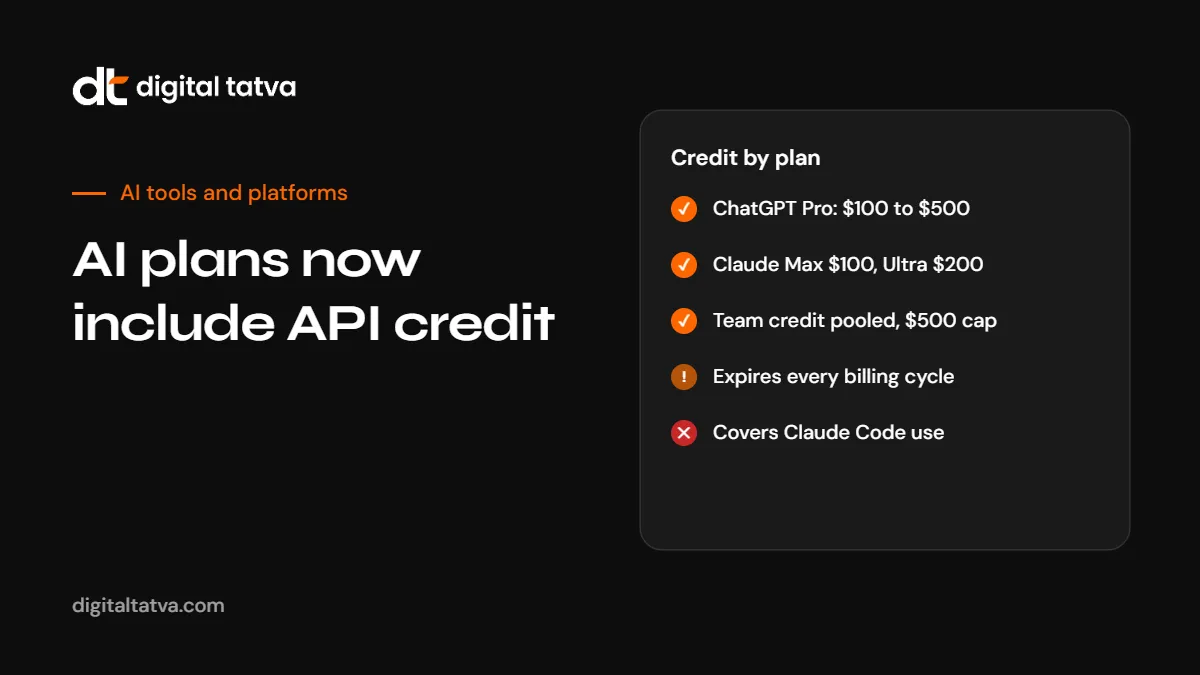
Quick answer: In October 2026 both OpenAI and Anthropic started including monthly API credit with some paid plans. OpenAI gives ChatGPT Pro subscribers credit equal to their plan price ($100, $200 or $500 a month) and Business workspaces $20 per Standard seat or $100 per Premium seat on annual billing, capped at $500 a month per workspace. Anthropic gives Claude Max $100 a month, Ultra $200 a month, and Team $20 per Standard seat or $100 per Premium seat, pooled and capped at $500 a month per organisation. The credit is only for API use, expires at the end of each billing cycle and does not cover ChatGPT, Codex or interactive Claude Code usage. ChatGPT Plus, Enterprise and Edu, and Claude Pro, are not eligible.
Key takeaways
- The credit funds API calls to one linked developer organisation. It does not raise app usage limits.
- Credit does not roll over. Use it or lose it each billing cycle.
- Both companies require the subscription to be at least seven days old before you can claim.
- Interactive Claude Code, and Codex usage billed through API keys, are excluded.
- For many small businesses, the credit is enough to run useful automations without a separate API budget.
OpenAI: API credit with ChatGPT plans
| Plan | Monthly API credit | Notes |
|---|---|---|
| ChatGPT Pro | $100, $200 or $500, matching the plan price | Claim in ChatGPT billing settings |
| ChatGPT Business, Standard seat | $20 per seat on annual billing ($25 on monthly) | Pooled per workspace |
| ChatGPT Business, Premium seat | $100 per seat on annual billing ($125 on monthly) | Pooled per workspace |
| Business workspace cap | $500 per month | Extra seats add nothing past the cap |
| Annual prepaid Business | One grant of up to $6,000 for the year | First grant prorated |
| Plus, Enterprise, Edu | Not eligible |
Rules to know:
- The API organisation must belong to the subscription or workspace owner, using the same email address. A Business admin role is not enough.
- Each subscription funds one API organisation, and each organisation takes credit from one subscription.
- Free credit is used before any purchased credit. When both run out, requests fail unless you have a payment method.
- Codex usage billed through API keys is excluded.
- From 30 October 2026, OpenAI halved the Codex and ChatGPT Work usage included in Pro 200, and the API credit does not offset that.
Anthropic: API credit with Claude plans
| Plan | Plan price | Monthly API credit |
|---|---|---|
| Claude Max | $100 a month | $100 |
| Claude Ultra (formerly Max 20x) | $200 a month | $200 |
| Team Standard | $25 per seat a month | $20 per seat, pooled |
| Team Premium | $125 per seat a month | $100 per seat, pooled |
| Team pool cap | $500 per month per organisation | |
| Claude Pro | $20 a month | Not included |
Rules to know:
- Interactive Claude Code in the terminal, IDE, desktop or web is excluded, as is extra usage in Claude, Claude Code or Cowork.
- Claude through Amazon Bedrock, Google Cloud Vertex AI or Microsoft Foundry is excluded.
- Agent SDK runs or
claude -pusing an API key from the linked Console organisation can use the credit. - Claim after seven days on an eligible plan: Settings, then Billing for Max and Ultra; Organization settings, then Billing for Team owners.
- Link one Claude Console organisation. The Team credit is claimed once for the whole team.
Anthropic also renamed Max 20x to Ultra in October 2026. Verified Ultra accounts no longer have a five-hour usage limit, according to reporting on the change. See Claude Pro vs Max and Claude usage limits.
How to claim your credit
- Check eligibility. Make sure you are on a qualifying plan and have been for at least seven days.
- Create or find your API organisation. OpenAI Platform or Claude Console, using the same email as the subscription owner.
- Open billing settings in ChatGPT or Claude and claim the credit.
- Choose the organisation that should receive it.
- Create an API key in that organisation.
- Set a usage alert so you know when the credit is running out.
What you can do with $100 to $500 a month
For a small business, this is real capacity. Some practical uses:
| Use | How |
|---|---|
| Automate content workflows | Connect the API to n8n, Zapier or Make to draft product descriptions, summaries or social posts for review. See how to build an n8n AI workflow |
| Classify and route emails or tickets | Use a cheap model to tag and prioritise incoming messages |
| Website chatbot | Power a support assistant on your site. See how to add an AI chatbot to your website |
| Document processing | Extract data from invoices, contracts or forms into a spreadsheet |
| Monitoring | Run a monthly script that checks how AI answers describe your brand. See ChatGPT brand monitoring |
| Prototyping | Test an AI feature for your product before committing budget |
Make the credit go further
- Pick the cheapest model that does the job. Many tasks do not need a frontier model. See the cheapest AI model for each task.
- Use prompt caching for repeated instructions. See prompt caching explained.
- Use batch processing for non-urgent work at about half price. See batch API savings.
- Keep prompts short and outputs structured. See how to reduce token usage.
- Estimate before you build. See how to estimate AI API costs.
Does this change which plan you should buy?
The credit makes higher plans better value if you would use the API anyway. A few scenarios:
- A solo professional on Claude Pro who rarely uses the API gains nothing by upgrading just for credit.
- A developer already paying for API usage and a Max or Pro plan effectively gets part of the subscription back.
- A small team on ChatGPT Business with five Standard seats gets $100 a month of API credit at annual billing, enough for several automations.
- Anyone relying on Claude Code should note the credit does not cover interactive Claude Code use. See how to reduce Claude Code costs.
See AI subscriptions worth paying for and how to save money on AI subscriptions.
Common mistakes
- Linking the wrong organisation or one owned by a different email address.
- Expecting the credit to raise ChatGPT or Claude app limits. It does not.
- Letting it expire unused. Set a reminder to put it to work each month.
- Running out with no payment method and having production automations fail. Decide whether to add a card with a spending limit.
- Sharing API keys widely. Keep keys secret and rotate them.
Example: turning $100 of credit into a useful automation
An illustrative example for a small online store on ChatGPT Business with five Standard seats ($100 of monthly credit on annual billing):
- Goal: draft product descriptions for new arrivals and tag incoming customer emails.
- Setup: an n8n workflow watches a spreadsheet of new products and a support inbox.
- Descriptions: for each new product, the workflow sends specifications to a mid-priced model and saves a draft description for review.
- Email tagging: each new email is sent to a cheap model that returns a category and urgency, which the helpdesk uses for routing.
- Cost control: a usage alert at 80% of the monthly credit, and a rule to pause non-urgent tasks if credit runs low.
Hundreds of short classification requests and dozens of descriptions a month typically fit comfortably within $100 on cost-efficient models. Measure your own usage in the first month.
Security basics for API keys
- Create separate keys for separate projects so you can revoke one without breaking others.
- Never paste keys into public code, shared documents or chat.
- Store keys in a secrets manager or your automation tool’s credential store.
- Set project-level spending limits where the platform allows it.
- Rotate keys if a team member leaves or a key may have been exposed.
Comparing the two offers
| Aspect | OpenAI | Anthropic |
|---|---|---|
| Individual plans with credit | Pro ($100, $200 or $500 tiers) | Max ($100) and Ultra ($200) |
| Team plans with credit | Business: $20 Standard, $100 Premium per seat (annual) | Team: $20 Standard, $100 Premium per seat |
| Team cap | $500 a month per workspace | $500 a month per organisation |
| Not eligible | Plus, Enterprise, Edu | Pro |
| Main exclusion | Codex billed through API keys; does not raise ChatGPT limits | Interactive Claude Code, cloud marketplaces |
| Rollover | No | No |
See OpenAI API pricing and Claude API pricing for model rates.
Frequently asked questions
Does ChatGPT Plus include API credit?
No. OpenAI’s credit applies to ChatGPT Pro and Business plans. Plus, Enterprise and Edu are not eligible.
How much API credit does ChatGPT Pro include?
Credit equal to the plan price: $100, $200 or $500 a month.
Does Claude Pro include API credit?
No. Anthropic’s credit applies to Max ($100), Ultra ($200) and Team plans.
Can I use the credit for Claude Code?
Not for interactive Claude Code. Agent SDK runs or claude -p with an API key from the linked organisation can use it.
Does unused credit roll over?
No. It expires at the end of each billing cycle for both companies.
How do I claim the credit?
After seven days on an eligible plan, open billing settings in ChatGPT or Claude, claim the credit and choose the API organisation to receive it.
Is there a cap for teams?
Yes. Both OpenAI Business workspaces and Claude Team organisations are capped at $500 a month.
Can I use the credit on Bedrock or Vertex AI?
No. Anthropic’s credit excludes Claude through Amazon Bedrock, Google Cloud Vertex AI and Microsoft Foundry.
Product details, prices and features are checked at the time of writing and can change. Sources are linked in the text so you can check them yourself.
How does your brand appear in AI answers?
We test the questions your buyers ask across the major AI assistants and search engines, then show you what to fix first.
Get an AI Visibility Audit