ChatGPT Brand Monitoring: How to Track Brand Mentions in ChatGPT
How to monitor what ChatGPT says about your brand: the prompts to track, the fields to log, manual and tool-based methods, and what to do with the results.
On this page
- Key takeaways
- Why ChatGPT brand monitoring matters now
- What to track in every answer
- Build the right prompt list
- Example prompts by industry
- How to monitor ChatGPT manually
- A simple monitoring spreadsheet
- When to use a ChatGPT monitoring tool
- Connect monitoring to traffic and leads
- What to do with what you find
- Why ChatGPT answers vary, and how to handle it
- Monitoring competitors in ChatGPT
- How often should you monitor?
- Reporting ChatGPT visibility to your team
- A monthly monitoring workflow
- Common monitoring mistakes
- Beyond ChatGPT
- How Digital Tatva can help
- Frequently asked questions
Last updated: 7 November 2026
Quick answer: ChatGPT brand monitoring means checking, on a regular schedule, whether ChatGPT mentions your brand when people ask about your category, how it describes you, which competitors it names instead and which websites it cites. The reliable way to do it is a fixed list of 20 to 100 real buyer prompts, run in ChatGPT several times a month in fresh sessions, with every answer logged in a spreadsheet or a monitoring tool. Combine that with AI referral data in GA4 and you can see both what ChatGPT says about you and whether it sends you customers.
Key takeaways
- One ChatGPT answer proves very little. Answers change between sessions, so monitoring works on repeated samples, not screenshots.
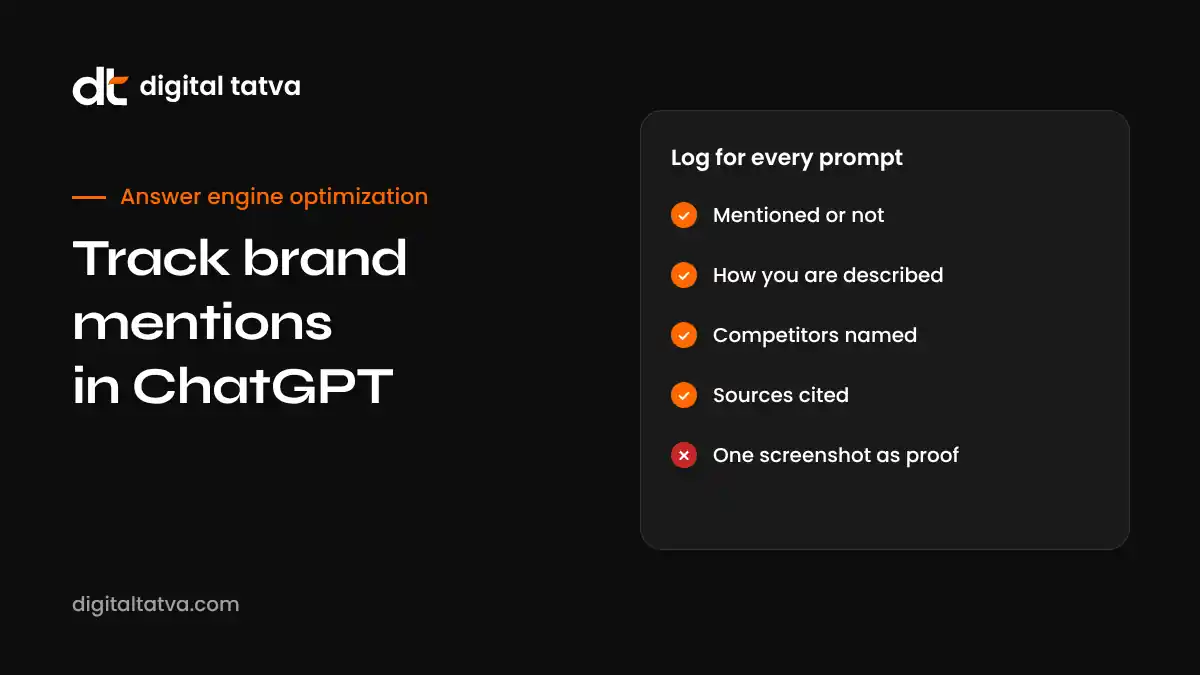
- Track four things for every prompt: whether you are mentioned, how you are described, who else is named and which sources are cited.
- Your prompt list matters more than your tool. Build it from real sales, support and search questions.
- Manual tracking works for a small prompt set. Dedicated tools save time once you track dozens of prompts or several markets.
- Monitoring is only useful if it leads to action: fixing wrong facts, improving pages and earning mentions on the sources ChatGPT cites.
Why ChatGPT brand monitoring matters now
OpenAI said in November 2026 that ChatGPT has about 1.2 billion weekly users, and that search-like queries in ChatGPT equal roughly 20% of Google’s search volume. Those figures come from OpenAI without a published method, so treat them as direction rather than precision. Even on a cautious reading, a large number of people now ask ChatGPT questions such as “best CRM for a small real estate team”, “is this brand reliable” or “cheaper alternatives to this product”.
When ChatGPT answers, it usually names a handful of brands and gives reasons. That short list shapes who gets considered. If you are not on it, or you are described with an old price or a feature you no longer offer, you lose buyers you never knew you had.
Traditional rank tracking does not show any of this. Google Search Console does not report ChatGPT. Analytics only shows the small share of people who click through. Brand monitoring fills that gap by recording what ChatGPT actually says.
What to track in every answer
For each prompt you monitor, record the same fields every time. Consistency is what turns a pile of answers into a trend.
| Field | What to record | Why it matters |
|---|---|---|
| Mentioned | Yes or no | The basic visibility signal |
| Position | First, in the list, or a passing mention | Being named first carries more weight than a footnote |
| Description | The words used about you, copied exactly | Shows how ChatGPT understands your brand |
| Accuracy | Correct, partly wrong or wrong, with the error noted | Wrong facts cost deals and need fixing at source |
| Sentiment | Positive, neutral, mixed or negative | Tracks reputation, not just presence |
| Competitors named | Every other brand in the answer | Shows who you are losing the answer to |
| Sources cited | Every URL ChatGPT links | Tells you which pages shape the answer |
| Search used | Whether the answer searched the web | Web-search answers change faster when sources change |
Build the right prompt list
Your prompt list is the foundation. A list built from guesses tracks vanity questions. A list built from real buyer questions tracks revenue. Our guide to AEO prompt research covers the method in detail. In short, group prompts into five types:
- Category prompts: “Best project management software for agencies”, “top AEO agencies in India”.
- Problem prompts: “How do I reduce no-shows at my clinic”, where a product or service could be the answer.
- Comparison prompts: “Brand A vs Brand B”, “alternatives to Brand A”.
- Cost prompts: “How much does X cost”, “cheapest X for small business”.
- Brand prompts: “What is [your brand]”, “is [your brand] good”, “[your brand] reviews”.
Where do the prompts come from?
- Questions your sales team hears on calls.
- Support tickets and live chat logs.
- Search Console queries, especially long, question-style ones.
- “People also ask” boxes in Google.
- Reddit, Quora and industry forums where your buyers talk.
- Questions customers ask before buying, collected through a short form.
Write prompts the way people actually type them into ChatGPT: full sentences, with context. “I run a 10-person design agency in Pune, what is the best invoicing software for us?” is more realistic than “invoicing software”.
Example prompts by industry
Here is how a starter prompt set looks in a few different categories. Replace the brackets with your own details and add the questions your customers actually ask.
| Industry | Category prompt | Comparison prompt | Brand prompt |
|---|---|---|---|
| B2B software | “Best HR software for a 50-person company in India” | “[Brand] vs [competitor] for payroll” | “Is [brand] good for small teams?” |
| Ecommerce | “Best protein powder for beginners without artificial sweeteners” | “[Brand] vs [competitor] whey protein” | “Is [brand] protein genuine?” |
| Professional services | “Best CA firm for startups in Ahmedabad” | “Big firm vs boutique firm for startup accounting” | “What does [firm] specialise in?” |
| Healthcare | “Best physiotherapy clinic for sports injuries in Pune” | “[Clinic] vs [clinic] for knee rehab” | “What do patients say about [clinic]?” |
| Education | “Best online data science course for working professionals” | “[Course] vs [course] for placement support” | “Is [institute] worth the fees?” |
| Hospitality | “Best boutique hotel near the old city in Jaipur” | “[Hotel] vs [hotel] for a family stay” | “Is [hotel] good for business travellers?” |
Notice how the prompts include context such as team size, location, budget or audience. That is how real people use ChatGPT, and it often changes which brands appear.
How to monitor ChatGPT manually
For up to about 30 prompts, a careful manual process works well and costs nothing but time.
- Set up a clean session. Use a ChatGPT account with memory turned off, or a temporary chat, so past conversations do not shape the answer. Note the model and plan you use.
- Run each prompt as a new chat. Do not ask several prompts in one conversation, because earlier answers influence later ones.
- Run each prompt more than once. Three runs per prompt per check is a reasonable minimum. Record each run separately.
- Log every field. Use the table above as your spreadsheet columns, with a row per run and a column for the date.
- Save the evidence. Copy the full answer text and the cited links. Screenshots are useful for reports but text is easier to analyse.
- Repeat on a fixed schedule. Monthly suits most brands. Weekly suits fast-moving categories or brands fixing a specific problem.
Our step-by-step guide to checking whether ChatGPT recommends your business walks through a first check in detail.
A simple monitoring spreadsheet
You do not need software to start. This structure covers everything above:
| Column | Example entry |
|---|---|
| Date | 7 Nov 2026 |
| Prompt ID | P07 |
| Prompt type | Comparison |
| Prompt text | “Best alternatives to [competitor] for small clinics” |
| Run number | 2 |
| Mentioned | Yes |
| Position | Third of five |
| Description | “Affordable option with good WhatsApp reminders” |
| Accuracy | Partly wrong: price quoted is last year’s |
| Competitors | Brand A, Brand B, Brand C, Brand D |
| Sources | Two review sites, one comparison article |
From this you can calculate your mention rate per prompt type, see which competitors appear most, and spot the sources that keep coming up. Our guide to AI share of voice shows how to turn these counts into a single comparable metric.
When to use a ChatGPT monitoring tool
Manual tracking becomes slow once you have more than a few dozen prompts, several markets or several AI engines to cover. Dedicated AEO monitoring tools run prompts automatically, store answers, chart trends and often track Perplexity, Gemini, Copilot and Google’s AI features as well.
When you compare tools, look for:
- Repeated runs: the tool should sample each prompt more than once.
- Location and language settings: answers vary by market.
- Citation capture: the cited URLs, not just mentions.
- Exportable raw data: so you can check the tool’s numbers.
- Competitor tracking: mentions for named competitors on the same prompts.
- Clear method: how prompts are run and which model versions are used.
We compare popular options in Peec AI vs Otterly vs Profound and list more in the best AEO tools. If budget is tight, free AEO tools plus a spreadsheet will take you a long way.
Connect monitoring to traffic and leads
Mentions are the leading signal. Traffic and leads are the result. Track both.
AI referral traffic in GA4
When someone clicks a link in a ChatGPT answer, the visit often shows chatgpt.com as the referrer. Create a custom channel group in GA4 that captures chatgpt.com and other AI referrers, then track sessions and conversions over time. Our guide to tracking AI traffic in GA4 shows the setup.
Branded search
Many people who hear about you in ChatGPT search your name on Google afterwards. Watch branded query impressions in Search Console. A steady rise alongside better ChatGPT mentions is a good sign.
Self-reported source
Add “ChatGPT or another AI assistant” to the “How did you hear about us?” field on forms and in sales calls. It is imperfect, but it captures influence that analytics misses.
What to do with what you find
Monitoring is only worth doing if it changes what you do. Here is how to respond to the most common findings.
| Finding | What it usually means | What to do |
|---|---|---|
| Not mentioned at all | ChatGPT cannot find or trust enough about you | Check crawler access, publish clear answer pages, earn mentions on cited sources |
| Mentioned with wrong facts | Outdated or conflicting information exists online | Fix your own pages first, then correct directories and third-party pages |
| Competitors always named first | They appear on the sources ChatGPT trusts | Study the cited pages and work to be included honestly |
| Mentioned only for brand prompts | ChatGPT knows you exist but not what you are best for | Make your positioning and use cases explicit on your site and profiles |
| Negative sentiment | An old complaint or thin review base dominates | Address the issue publicly and build genuine recent reviews |
| Cited sources are all third parties | Your pages are not the best answer for the question | Create or improve the page that answers that exact question |
For deeper fixes, see fixing wrong AI answers about your brand, how to get cited by ChatGPT and our guide to AI reputation management.
Why ChatGPT answers vary, and how to handle it
New users of brand monitoring are often surprised that the same prompt gives different answers. That is normal, for several reasons:
- Sampling. Language models generate text with some randomness, so wording and lists change between runs.
- Web search. Some answers search the web and some do not, and the pages found can differ.
- Model updates. OpenAI updates models and search behaviour regularly.
- Location and language. Results can differ by country and language.
- Personalisation. Memory and previous chats can shape answers for logged-in users.
The answer is not to chase a single perfect screenshot. It is to measure in samples: run each prompt several times, report percentages rather than single results, and compare the same prompt set over months. A move from being named in 2 of 10 runs to 6 of 10 runs is a meaningful change. A single run is not.
Monitoring competitors in ChatGPT
The same prompt set tells you a lot about competitors. Over a few months you can see:
- Which competitor is named most often, and for which prompt types.
- How ChatGPT describes each competitor’s strengths, which often reveals what content or coverage it relies on.
- Which sources mention competitors but not you. These are your best outreach targets.
- When a competitor suddenly gains or loses mentions, which often follows a launch, a pricing change or new press coverage.
Keep this ethical: monitor public answers and public sources. The goal is to understand the landscape and improve your own presence, not to attack anyone.
How often should you monitor?
| Situation | Suggested rhythm |
|---|---|
| Stable brand, steady category | Monthly |
| Active AEO programme | Monthly full set, weekly spot checks on priority prompts |
| After a rebrand, price change or launch | Weekly for two to three months |
| Fixing a serious error or reputation issue | Every few days until it settles |
| Fast-moving category such as AI tools or finance | Weekly |
Reporting ChatGPT visibility to your team
Leaders do not need every answer. They need a short, honest summary. A monthly report can cover:
- Headline: three lines on what changed and why.
- Mention rate: share of prompt runs that named you, overall and by prompt type, compared with last month.
- Competitors: who is named most and where you trail.
- Accuracy: errors found, fixed and still open.
- Sources: the most cited domains and any new mentions earned.
- Traffic: ChatGPT referral sessions and conversions from GA4.
- Next actions: the three most important fixes for next month.
Our AEO reporting template gives you a ready structure, and AEO KPIs explains which metrics to include.
A monthly monitoring workflow
Here is a simple routine that a marketer can run in a few hours each month, or that a tool can automate.
- Week 1: run the prompt set. Run every prompt several times in clean sessions, or let your tool run them. Export the results.
- Week 1: score the results. Calculate mention rate by prompt type, list competitors by frequency and flag any new errors.
- Week 2: investigate changes. For any prompt where you gained or lost mentions, look at the cited sources to understand why.
- Week 2: plan fixes. Pick the three most valuable actions: a page to improve, an error to correct, a source to approach.
- Weeks 2 to 4: act. Make the fixes. Update pages, correct profiles, contact publishers, ask happy customers for reviews.
- Week 4: report. Share a short summary with your team and note what to watch next month.
Set a few simple alerts too. For example, if a brand prompt starts returning a wrong price, or a key category prompt stops naming you in most runs, treat it as a priority rather than waiting for the monthly cycle.
Common monitoring mistakes
- Judging from one screenshot. Always use repeated runs.
- Using a logged-in account with memory on. Your own history can bias results.
- Changing the prompt list every month. Keep a stable core set so trends are comparable. Add new prompts as a separate group.
- Tracking only brand prompts. Being found when someone types your name is the easy part. Category and comparison prompts matter more.
- Ignoring cited sources. They tell you exactly where to act.
- Monitoring without fixing. A beautiful dashboard that never leads to action is wasted effort.
Beyond ChatGPT
ChatGPT is the largest AI assistant, but your buyers may also use Google’s AI Overviews and AI Mode, Gemini, Perplexity and Microsoft Copilot. The same prompt set and spreadsheet structure work for all of them. Running the same prompts across engines shows where you are strong and where you are missing. Our guides to Perplexity SEO, Gemini SEO and Google AI Overviews optimization cover each engine.
How Digital Tatva can help
Digital Tatva runs ChatGPT and multi-engine brand monitoring as part of our answer engine optimization service. We build your prompt set from real buyer questions, test it across engines with repeated runs, log every mention, error and citation, and report the changes every month with clear next actions. Every engagement starts with an AI visibility audit, which gives you a full baseline and fix list.
Want to know what ChatGPT says about you? Request an AI visibility audit and get a measured baseline of your brand in ChatGPT, Gemini, Perplexity, Copilot and Google AI. You can also run our free AI visibility checker to test crawler access in a minute.
Frequently asked questions
How can I see if ChatGPT mentions my brand?
Ask ChatGPT the questions your buyers ask, in fresh chats with memory off, and record whether you are named. Repeat each question several times and on a regular schedule to see a reliable picture.
Is there a tool that tracks ChatGPT brand mentions?
Yes. Several AEO monitoring tools run prompts automatically and track mentions, competitors and citations across ChatGPT and other AI engines. A spreadsheet works well for smaller prompt sets.
Why does ChatGPT give different answers to the same question?
Language models generate text with some randomness, answers may or may not search the web, and models are updated regularly. That is why monitoring should use repeated runs and percentages.
How many prompts should I track?
Start with 20 to 50 prompts that cover category, problem, comparison, cost and brand questions. Larger brands or multi-market businesses often track 100 or more.
How often should I check ChatGPT for my brand?
Monthly suits most brands. Check weekly after major changes such as a rebrand, new pricing or a product launch.
Does Google Search Console show ChatGPT data?
No. Search Console covers Google Search, including AI Overviews and AI Mode. ChatGPT visibility has to be measured through prompt testing, and ChatGPT clicks through GA4 referral data.
What should I do if ChatGPT says something wrong about my brand?
Find the source of the error, correct your own pages, update directories and profiles, and ask third-party sites to fix factual mistakes. Answers that use web search often update once the sources are corrected and recrawled.
Can Digital Tatva monitor ChatGPT for my brand?
Yes. Brand monitoring across ChatGPT and other AI engines is part of our answer engine optimization service, starting with an AI visibility audit.
Product details, prices and features are checked at the time of writing and can change. Sources are linked in the text so you can check them yourself.
How does your brand appear in AI answers?
We test the questions your buyers ask across the major AI assistants and search engines, then show you what to fix first.
Get an AI Visibility Audit