
ChatGPT for Business: Plans, Use Cases and Rollout Guide (2026)
ChatGPT for business explained: Business vs Enterprise plans and pricing, 15 use cases by department, a step-by-step rollout, prompt templates, data privacy and ROI.

On this page
- Key takeaways
- Which ChatGPT plan is right for your business?
- What ChatGPT Business includes
- 15 ways businesses use ChatGPT
- How to roll out ChatGPT in your company
- Prompt templates your team can copy
- Data privacy and security for ChatGPT at work
- Common mistakes when adopting ChatGPT at work
- How to measure ChatGPT ROI
- ChatGPT vs other business AI assistants
- Frequently asked questions
- The bottom line
ChatGPT for business means using OpenAI’s assistant to speed up writing, research, customer support, sales, marketing, data analysis and internal knowledge work. Small teams can start on individual Plus accounts at $20 a month, but most companies should use ChatGPT Business, which costs $25 per user per month billed monthly or $20 billed annually, because it adds admin controls, shared workspaces, company knowledge, agents and Codex, and OpenAI does not train on workspace data.
This guide explains which ChatGPT plan suits a business, 15 practical use cases by department, how to roll ChatGPT out safely, prompt templates your team can copy, how to measure return on investment and how ChatGPT compares with Claude, Gemini and Microsoft Copilot for business.
Key takeaways
- ChatGPT Business (formerly Team) costs $25 per user per month, or $20 billed annually, and includes ChatGPT Work, Codex, custom GPTs, Projects, Apps, Company Knowledge, ChatGPT Agent and deep research.
- OpenAI says it does not train on Business or Enterprise workspace data, which makes these plans safer for company information than personal accounts.
- The biggest early wins usually come from writing, meeting follow-ups, customer support drafts, sales research and spreadsheet analysis.
- Roll out with a short AI policy, a shared prompt library, a few custom GPTs and clear rules for checking output.
- Measure time saved on specific tasks to prove value before expanding seats.
Which ChatGPT plan is right for your business?
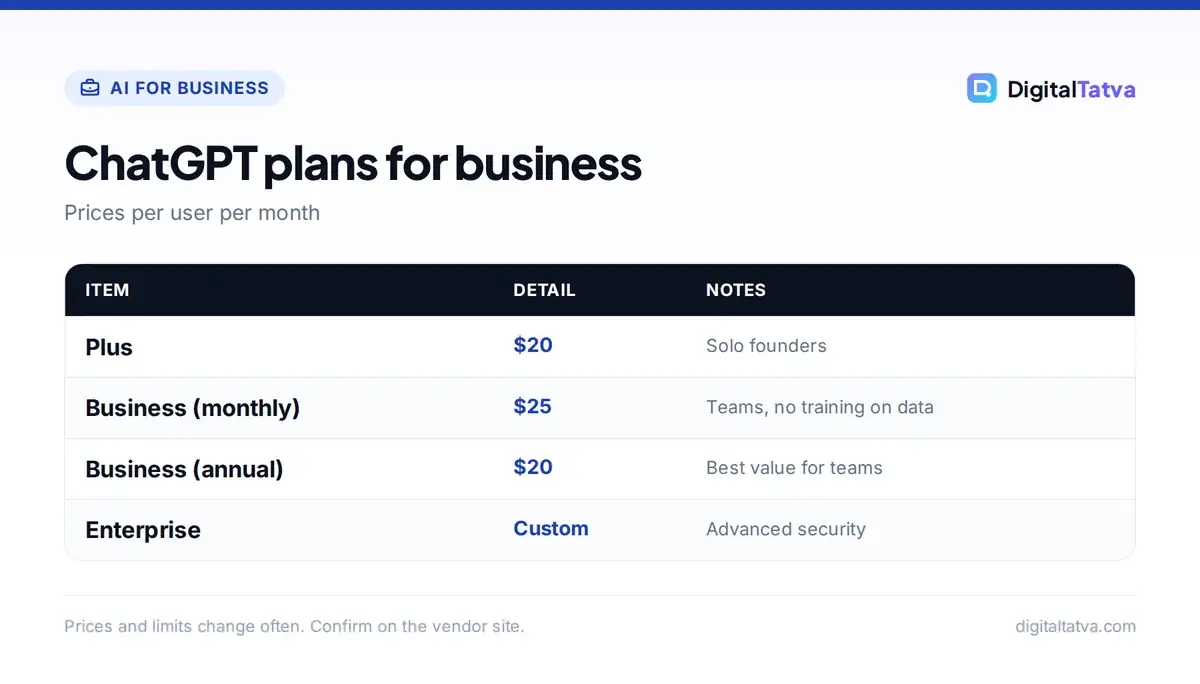
| Plan | Price | Best for | Business data training |
|---|---|---|---|
| Free / Go | $0 / $8 a month (US) | Trying ChatGPT | Controlled by user settings; not ideal for company data |
| Plus | $20 a month | Solo founders and freelancers | Controlled by user settings |
| Business | $25/user/month, or $20 annual | Teams of 2 to a few hundred | Not used for training |
| Enterprise | Custom pricing | Large companies needing advanced security and compliance | Not used for training |
Nonprofits can get up to 75% off Business and Enterprise, according to OpenAI’s pricing page. For a full plan breakdown, read our ChatGPT pricing guide, ChatGPT Free vs Plus, and our comparison of AI team plans. Official details are on OpenAI’s ChatGPT pricing page.
What ChatGPT Business includes
- Latest models: GPT-5.6 Sol with higher thinking levels and access to GPT-6 Pro. Our GPT-6 models explainer covers the differences.
- ChatGPT Work: an agentic workspace for longer tasks on documents, spreadsheets and research; see how to use ChatGPT Work.
- Custom GPTs and Projects: shared assistants and workspaces for teams and clients.
- Company Knowledge and Apps: connect tools like Google Drive, SharePoint, Slack and CRMs so ChatGPT can answer from internal information with permissions respected.
- ChatGPT Agent and deep research: multi-step tasks and research reports with sources.
- Codex: OpenAI’s coding agent for technical teams.
- Admin controls: central billing, user management, spend controls and single sign-on options.
15 ways businesses use ChatGPT
| Department | Use case | Typical time saved |
|---|---|---|
| Marketing | Campaign ideas, ad copy, blog drafts, social posts | High |
| Marketing | Repurposing a webinar into posts, emails and a blog | High |
| Sales | Account research and personalized outreach drafts | High |
| Sales | Proposal and quote first drafts | Medium |
| Support | Reply drafts and help-article writing | High |
| Support | Summarizing ticket trends weekly | Medium |
| Operations | SOPs, checklists and process documentation | Medium |
| Operations | Spreadsheet analysis and reporting | High |
| HR | Job descriptions, interview questions, policy drafts | Medium |
| Finance | Explaining variances, drafting reports, checking formulas | Medium |
| Leadership | Strategy research, board memo drafts, competitor scans | Medium |
| Meetings | Notes, action items and follow-up emails | High |
| Product | User feedback analysis, specs and release notes | Medium |
| Engineering | Code, tests and reviews with Codex | High |
| Everyone | Email writing and translation | High |
For department-specific ideas, see our guides on AI for small business, AI for HR and AI for accountants.
How to roll out ChatGPT in your company
- Pick a pilot group. Start with 5 to 20 enthusiastic users across two or three teams.
- Write a one-page AI policy. Cover what data can be shared, required human review, disclosure and approved tools. Use our AI usage policy template.
- Choose three priority use cases per team with a clear before-and-after time estimate.
- Build a shared prompt library in a doc or a custom GPT so good prompts spread quickly.
- Create a few custom GPTs for repeated jobs, such as a brand voice writer, a proposal builder or a policy assistant.
- Train people in one hour. Show real examples from their own work, not generic demos.
- Measure and expand. After 30 days, compare time saved and quality, then add seats where value is clear.
Prompt templates your team can copy
- Sales research: “Research [company] using its website and recent news. Summarize what they sell, their customers, recent changes and three pain points our [product] could solve. Then draft a 100-word email.”
- Support reply: “Using our policy below, draft a friendly reply to this customer. Acknowledge the issue, explain the next step and keep it under 120 words. Policy: [paste]. Message: [paste].”
- Meeting follow-up: “Turn these notes into a summary, decisions, action items with owners and dates, and a follow-up email.”
- Data analysis: “Analyze the attached sales file. Show monthly revenue trends as a chart, the top 10 customers and any unusual drops. Explain in plain English.”
- Marketing: “Create five LinkedIn post ideas for [audience] about [topic], each with a hook, three key points and a question.”
More templates are in our ChatGPT prompts for marketing, ChatGPT email prompts and AI prompts for small business.
Data privacy and security for ChatGPT at work
The biggest risk is employees pasting customer data, financials or confidential plans into personal accounts. Business and Enterprise plans keep workspace data out of model training and give admins control. Still:
- Ban sharing passwords, card details, health data and government ID numbers.
- Use connectors with proper permissions instead of copying data around.
- Require human review for anything sent to customers or published.
- Review OpenAI’s business data privacy commitments with your IT or legal team.
Our guide to AI data privacy for business and is ChatGPT safe cover this in more depth.
Common mistakes when adopting ChatGPT at work
Most failed rollouts look the same. A company buys seats, sends a welcome email and waits. A month later only a handful of people use ChatGPT regularly, and leadership concludes AI is overhyped. The problem is rarely the tool. It is the lack of specific use cases, training and permission.
- No clear use cases. “Use AI more” is not a plan. Give each team two or three named tasks where ChatGPT is expected to help, such as weekly reports or first-draft proposals.
- No permission to experiment. Employees worry about getting in trouble. A short policy that clearly says what is allowed removes that fear.
- Treating output as final. ChatGPT drafts; people decide. Teams that skip review end up sending generic or wrong content to customers, which damages trust quickly.
- Ignoring champions. In every company a few people become power users fast. Ask them to share their prompts and workflows in a weekly 15-minute session.
- Measuring nothing. Without before-and-after numbers, it is impossible to justify renewing or expanding seats.
A useful rule: within the first 30 days, every pilot user should be able to name one task that now takes half the time it used to. If they cannot, revisit the use cases rather than the tool. For a wider view of how companies are capturing value from AI, see our roundup of AI statistics, which includes McKinsey’s finding that only a small group of high performers redesign workflows deeply enough to see major profit impact.
How to measure ChatGPT ROI
Track a handful of repeated tasks. For each, record time before and after, quality and error rates. Example: if 10 people each save three hours a week at an internal cost of Rs 600 an hour, that is Rs 18,000 a week, far above the cost of ten Business seats. Our guide to measuring AI ROI includes a calculator approach and the metrics leaders care about.
ChatGPT vs other business AI assistants
| Assistant | Best for | Team price (annual) |
|---|---|---|
| ChatGPT Business | All-round work, agents, custom GPTs, image creation | $20/user/month |
| Claude Team | Writing, long documents, coding with Claude Code | $20/user/month (Standard) |
| Gemini in Google Workspace | Teams living in Gmail, Docs and Sheets | Included in Workspace plans |
| Microsoft 365 Copilot | Teams using Outlook, Word, Excel and Teams | $21/user/month Business (after promo) |
Compare the main options in ChatGPT vs Claude, ChatGPT vs Gemini and Gemini vs Copilot.
Pros of ChatGPT for business
- Broadest set of features in one tool
- Familiar to most employees already
- Custom GPTs make sharing workflows easy
- Strong agents, research and image creation
- Workspace data not used for training
Cons
- Per-seat cost adds up for large teams
- Less native inside Office or Google apps than Copilot or Gemini
- Output still needs human review
- Usage limits apply to the heaviest features
Frequently asked questions
How much does ChatGPT for business cost?
ChatGPT Business costs $25 per user per month billed monthly, or $20 per user per month billed annually. Enterprise pricing is custom through OpenAI’s sales team. Solo business owners can start with ChatGPT Plus at $20 a month.
Is ChatGPT safe for business data?
On ChatGPT Business and Enterprise, OpenAI says it does not train its models on your workspace data, and admins get controls over users and access. You should still set a policy on what data employees can share and review outputs before sending them to customers.
What is the difference between ChatGPT Plus and ChatGPT Business?
Plus is an individual plan. Business adds a shared workspace, admin and billing controls, company knowledge connectors, shared custom GPTs and Projects, and a commitment not to train on workspace data, which makes it better for teams.
How can a small business use ChatGPT?
Small businesses use ChatGPT for marketing content, social posts, customer replies, product descriptions, proposals, spreadsheet analysis, SOPs and meeting summaries. Start with three repetitive tasks, build prompt templates and measure the time saved.
Can ChatGPT connect to my company’s tools?
Yes. ChatGPT Business supports apps and company knowledge connectors for tools such as Google Drive, SharePoint, Slack and CRMs, so it can answer from internal information while respecting each user’s permissions.
The bottom line
ChatGPT can save every department hours a week, but the value comes from a structured rollout, not just buying seats. Use ChatGPT Business for company data, start with a pilot, give people a clear policy and proven prompts, and measure results. Expand once you can show the time and quality gains.
Pricing and features are checked at the time of writing and can change. Some links may be affiliate links, which never affect our verdicts.



