How to Use the Free AI Visibility Checker (and What Every Result Means)
A complete guide to Digital Tatva's free AI visibility checker: how the website check and the AI answer check work, how the score is calculated, what each result means and how to fix the most common problems.
On this page
- Key takeaways
- Why we built a free checker
- How to run the website check
- What the website check tests
- How the score is calculated
- What to do about each result
- How to run the AI answer check
- How to read your AI answer results
- Privacy and fair use
- Limits of the checker
- Example: reading a sample result
- How the checker relates to a full audit
- Fixes by platform
- Using the checker for clients and competitors
- Re-run the check after changes
- What to do after the check
- Frequently asked questions
- Sources
Last updated: 4 November 2026
Quick answer: Digital Tatva’s free AI visibility checker works in two steps. Step 1 fetches your homepage live, the way an AI crawler would, and checks robots.txt rules for AI crawlers, whether your server or firewall turns AI bots away, how much content is readable without JavaScript, indexing signals, Organization schema, sameAs links and your sitemap. It returns an AI readiness score out of 100 with a pass, warning or fail for each check and a suggested fix. Step 2 writes five buyer questions for your brand and category with one-click links to ChatGPT, Perplexity, Google AI Mode and Copilot, so you can test, in your own browser, whether AI actually names you. Nothing you enter is stored.
Key takeaways
- The checker shows whether AI engines can reach and understand your website, which is the foundation of AI visibility.
- All results come from a live check at the moment you run it, not from estimates or a database.
- The score measures readiness, not placement: a high score does not guarantee AI will recommend you.
- The AI answer test is done by you, so you see what a real buyer sees today.
- Most failing checks can be fixed in a day by a developer or site owner.
Why we built a free checker
Many businesses want to know whether ChatGPT or Google’s AI mentions them, but they do not know where to start. Paid AI visibility trackers are useful for ongoing measurement, but they cost money and can feel abstract. We wanted a tool that gives any business owner two honest answers in a few minutes: can AI engines read my website, and do they name my brand when buyers ask?
The checker is free, needs no sign-up and stores nothing. It does not show estimated numbers or a made-up “AI ranking”. Every result comes from a live request to your website or from a test you run yourself. If you want the bigger picture, our guide to AI visibility tools and free AEO tools list other options.
How to run the website check
- Open the checker at digitaltatva.com/ai-visibility-checker.
- Enter your website address, for example yourwebsite.com. You do not need to type https.
- Press “Check my website”. The tool fetches your site the way AI crawlers do. This usually takes 10 to 30 seconds.
- Read your score and results. Each check shows a green pass, an amber warning, a red fail or a grey note, with a plain explanation.
The check looks at your homepage and site-wide files such as robots.txt and your sitemap. It is a fast foundation check, not a full site audit. Different pages can have different issues, so important service or product pages may need their own review.
What the website check tests
The results are grouped into four areas.
Access
- Homepage loads: whether your homepage returns a normal 200 status. Crawlers need a successful response to read your page.
- Homepage can be indexed: whether a noindex meta tag or X-Robots-Tag header tells search engines not to index the page. AI search features rely on search indexes, so a noindex homepage is a serious problem.
- AI search crawlers in robots.txt: whether your robots.txt file blocks the crawlers that fetch pages for live AI answers: OAI-SearchBot and ChatGPT-User (ChatGPT), PerplexityBot (Perplexity), Googlebot (Google Search and AI Overviews) and Bingbot (Bing and Microsoft Copilot).
- Server and firewall response: the checker requests your homepage again using the OAI-SearchBot and PerplexityBot user agents and compares the response. If your server or a security service such as a CDN or firewall plugin returns an error to those bots, they may never see your page, even when robots.txt allows them.
AI crawlers in robots.txt
A grid shows each crawler with its status: Allowed, Allowed* (allowed, with some paths blocked, which is normal for admin areas) or Blocked. The grid also shows training crawlers such as GPTBot, Google-Extended and ClaudeBot. These collect data for model training. Whether you allow them is a business decision, so they are shown but not scored.
Content
- Content in the HTML: roughly how many words of visible text are readable without running JavaScript. Many AI crawlers do not run scripts, so a page that relies on JavaScript to show its content may look almost empty to them.
- Title and meta description: whether both are present. They summarise the page for search engines and AI.
- H1 heading: whether the page has one clear main heading.
Brand signals
- Organization schema: whether your homepage contains structured data that identifies your business, such as Organization, LocalBusiness or ProfessionalService.
- sameAs links: whether that schema links to your official profiles elsewhere, which helps engines connect your brand across the web.
- XML sitemap: whether a sitemap is found through robots.txt or at common locations.
- llms.txt: shown for information only. It is a proposed standard, and no major AI engine has confirmed using it. See do you need an llms.txt file?
How the score is calculated
The AI readiness score adds up points for each scored check, out of 100.
| Check | Points | How points are given |
|---|---|---|
| Homepage loads normally | 15 | Full points for a 2xx response |
| Homepage can be indexed | 10 | Full points if no noindex is found |
| AI search crawlers allowed | 25 | 5 points each for OAI-SearchBot, ChatGPT-User, PerplexityBot, Googlebot and Bingbot |
| Server accepts AI crawler requests | 10 | Full points if both test bots get a normal response |
| Content in HTML | 15 | Full points at about 300 words or more; partial points from about 120 words |
| Title and meta description | 5 | 3 for a title, 2 for a description |
| Organization schema | 10 | Full points if an organisation or business type is found |
| sameAs links | 5 | Full points if found in structured data |
| XML sitemap | 5 | Full points if a valid sitemap is found |
A score of 80 or more is labelled a strong foundation. Between 55 and 79 means there are some gaps to fix. Below 55 means AI engines may struggle to use your site. These labels describe technical readiness only.
Important: A high score means AI engines can access and understand your homepage. It does not mean they will recommend you. Recommendations also depend on your content, reputation, reviews and mentions on other websites. No tool or agency can guarantee placement in AI answers.
What to do about each result
Homepage did not load normally
If the status is a 4xx or 5xx error, or a redirect loop, ask your developer or host to check server logs. Common causes are misconfigured redirects, maintenance mode left on or a server that blocks unknown visitors.
Homepage is set to noindex
This is often left over from a staging site. Remove the noindex tag in your CMS settings or theme, or the X-Robots-Tag header in your server configuration. In WordPress, check Settings, Reading and your SEO plugin.
robots.txt blocks AI search crawlers
Edit robots.txt to remove Disallow rules for the blocked crawlers, or add explicit Allow rules. Our guide to AI crawlers and robots.txt includes example rules. Remember that blocking training crawlers such as GPTBot is separate and does not stop search crawlers.
Your server or firewall turns AI crawlers away
This is one of the most common hidden problems. Check bot protection settings in your CDN (for example Cloudflare’s bot management or AI crawler controls), security plugins and hosting firewall. Allow the verified AI search crawlers you want. Many providers let you allow known bots by name. Then run the checker again.
Thin or very little content in the HTML
If your homepage shows fewer than about 120 words without JavaScript, crawlers that do not run scripts see almost nothing. Options include server-side rendering, static generation, prerendering or simply adding meaningful text that is part of the initial HTML. Read can AI crawlers read JavaScript? If the tool notes that your page looks like a JavaScript app, this is a priority fix.
Missing title or meta description
Add a clear title that names your business and what you do, and a one or two sentence description. Most CMSs and SEO plugins provide fields for both.
No H1 or several H1 headings
Use one H1 that states what the page is about. This is a warning, not a scored item, but it helps clarity.
No Organization schema
Add Organization or LocalBusiness structured data with your official name, logo, address, phone and website. Many SEO plugins add it automatically once configured. See schema markup for AEO and our list of schema markup tools.
No sameAs links
Add your official profile URLs (LinkedIn, Facebook, Instagram, YouTube, Google Business Profile, Wikipedia or Wikidata if you have them) to the sameAs field of your Organization schema.
No XML sitemap
Generate a sitemap with your CMS or SEO plugin, list it in robots.txt with a Sitemap line and submit it in Google Search Console and Bing Webmaster Tools.
How to run the AI answer check
The second step answers the question most business owners really care about: does AI name my brand? No tool can see inside ChatGPT for you, because answers vary by user, session and location. So the checker helps you run the test yourself.
- Enter your brand name. If you ran the website check first, the tool suggests a name from your page title, which you can edit.
- Enter what you sell, for example “interior design services” or “CBSE school”.
- Enter a city or country if location matters to your buyers.
- Press “Write my questions”. The tool writes five buyer questions: three category questions (best providers, a recommendation for a small business, cost and value) and two brand questions (is your brand a good choice, and what your brand offers).
- Open each question in each engine. Links open ChatGPT, Perplexity, Google AI Mode and Copilot with the question filled in. If a link opens without the question, use the Copy button and paste it.
- Mark the result. For each engine, press Named or Not named.
- Read your summary. The tool shows the share of answers that named you and a suggested next step.
Tip: Use a private window or a logged-out session for the most neutral results. If you are logged in, your history and memory settings can influence what the assistant says. Run important questions more than once, because answers vary.
How to read your AI answer results
- Not named for any category question: AI engines do not yet connect your brand with what you sell. Focus on clear service pages, Organization schema, consistent listings and mentions on sites AI engines cite. See how to get cited by AI.
- Named for some questions but not most: you have a foundation. Look at the sources cited for competitors; those are the sites where mentions would help most.
- Named in most answers: check that descriptions are accurate and re-test monthly, because answers change.
- Named only for brand questions: AI knows who you are but does not recommend you for the category. You need stronger category content and third-party coverage.
- Named with wrong facts: read what to do when AI gets your brand wrong.
Privacy and fair use
- Nothing you enter is stored. The website check runs when you press the button, and results are not saved.
- Your Named or Not named marks stay in your browser.
- To keep the tool fast and free, there is a fair-use limit of 15 website checks per hour.
- The checker only fetches public pages and files. It does not log in, submit forms or crawl your whole site.
Limits of the checker
We want you to understand what the tool can and cannot tell you.
- It checks your homepage and site-wide files, not every page.
- It tests two AI crawler user agents for firewall behaviour. Some security systems treat bots differently by IP address, which a single test cannot fully reproduce.
- Word count is approximate and based on text in the initial HTML.
- It cannot measure off-site signals such as reviews, mentions or backlinks.
- The AI answer step relies on your own testing, which reflects one session at one moment.
For a complete picture, a full audit tests a larger prompt set across engines, compares competitors, maps sources and checks key pages. See what is inside our AI visibility audit.
Example: reading a sample result
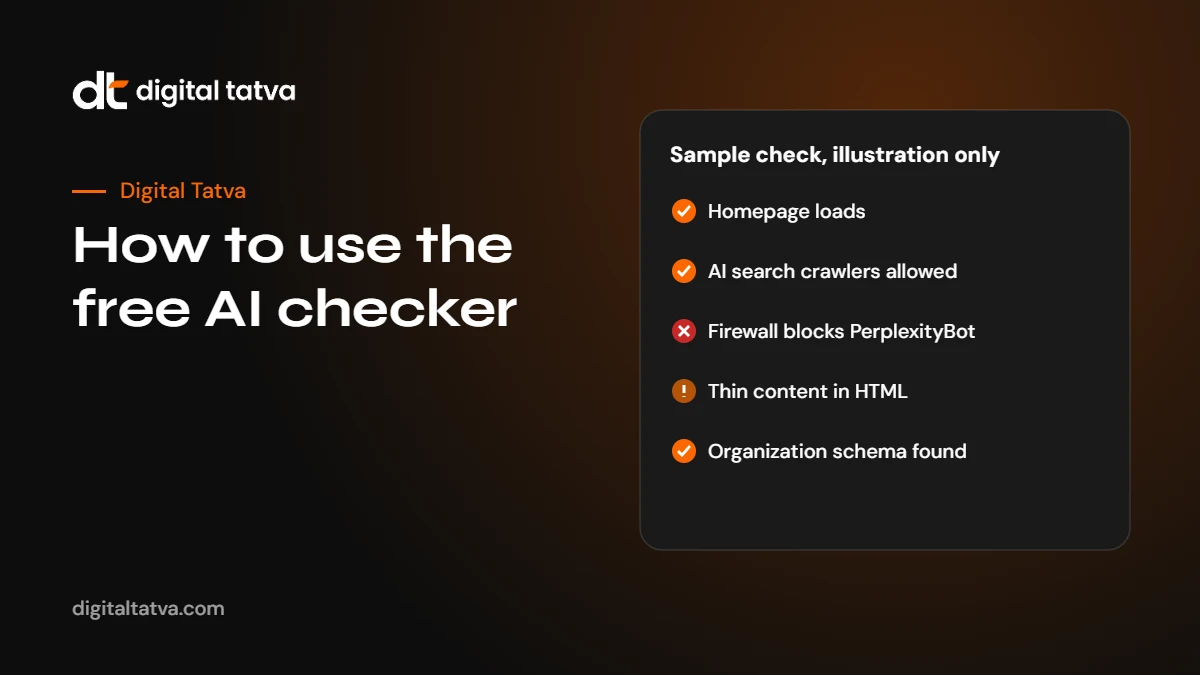
Here is an illustration of how to read a result. Imagine a furniture brand runs the checker and scores 62.
- Access: homepage loads (pass), can be indexed (pass), AI search crawlers allowed in robots.txt (pass), but the server or firewall check shows PerplexityBot received a 403 error (fail).
- Crawler grid: all search crawlers allowed; GPTBot blocked, which the brand chose deliberately.
- Content: only about 90 words readable in the HTML (fail), with a note that the page looks like a JavaScript app.
- Brand signals: Organization schema found (pass), no sameAs links (warning), sitemap found (pass).
What should the brand do? First, the firewall: a security rule is rejecting Perplexity’s crawler, so Perplexity is very unlikely to cite the site. Allowing verified AI search crawlers in the CDN settings is a quick fix. Second, the content: the homepage renders almost entirely in the browser, so crawlers that do not run JavaScript see a near-empty page. The developer should add server-side rendering or at least put the key text in the initial HTML. Third, add sameAs links to the brand’s social and marketplace profiles. After those three fixes, the score would rise into the strong range, and, more importantly, AI engines would be able to read and identify the site properly.
How the checker relates to a full audit
| Area | Free checker | Full AI visibility audit |
|---|---|---|
| Crawler access and firewall | Homepage and robots.txt | Key pages, sections and user agents |
| Content readability | Homepage word count in HTML | Content review of priority pages |
| Schema and sitemap | Presence on homepage | Accuracy and coverage across key templates |
| AI answers | Five questions you test yourself | 30 to 100 agreed prompts across engines, repeated runs |
| Competitors | Not included | Share of voice against named competitors |
| Sources | Not included | Map of domains AI cites for your category |
| Accuracy | Your own observation | Error log with likely sources and fixes |
| Plan | Fix suggestions per check | Ranked fix list with effort and impact |
Many businesses use the checker to fix the basics themselves, then come back to it every month to make sure nothing has broken. If you need the deeper view, read what is inside our audit.
Fixes by platform
- WordPress: check Settings, Reading for “Discourage search engines”; check your SEO plugin’s robots.txt editor and schema settings; review security plugins for bot blocking rules.
- Shopify: robots.txt can be customised through the theme’s robots.txt.liquid template; check apps that add bot protection; most themes render content in HTML.
- Wix and Squarespace: check the platform’s SEO settings for indexing and robots options; add structured data through built-in settings or code injection where supported.
- Webflow: check site settings for indexing and robots.txt; add schema through custom code in page settings.
- Custom JavaScript apps (React, Vue, Angular): use server-side rendering, static generation or prerendering for public pages.
- Cloudflare and other CDNs: review bot management and AI crawler settings and allow the verified search crawlers you want.
Platform settings change over time, so check each provider’s current documentation before making changes.
Using the checker for clients and competitors
Agencies and consultants can use the checker for quick first looks at client websites, and anyone can check a competitor’s public site to compare technical foundations. Remember that the fair-use limit applies per visitor, and the tool only reads public pages. A competitor scoring higher does not mean they are recommended more often; it means their site is easier for AI engines to read. Combine the technical comparison with the AI answer test to see the full picture.
Re-run the check after changes
Website changes, plugin updates and new security rules can break AI access without anyone noticing. Run the checker again after any of these: a website redesign or migration, a new CDN or security plugin, changes to robots.txt, a new theme or page builder, or a hosting change. It takes less than a minute and can save months of invisible problems.
What to do after the check
- Fix any red results first. Access problems block everything else.
- Fix amber warnings next. Thin content and missing schema are usually quick wins.
- Run the AI answer check and note who is named instead of you.
- Write down 20 more buyer questions and test them monthly. Our guide on checking if ChatGPT recommends your brand explains a full method.
- Work through the basics: our technical AEO checklist and AEO quick wins.
- Get help if you need it. Request an audit and a person will review your results with you.
Frequently asked questions
Is the AI visibility checker really free?
Yes. There is no sign-up and no charge. A fair-use limit of 15 website checks per hour keeps it fast for everyone.
Does a score of 100 mean ChatGPT will recommend my business?
No. The score measures whether AI engines can access and understand your homepage. Recommendations also depend on your content, reputation and mentions elsewhere, and nobody can guarantee placement.
Why does the checker say my firewall blocks AI crawlers?
Your server, CDN or security plugin returned an error when the checker requested your homepage as OAI-SearchBot or PerplexityBot. Check your bot protection settings and allow the AI search crawlers you want.
Should I allow GPTBot and Google-Extended?
That is a business choice. They collect data for model training. Blocking them does not stop ChatGPT search or Google AI Overviews from showing your pages, which use OAI-SearchBot and Googlebot.
Why do I test AI answers myself?
AI assistants give different answers to different people and change over time. Running the questions in your own browser shows you what a real buyer sees today.
Does the tool store my website or brand name?
No. Results are generated live and not saved, and your Named or Not named marks stay in your browser.
Sources
- Overview of OpenAI crawlers, OpenAI
- Perplexity crawlers, Perplexity
- Introduction to robots.txt, Google Search Central
- AI features and your website, Google Search Central
Product details, prices and features are checked at the time of writing and can change. Sources are linked in the text so you can check them yourself.
How does your brand appear in AI answers?
We test the questions your buyers ask across the major AI assistants and search engines, then show you what to fix first.
Get an AI Visibility Audit