Technical AEO Checklist: 15 Fixes So AI Crawlers Can Read Your Site
If AI crawlers cannot fetch, render and understand your pages, nothing else in AEO matters. A 15-point technical checklist with what to check and how to fix it.
On this page
- Key takeaways
- The AI crawlers you need to know
- Access (checks 1 to 3)
- Rendering (checks 4 to 6)
- Indexability (checks 7 to 10)
- Understanding (checks 11 to 13)
- Structure and speed (checks 14 and 15)
- How to test without special tools
- What about llms.txt?
- Common technical problems we find
- Platform notes
- Example robots.txt rules
- How to check server logs for AI crawlers
- A monitoring schedule
- Technical AEO quick checklist
- Structured data mistakes to avoid
- Frequently asked questions
- Sources
Last updated: 31 October 2026
Quick answer: Technical AEO makes sure AI crawlers can fetch, render and understand your pages. The essentials are: allow the right AI and search crawlers in robots.txt and your firewall, serve key content in HTML, keep pages indexable and snippet-eligible, add accurate structured data, link important pages internally and keep pages fast and stable. Fix these before investing in new content.
Answer engine optimization often starts with content, but the most common reasons a brand is missing from AI answers are technical. A security rule blocks an AI crawler. A JavaScript framework hides the main text from bots. A page builder adds noindex to a template. Structured data describes the wrong company. None of these show up when you look at your website in a browser, which is why they go unnoticed.
This checklist covers the 15 technical checks we run on every site, how to test each one, what good looks like and how to fix common problems. Use it on your most important pages first: home, services or products, pricing, about, locations and your best guides. It underpins our Technical AEO service.
Key takeaways
- Check robots.txt and bot protection for each AI crawler separately.
- Training crawlers and search crawlers are different; decide on each.
- Content that only appears after JavaScript runs is often missed.
- Pages must be indexed and snippet-eligible to appear in Google’s AI features.
- Structured data helps engines identify your organisation and services.
- Fix technical issues before investing in content.
The AI crawlers you need to know
| Crawler or token | Operator | Main purpose | Typical decision |
|---|---|---|---|
| Googlebot | Search, including AI Overviews and AI Mode | Allow | |
| Google-Extended | Controls use of content for Gemini models; does not affect Search | Business choice | |
| Bingbot | Microsoft | Bing search, which feeds Copilot and other services | Allow |
| OAI-SearchBot | OpenAI | Search results in ChatGPT | Allow if you want to appear in ChatGPT search |
| ChatGPT-User | OpenAI | Fetches pages when a user asks ChatGPT to | Usually allow |
| GPTBot | OpenAI | Collects data for model training | Business choice |
| PerplexityBot | Perplexity | Indexing for Perplexity answers | Allow if you want Perplexity citations |
| ClaudeBot | Anthropic | Collects data for Anthropic’s models | Business choice |
Crawler names and purposes change, so check each operator’s documentation. Our robots.txt guide has example rules.
Access (checks 1 to 3)
- Robots.txt rules per crawler. Open yourdomain.com/robots.txt. Look for Disallow rules under each user agent and under “User-agent: *”. A common mistake is a blanket block added during development and never removed. Decide separately on search crawlers (usually allow) and training crawlers (your choice).
- Firewall and bot protection. CDNs, hosting firewalls and security plugins can block or challenge AI crawlers even when robots.txt allows them. Check your CDN’s bot settings and your server logs for refused requests from these user agents.
- Status codes and redirects. Key pages should return 200. Redirects should be a single hop. Avoid soft 404s, where a missing page returns 200 with an error message.
Rendering (checks 4 to 6)
- Content in HTML. Use “view page source”, not the browser’s inspector, and search for a sentence from your main content. If it is not there, crawlers that do not run JavaScript will not see it. Fix with server-side rendering, static generation or pre-rendering. See JavaScript rendering for AI crawlers.
- No content behind clicks. Tabs, accordions and “read more” sections are fine if the text is already in the HTML. Content loaded only when a user clicks is often missed.
- Readable without cookies. Consent banners and pop-ups should not replace or hide the main content for visitors who do not interact with them.
Indexability (checks 7 to 10)
- No accidental noindex. Check the meta robots tag and the X-Robots-Tag HTTP header on key templates. Page builders and SEO plugins sometimes add noindex to archives or new page types.
- Canonical tags. Each page should point to its own preferred URL, not to the home page or a different language version.
- XML sitemap. List important pages with accurate last-modified dates and submit the sitemap in Google Search Console and Bing Webmaster Tools.
- Snippet eligibility. Google says pages need to be indexed and eligible to be shown with a snippet to appear as a supporting link in AI features. Avoid nosnippet and very restrictive max-snippet settings on pages you want quoted.
Understanding (checks 11 to 13)
- Organization schema. On your home or about page: name, legal name if different, logo, URL, description, contact details, address, founders and sameAs links to official profiles such as LinkedIn.
- Page-level schema. Service, Product, LocalBusiness, Article, FAQPage and BreadcrumbList on the matching pages, with details that match the visible content. See schema markup for AEO.
- Clear headings. One H1 per page, descriptive H2s phrased like the questions people ask, and short paragraphs.
A minimal Organization example looks like this:
{
  "@context": "https://schema.org",
  "@type": "Organization",
  "name": "Your Company",
  "url": "https://yourcompany.com",
  "logo": "https://yourcompany.com/logo.png",
  "description": "One clear sentence about what you do and for whom.",
  "sameAs": ["https://www.linkedin.com/company/yourcompany"]
}
Structure and speed (checks 14 and 15)
- Internal links. Important pages should be linked from navigation and from related content, with descriptive anchor text such as “payroll outsourcing pricing” rather than “click here”. Orphan pages are rarely crawled well.
- Fast, stable pages. Good Core Web Vitals improve user experience and make crawling more efficient. Compress images, limit heavy scripts and avoid layout shifts.
How to test without special tools
- robots.txt: open it in a browser and read each block.
- Rendering: view page source and search for key sentences.
- Indexing: use the URL Inspection tool in Google Search Console and Bing Webmaster Tools.
- Schema: use Google’s Rich Results Test and the Schema.org validator.
- Crawler access: check server or CDN logs for requests from the user agents above.
What about llms.txt?
An llms.txt file is a proposed text file that lists your most useful pages for language models. It is optional and cheap to add, but no major engine has said it uses it for ranking or citation. Treat it as a nice extra after the checks above, not a fix. More in our llms.txt guide.
Common technical problems we find
| Problem | Symptom in AI answers | Fix |
|---|---|---|
| OAI-SearchBot blocked | Never cited in ChatGPT search | Allow it in robots.txt and firewall |
| Content rendered by JavaScript | Engines describe you vaguely or from third-party sites | Server-side rendering or pre-rendering |
| Noindex on service pages | Service pages never cited | Remove noindex, resubmit sitemap |
| Schema with old address | Wrong location in answers | Update schema and listings together |
| Not in Bing index | Missing from Copilot | Verify in Bing Webmaster Tools, submit sitemap |
Once these are fixed, move on to content and citations. Our guides on getting cited by AI and the AI visibility audit checklist cover the next steps.
Platform notes
| Platform | Common issue | What to check |
|---|---|---|
| WordPress | Security plugins or “discourage search engines” setting blocking crawlers; noindex on templates | Settings, Reading; security plugin bot rules; SEO plugin index settings |
| Shopify | Thin product descriptions, duplicate collection URLs | Canonical tags, product content in HTML, robots.txt.liquid edits |
| Webflow | Content in CMS collections not linked internally; missing schema | Internal links, custom code for JSON-LD, sitemap settings |
| Next.js or React | Client-side rendering hides content | Server-side rendering or static generation for key pages |
| Wix and Squarespace | Limited control over robots.txt and schema | Built-in SEO settings, structured data options, page source |
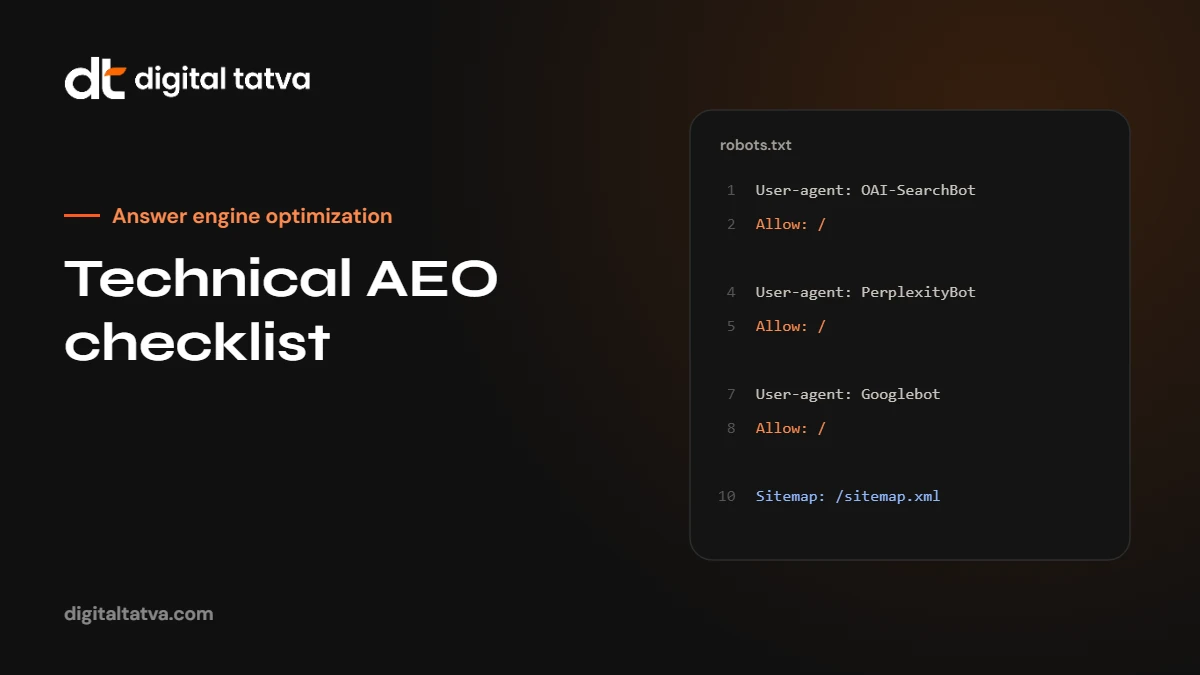
Example robots.txt rules
This example allows search crawlers while blocking training-only crawlers. Adapt it to your own decisions and check each operator’s current documentation:
User-agent: Googlebot
Allow: /

User-agent: Bingbot
Allow: /

User-agent: OAI-SearchBot
Allow: /

User-agent: PerplexityBot
Allow: /

User-agent: GPTBot
Disallow: /

User-agent: Google-Extended
Disallow: /

Sitemap: https://yourdomain.com/sitemap.xml
If you want your content available for AI training as well, allow the training crawlers too. The key is to decide deliberately rather than inherit a rule nobody remembers adding.
How to check server logs for AI crawlers
- Download access logs from your hosting panel or CDN for the last 7 to 30 days.
- Search for user agent strings such as OAI-SearchBot, GPTBot, PerplexityBot, ClaudeBot and bingbot.
- Check the status codes they received. 200 is good; 403 or 429 means they are being blocked or rate-limited.
- Check which URLs they request. If key pages never appear, review internal links and sitemaps.
A monitoring schedule
- Weekly: indexing errors in Google Search Console and Bing Webmaster Tools.
- Monthly: AI crawler activity in logs; schema validation on key templates.
- Quarterly: full run of this checklist on your most important pages.
- After any change: redesigns, migrations, new plugins, CDN or security changes.
Technical AEO quick checklist
- Search crawlers allowed in robots.txt and firewall.
- Key content visible in page source.
- No accidental noindex, correct canonicals, sitemap submitted.
- Snippet-eligible pages for content you want quoted.
- Organization and page-level schema, valid and accurate.
- Descriptive headings and internal links.
- Fast, stable pages.
Structured data mistakes to avoid
- Markup that contradicts the page. Prices, ratings or addresses in schema that do not match the visible content.
- Self-serving review markup. Adding star ratings for your own business from reviews you selected.
- Duplicate Organization blocks. Different plugins each adding their own, with different details.
- Old data. A former address or logo left in schema after a change.
- Wrong types. Marking a service page as a Product or a blog post as a FAQPage when it is not.
Validate key templates after every plugin or theme update, and keep schema details in step with your brand fact sheet.
Not sure if AI crawlers can read your site? Request an AI visibility audit.
Frequently asked questions
What is technical AEO?
Technical AEO is the part of answer engine optimization that makes sure AI crawlers can access, render and understand your pages, through crawler rules, HTML content, indexability and structured data.
Should I block GPTBot?
That is a business choice. GPTBot collects data for training. Blocking it does not stop ChatGPT search, which uses OAI-SearchBot. Many businesses allow search crawlers and decide separately on training crawlers.
Does Google-Extended affect AI Overviews?
Google says Google-Extended controls use of content for Gemini models and does not affect Google Search. AI Overviews are part of Search and rely on Googlebot.
Is schema required for AI answers?
Not strictly, but accurate structured data helps engines identify your organisation, services and content type, and reduces the chance of wrong facts.
My site is built with React or Next.js. Is that a problem?
Not if pages are server-rendered or statically generated so the content is in the HTML. Purely client-side rendered pages often are a problem.
How often should I run these checks?
After every redesign, migration or plugin change, and at least every quarter.
Sources
- Overview of OpenAI crawlers, OpenAI
- Google crawlers overview, Google Search Central
- AI features and your website, Google Search Central
- Perplexity crawlers, Perplexity
Product details, prices and features are checked at the time of writing and can change. Sources are linked in the text so you can check them yourself.
How does your brand appear in AI answers?
We test the questions your buyers ask across the major AI assistants and search engines, then show you what to fix first.
Get an AI Visibility Audit