ChatGPT New Features: Every Major Update in 2026
Every major new ChatGPT feature of 2026, newest first: GPT-6 and Intelligent UI, Locked chats, Chrome tab control, ChatGPT Work, Slides, Images 2.5 and what was retired.

On this page
- Key takeaways
- What are the newest ChatGPT features?
- GPT-6 and Intelligent UI: the biggest change of the year
- Privacy and security features added in 2026
- Agent and automation features: Work, Chrome control and Dots
- Which new features work in Office and other apps?
- Creative features: Images 2.5, voice and Slides
- What features did ChatGPT remove in 2026?
- Which ChatGPT plan gets which new features?
- Frequently asked questions
- How to keep up with ChatGPT updates
- Sources
Last updated: 22 October 2026
Quick answer: The biggest new ChatGPT features of 2026 are GPT-6 with Intelligent UI (7 October), Locked chats (20 October), tab control in the ChatGPT extension for Chrome (15 October), ChatGPT Work for long tasks, ChatGPT Images 2.5, ChatGPT for Word and PowerPoint, and Slides and Space for Pro and business plans. OpenAI ships several updates every week.
OpenAI’s ChatGPT changed more in 2026 than in any year since launch. The chat app now answers with charts and buttons, runs long agent jobs in the background, controls your browser tabs, edits Word documents and hides private chats behind a PIN. Some features reach every plan, including Free, while others are limited to Plus, Pro or business workspaces.
This page tracks the most important ChatGPT updates of 2026, newest first, with the date, who gets each feature and how to use it. We update it as OpenAI publishes new release notes.
Key takeaways
- GPT-6 is now the default in Chat: paid plans get GPT-6 Sol and Free and Go get GPT-6 Luna, all with Intelligent UI.
- Locked chats (20 October 2026) let Free, Go, Plus and Pro users hide chosen conversations behind a PIN or Face ID.
- The ChatGPT extension for Chrome can read open tabs on all plans, and in Work mode it can fill forms and send messages.
- OpenAI is retiring custom GPTs in favor of plugins and has already retired group chats and the Atlas browser.
- Many headline features (Slides, Space, Dots, Pro 500) are limited to Pro and business plans, so check your plan before upgrading.
What are the newest ChatGPT features?
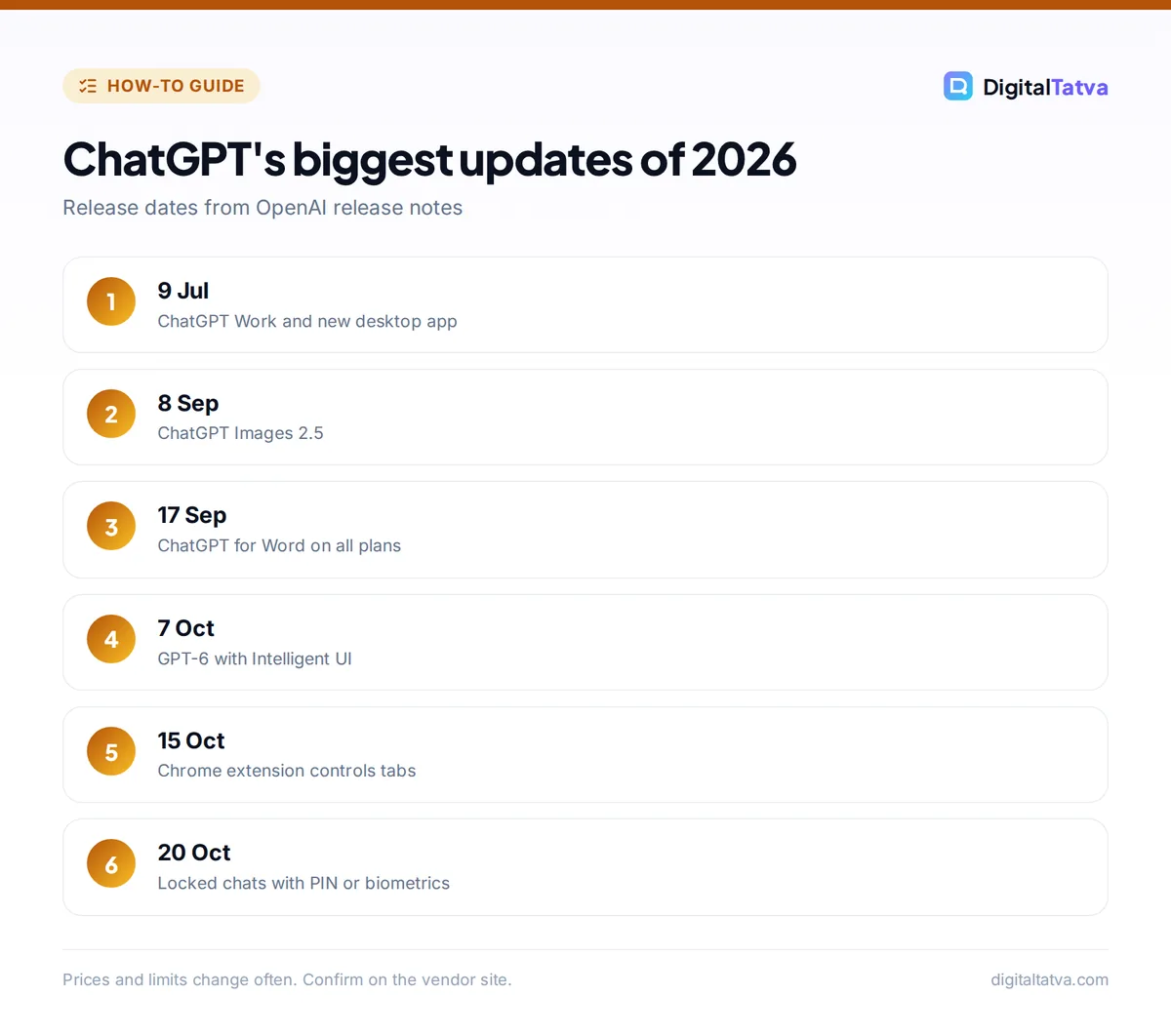
The newest ChatGPT features, as of 22 October 2026, are Locked chats, ChatGPT Slides, a faster GPT-6 Pro, new voices in ChatGPT Voice and tab control in the Chrome extension. All of them arrived in the second half of October 2026.
| Feature | Date | Who gets it | What it does |
|---|---|---|---|
| Locked chats | 20 Oct 2026 | Free, Go, Plus, Pro (rolling out) | Hides chosen chats behind a PIN or device authentication |
| ChatGPT Slides | 16 Oct 2026 | Pro, Business, Enterprise with Space | Creates and co-edits presentations |
| GPT-6 Pro update | 16 Oct 2026 | Pro | Faster answers, better tool use, parallel agents |
| Chrome extension tab control | 15 Oct 2026 | All plans (Work mode varies) | Reads tabs; Work mode fills forms and sends messages |
| GPT-Live-1.1 voices | 15 Oct 2026 | ChatGPT Voice users | More natural voices and accents |
| GPT-6 and Intelligent UI | 7 Oct 2026 | Paid plans, then Free and Go on 8 Oct | Answers with charts, buttons, forms and mini tools |
| Audio uploads | 6 Oct 2026 | Paid plans | Transcribes and summarizes audio files |
| Text watermark (EU) | 5 Oct 2026 | EU users | Invisible statistical watermark on text |
OpenAI’s ChatGPT release notes list dozens of smaller changes too, such as camera document scanning on iOS (1 October) and virtual try-on for clothes in shopping answers (1 October).
GPT-6 and Intelligent UI: the biggest change of the year
GPT-6 with Intelligent UI is the biggest ChatGPT change of 2026 because it changes what an answer looks like. Instead of only text, ChatGPT can now reply with charts, tappable buttons, forms and small interactive tools, such as a bill splitter, inside the chat.
According to OpenAI’s 7 October 2026 announcement, GPT-6 Sol powers Chat for Plus, Pro, Business and Enterprise, and GPT-6 Luna powers Free and Go. Intelligent UI has no separate usage quota, and you can turn off “Layout and visuals” in settings on the web if you prefer plain text. Our guide to ChatGPT Intelligent UI shows practical prompts, and GPT-6 models explained compares Astra, Sol and Luna.
Privacy and security features added in 2026
OpenAI added five main privacy and security controls to ChatGPT in 2026: Lockdown Mode, Active sessions, Security history, the Privacy Center and Locked chats. Together they let you limit risky web access, see where you are signed in and hide sensitive conversations.
- Locked chats (20 October): lock a chat and it disappears from history, pins and search until you unlock it with a PIN or Face ID or fingerprint. It is a privacy screen on your device, not end-to-end encryption.
- Lockdown Mode (4 June): restricts web and external access to reduce the risk of prompt injection stealing your data.
- Active sessions and Security history: see every device signed in, sign them out and review security changes in Settings.
- Privacy Center (21 September): one page for memory, data and security settings.
How to lock a chat in ChatGPT
- Update the app. Locked chats work on the web, iOS, Android and the new desktop app as the rollout reaches your account.
- Open the chat menu. Tap the three dots next to the conversation and choose the lock option.
- Set your PIN or biometrics. The first time, you choose a four-digit PIN or allow device authentication.
- Find locked chats later. They live in a separate locked section and need your PIN to open.
For a full privacy checklist, read Is ChatGPT safe? and our explainer on how ChatGPT memory works.
Agent and automation features: Work, Chrome control and Dots
ChatGPT’s agent features let it carry out multi-step tasks instead of only answering questions. The three that matter most in 2026 are ChatGPT Work, tab control in the Chrome extension and Dots.
- ChatGPT Work (9 July): an agent for longer tasks that creates documents and shows progress, available on paid plans but not Free or Go. Since 25 August it can also work on websites where you are signed in, with confirmation before consequential actions. See how to use ChatGPT Work.
- ChatGPT extension for Chrome (15 October): in chat mode it reads your open tabs as context; in Work mode it can send messages, fill out forms, download files and group tabs. OpenAI says the extension is available on all plans.
- Dots (29 September): always-on agents that keep working on goals between conversations, for eligible Pro and Business Premium users aged 18 and over.
- Scheduled tasks and webhooks: recurring tasks, plus tasks triggered by Gmail, Slack or GitHub events on Plus and Pro.
Watch out: an agent that can fill forms and send messages can also make mistakes or be tricked by a malicious web page. Ask it to stop before submitting anything, and read our guide to AI agent security.
Which new features work in Office and other apps?
ChatGPT now works inside Microsoft Word and PowerPoint on every plan, including Free. ChatGPT for PowerPoint became generally available on 6 July 2026 and ChatGPT for Word launched on 17 September 2026, each as a sidebar that drafts, summarizes and revises inside the document.
- Library connections: Google Drive, Box, Dropbox and SharePoint files can be used in chats without re-uploading on most paid plans.
- Plugins: connect Gmail, Calendar, Contacts and many business apps. OpenAI announced on 11 September that custom GPTs will be retired and migrated to plugins, so builders should plan ahead (our custom GPT guide covers what to move).
- Restaurant reservations (10 August): search and book through OpenTable, Resy and Yelp where available.
Creative features: Images 2.5, voice and Slides
ChatGPT’s creative tools improved in three areas in 2026: images, voice and presentations. ChatGPT Images 2.5 (8 September) added sharper images, templates, sketch-to-image and prompt sharing, which our guide to generating images in ChatGPT covers step by step.
Voice moved to GPT-Live-1 on 8 July, which can listen and speak at the same time, and GPT-Live-1.1 added new voices on 15 October. ChatGPT Slides (16 October) creates and co-edits presentations in Space for Pro, Business and Enterprise users; for other plans, compare the best AI presentation makers.
What features did ChatGPT remove in 2026?
ChatGPT removed or scheduled several features for retirement in 2026: group chats, the ChatGPT Atlas browser, the DALL·E GPT, canvas in GPT-5.5 models, older models and, soon, custom GPTs. Knowing what is gone helps you avoid building workflows on features that are ending.
| Feature | Status | Replacement |
|---|---|---|
| Group chats | Creation ended 9 July 2026; old chats read-only | Shared projects and Space |
| ChatGPT Atlas browser | Stopped 9 August 2026 | ChatGPT extension for Chrome and other browsers |
| DALL·E GPT | Retired 30 August 2026 | ChatGPT Images |
| Custom GPTs | Retirement planned (announced 11 September) | Plugins |
| GPT-4o and GPT-4.1 in the API | Removal on 14 January 2027 | GPT-6 Luna and newer models |
Developers should read our guide to the GPT-4o API retirement for migration steps.
Which ChatGPT plan gets which new features?
Free and Go users get GPT-6 Luna, Intelligent UI, Locked chats, Flashcards, ChatGPT for Word and PowerPoint and basic Chrome tab reading. Plus adds GPT-6 Sol, ChatGPT Work, audio uploads, Sites and scheduled tasks. Pro adds GPT-6 Pro, Slides, Space and Dots.
| Plan | Price (USD) | Headline 2026 features |
|---|---|---|
| Free | $0 | GPT-6 Luna, Intelligent UI, Locked chats, Word and PowerPoint sidebars; ads in some countries |
| Go | Low-cost plan (price varies by country) | As Free with higher limits; ads in some countries |
| Plus | $20/month | GPT-6 Sol, ChatGPT Work, audio uploads, Sites, scheduled tasks, no ads |
| Pro 200 and Pro 500 | $200 or $500/month | GPT-6 Pro, Slides, Space, Dots, highest limits |
For a full plan breakdown, see ChatGPT pricing and ChatGPT Free vs Plus. Free and Go users in supported countries also see ads, which we explain in how ChatGPT ads work.
Frequently asked questions
What is the latest ChatGPT update?
As of 22 October 2026, the latest major ChatGPT update is Locked chats, released on 20 October, which hides chosen conversations behind a PIN or biometrics. Just before it came ChatGPT Slides and a faster GPT-6 Pro (16 October) and tab control in the Chrome extension (15 October).
Is GPT-6 free in ChatGPT?
Yes. Free and Go users get GPT-6 Luna with Intelligent UI from 8 October 2026. Paid plans get the stronger GPT-6 Sol, and Pro and business plans also get GPT-6 Pro. Usage limits on Free are lower, so heavy users may still hit caps.
How do I lock a chat in ChatGPT?
Open the conversation menu, choose the lock option and set a four-digit PIN or allow Face ID or fingerprint. Locked chats move to a separate section and are hidden from history and search. The feature is rolling out to Free, Go, Plus and Pro on web, iOS, Android and desktop.
Are custom GPTs going away?
Yes, gradually. OpenAI announced on 11 September 2026 that it plans to retire custom GPTs and migrate them to plugins, with timing that varies by plan. If you rely on a custom GPT, save its instructions and files now so you can rebuild it as a plugin or project.
Can ChatGPT control my browser?
Yes, through the ChatGPT extension for Chrome. In chat mode it reads open tabs for context, and in Work mode it can fill forms, send messages, download files and group tabs. Always review actions before it submits anything important.
How to keep up with ChatGPT updates
The simplest way to keep up is to check OpenAI’s official release notes once a week and update your apps, because many features roll out gradually by plan, country and platform. If a feature is missing, sign out and back in, update the app, or check our ChatGPT troubleshooting guide. Features, limits and prices change often, so confirm details on OpenAI’s site before you pay for an upgrade.
Sources
- ChatGPT release notes, OpenAI Help Center, checked 22 October 2026
- GPT-6 and Intelligent UI for everyone, OpenAI, 7 October 2026, checked 22 October 2026
- ChatGPT pricing, OpenAI, checked 22 October 2026
- ChatGPT gains control of Chrome tabs, PPC Land, October 2026, checked 22 October 2026
Pricing and features are checked at the time of writing and can change. Some links may be affiliate links, which never affect our verdicts.