How to Use Mistral Vibe (Formerly Le Chat): Free Plan, Pro and API
How to use Mistral Vibe, formerly Le Chat: free plan step by step, Pro at $14.99, Work Mode and Code Mode, Mistral API prices and who should choose Mistral.

On this page
- Key takeaways
- What is Mistral Vibe (formerly Le Chat)?
- How do you use Mistral Vibe for free?
- How do Work Mode and Code Mode work?
- How much does Mistral Vibe cost?
- How do you use the Mistral API?
- Who should use Mistral instead of ChatGPT or Claude?
- Mistral Vibe vs ChatGPT vs Claude at a glance
- Frequently asked questions
- Get started with Mistral Vibe
- Sources
Last updated: 22 October 2026
Quick answer: Mistral Le Chat is now called Mistral Vibe: Mistral AI renamed its chatbot on 28 May 2026 and added Work Mode and coding agents. To use it, go to chat.mistral.ai or the Vibe app, sign in and start chatting. The free plan covers everyday chat and search; Pro costs $14.99 a month ($5.99 for verified students), and the API starts at $0.15 per million input tokens.
Mistral AI, the Paris-based AI company, launched Le Chat in February 2024 as Europe’s answer to ChatGPT. In 2026 it became Vibe, a work agent that can read your inbox, build reports from spreadsheets, schedule recurring tasks and run coding agents that open pull requests. Your old Le Chat conversations and settings carried over.
This guide explains how to use Mistral Vibe (formerly Le Chat) step by step, what the free and paid plans include, how Work Mode and Code Mode work, how to use the Mistral API and what it costs, and who should pick Mistral over ChatGPT or Claude.
Key takeaways
- Le Chat was renamed Mistral Vibe on 28 May 2026; the web address is still chat.mistral.ai.
- Pro costs $14.99 a month (excluding tax) with up to 6x the free messages, 40x image generations, 15 GB of Libraries and $15 a month in API credits.
- Work Mode connects Google Workspace, Outlook, SharePoint, Slack and GitHub, and asks for approval before it acts.
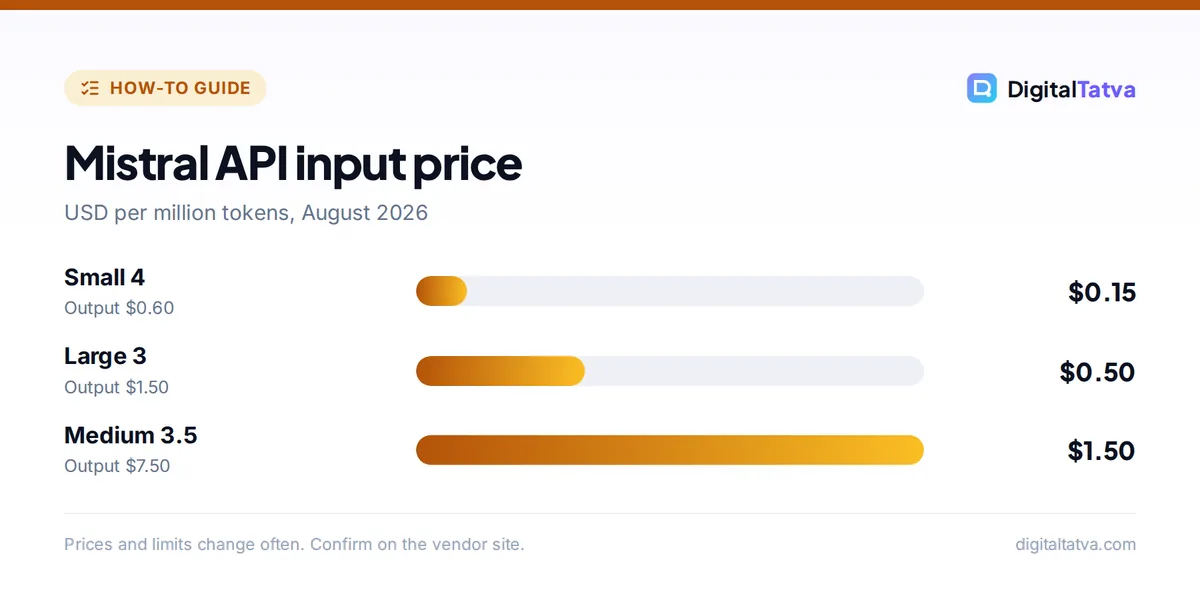
- Mistral’s API is among the cheapest: Small 4 costs $0.15 input and $0.60 output per million tokens.
- Mistral is a European company, which appeals to teams that want EU-based AI and private deployments.
What is Mistral Vibe (formerly Le Chat)?
Mistral Vibe is the AI assistant from Mistral AI that combines chat, research, document and slide creation, a Work Mode agent and coding agents in one app. Until May 2026 it was called Le Chat.
| Key fact | Detail |
|---|---|
| Developer | Mistral AI (Paris, France) |
| Launched | February 2024 as Le Chat; renamed Vibe on 28 May 2026 |
| Where | chat.mistral.ai, iOS, Android, code.mistral.ai for coding |
| Free plan | Yes: limited messages, web searches, coding sessions and image generation |
| Pro | $14.99/month excluding tax; students $5.99/month |
| Team | $24.99 per user/month (about EUR 19.99 billed yearly) |
| Key model | Mistral Medium 3.5, with fast and thorough reasoning modes |
Many people still search for “Le Chat”, and Mistral’s pages use both names during the transition. For alternatives, see our list of the best ChatGPT alternatives.
How do you use Mistral Vibe for free?
You use Mistral Vibe for free by visiting chat.mistral.ai or installing the Vibe app, signing in and typing your question. The free plan includes chat, web search, basic image generation and editing, limited Libraries, more than 100 connectors and up to five scheduled tasks.
- Open Vibe. Go to chat.mistral.ai or download Mistral’s app from the App Store or Google Play.
- Sign in with an email or a supported account. Existing Le Chat users keep their history.
- Ask a question. Type naturally; turn on web search for current topics.
- Try Flash Answers. Mistral is known for very fast responses; Pro includes 150 Flash Answers a day.
- Upload files. Add PDFs or spreadsheets to a Library so Vibe can answer from your documents.
- Use Deep Research for longer, cited reports on a topic.
- Create images with the built-in image generation and editing tools.
Tip: Vibe has memory of past conversations (added in September 2025). Review what it remembers in settings and delete anything you do not want stored, as explained in AI memory explained.
How do Work Mode and Code Mode work?
Work Mode is Mistral Vibe’s agent for office tasks: it connects to your work apps, proposes a plan, waits for your approval and then gathers information and produces outputs. Code Mode runs coding agents in isolated cloud sandboxes that build features, fix bugs, write tests and open pull requests.
Work Mode
- Connections: Google Workspace, Outlook, SharePoint, Slack and GitHub.
- Typical jobs: scan an inbox for client requests, pull figures from spreadsheets into a report, and push results to Notion or SharePoint.
- Control: it shows a plan first and you can expand each step to check what it did.
- Scheduling and Skills: repeat tasks daily, weekly or monthly, and save workflows as reusable Skills.
Code Mode
- Cloud agents: parallel coding sessions that keep running after you close your laptop.
- Developer tools: a VS Code extension and a command-line tool with a /teleport command that moves sessions between your terminal and the cloud.
- Where: code.mistral.ai.
Compare these agents with rivals in our best AI coding assistants and deep research guide.
How much does Mistral Vibe cost?
Mistral Vibe costs $0 on the Free plan, $14.99 a month on Pro, $24.99 per user a month on Team and a custom price on Enterprise, with taxes added. Verified students can get Pro for $5.99 a month.
| Plan | Price | Highlights |
|---|---|---|
| Free | $0 | Limited messages, searches and coding sessions; basic images; up to 5 scheduled tasks |
| Pro | $14.99/month | Up to 6x messages, 5x searches, 40x images, 15 GB Libraries, unlimited scheduling, slides and spreadsheets, $15/month API credits |
| Team | $24.99/user/month | Higher limits, 30 GB per user, domain verification, data export, admin tools |
| Enterprise | Custom | Custom models and agents, SSO, audit logs, private deployment |
Pro is cheaper than ChatGPT Plus and Claude Pro at $20, and the included $15 of API credits is unusual. See more deals in our AI student discounts guide and compare assistants in ChatGPT vs Claude.
How do you use the Mistral API?
You use the Mistral API by creating an account in Mistral Studio (studio.mistral.ai), generating an API key and calling a model such as Mistral Small 4, Medium 3.5 or Large 3. Studio includes a free plan for experimenting.
| Model | Input per 1M tokens | Output per 1M tokens | Context |
|---|---|---|---|
| Mistral Small 4 | $0.15 | $0.60 | 131K |
| Mistral Large 3 | $0.50 | $1.50 | 128K |
| Mistral Medium 3.5 | $1.50 | $7.50 | 131K |
Batch processing costs 50 percent less and cached input can be up to 90 percent cheaper, according to Mistral’s pricing page. Example: 30 million input and 15 million output tokens a month on Large 3 costs 30 x $0.50 = $15 plus 15 x $1.50 = $22.50, so $37.50; on Small 4 it is $4.50 plus $9, so $13.50. Use Small 4 for extraction and classification and save Large 3 for harder work, as explained in model routing. Compare all providers in our LLM API pricing comparison.
Who should use Mistral instead of ChatGPT or Claude?
Mistral suits teams that want a European AI provider, private or on-premise deployment, low API prices and open-weight models, plus individuals who want a capable assistant for less than $20 a month. ChatGPT and Claude still lead on breadth of features and top-end quality for many tasks.
- EU data needs: Mistral is headquartered in France and offers private deployments on Enterprise.
- Budget: Pro at $14.99 with API credits, and some of the cheapest capable API models.
- Open models: Mistral releases many open-weight models you can run yourself; see open-source AI models and running an LLM locally.
- Speech: Voxtral 3, released in October 2026, adds speech recognition and text-to-speech in 50+ languages with a voice agent SDK.
If you are exploring non-US AI options, also read our guides to Qwen and Kimi, keeping their data locations in mind.
Mistral Vibe vs ChatGPT vs Claude at a glance
Mistral Vibe, OpenAI’s ChatGPT and Anthropic’s Claude all offer a free plan, a paid individual plan, agents and an API, but they differ in price, data location and strengths. This table compares the entry options as of October 2026.
| Feature | Mistral Vibe | ChatGPT | Claude |
|---|---|---|---|
| Company and base | Mistral AI, France | OpenAI, US | Anthropic, US |
| Paid individual plan | Pro $14.99/month | Plus $20/month | Pro $20/month |
| Student price | $5.99/month for verified students | Occasional promotions | Through universities |
| Work agent | Work Mode | ChatGPT Work | Claude Cowork |
| Coding agent | Code Mode and Vibe CLI | Codex | Claude Code |
| API credits in plan | $15/month on Pro | No (billed separately) | No (billed separately) |
In everyday use, Mistral’s speed and price stand out, while ChatGPT and Claude offer more integrations and stronger results on the hardest reasoning and writing tasks. A sensible approach is to test the same five real prompts in each free plan before you pay.
Prompts to test Mistral Vibe
- “Summarize this 30-page PDF into ten bullet points with page references.”
- “Every Monday, scan my inbox for client requests and list them in a table with deadlines.” (Work Mode)
- “Write a Python script that cleans this CSV and explain each step.”
- “Translate this product page into French and German for European customers, keeping brand names unchanged.”
- “Create a five-slide summary of our quarterly numbers from this spreadsheet.”
Frequently asked questions
What happened to Mistral Le Chat?
Mistral AI renamed Le Chat to Vibe, announced on 28 May 2026. Vibe combines the chatbot with a Work Mode agent and coding agents. Existing conversations and settings carried over, and the web address remains chat.mistral.ai, but pricing was updated.
Is Mistral Vibe free?
Yes. The free plan includes limited messages, web searches and coding sessions, basic image generation and editing, limited Libraries, 100+ connectors and up to five scheduled tasks. Pro costs $14.99 a month and raises limits significantly, with $15 a month in API credits.
Is Mistral Pro worth it?
For many users, yes. At $14.99 a month it is cheaper than ChatGPT Plus or Claude Pro, includes up to 6x free-plan messages, 40x image generations, 15 GB of Libraries, Work Mode scheduling and $15 of API credits. Students pay $5.99 a month.
Is Mistral AI European?
Yes. Mistral AI is headquartered in Paris, France. That makes it a popular choice for organizations that prefer an EU-based provider, and its Enterprise plan supports private deployments for stricter data requirements.
What is the cheapest Mistral API model?
Mistral Small 4, at $0.15 per million input tokens and $0.60 per million output tokens, with a 131K token context window, according to a pricing guide updated in August 2026. Batch requests cost 50 percent less and cached input up to 90 percent less.
Get started with Mistral Vibe
Try Mistral Vibe’s free plan for a week of everyday questions and one Work Mode task, then decide whether Pro at $14.99 beats your current assistant. Developers should test Small 4 for high-volume jobs. Plans, limits and model prices change frequently, so check Mistral’s pricing page before you subscribe or build on the API.
Sources
- Mistral pricing, Mistral AI, checked 22 October 2026
- Mistral rebrands Le Chat as Vibe, The Decoder, May 2026, checked 22 October 2026
- Mistral API pricing 2026, DevTK, August 2026, checked 22 October 2026
- Mistral Vibe, Wikipedia, checked 22 October 2026
Pricing and features are checked at the time of writing and can change. Some links may be affiliate links, which never affect our verdicts.