How to Use Gemini in Android Auto and Your Car
How to use Gemini in Android Auto: setup, voice commands, the new Personal Intelligence feature with Gmail, Calendar and Maps, privacy settings and fixes.

On this page
- Key takeaways
- What is Gemini in Android Auto?
- How do you set up Gemini in Android Auto?
- What can you ask Gemini in your car?
- What is Personal Intelligence in Android Auto?
- Is Gemini in Android Auto safe and private?
- Why is Gemini not showing in Android Auto?
- Gemini in cars with Google built-in
- Frequently asked questions
- Drive smarter with Gemini
- Sources
Last updated: 22 October 2026
Quick answer: To use Gemini in Android Auto, install the Gemini app on your Android phone and switch from Google Assistant to Gemini, then connect to Android Auto and say “Hey Google”, tap the mic on the car screen or long-press the steering wheel voice button. Since 20 October 2026, Personal Intelligence also lets Gemini use your Gmail, Calendar, Maps and Photos in the car, if you turn it on.
Google’s Gemini replaced Google Assistant in Android Auto worldwide starting 20 November 2025, in 45 languages. You can now talk to your car the way you talk to a person: ask for a dog-friendly cafe on your route, get a summary of unread emails, reply to a message in another language, or start a free-flowing Gemini Live chat on a long drive.
This guide shows how to set up Gemini in Android Auto, the most useful voice commands, how the new Personal Intelligence feature works, privacy settings, and how to fix Gemini when it does not appear.
Key takeaways
- Gemini works in Android Auto for users who have switched to Gemini on their phone; no paid plan is needed for the basics.
- Activate it with “Hey Google”, the on-screen mic or a long press on the steering wheel voice button.
- Personal Intelligence in Android Auto began rolling out on 20 October 2026 and is off by default.
- Personal Intelligence needs a personal Google account, age 18+, and is not available in the EEA, UK, Switzerland or Nigeria.
- Cars with Google built-in get Personal Intelligence “in the coming months”, and only while your phone is connected.
What is Gemini in Android Auto?
Gemini in Android Auto is Google’s AI assistant running on your car’s display through your Android phone, replacing the older Google Assistant. It understands natural, conversational requests and can handle messages, email, navigation, music and open-ended questions while you drive.
| Key fact | Detail |
|---|---|
| Company | |
| Rollout | From 20 November 2025, worldwide, 45 languages |
| Replaces | Google Assistant in Android Auto |
| Needs | Android phone with the Gemini app and Android Auto |
| Cost | Free for core features |
| Personal Intelligence | Rolling out from 20 October 2026; opt-in; personal accounts, 18+ |
| Not available (Personal Intelligence) | EEA, UK, Switzerland, Nigeria; Workspace work and school accounts |
iPhone users use Apple CarPlay instead, where the assistant is Siri; see our guide to the new Siri AI. For Gemini on your phone, read how to use Gemini.
How do you set up Gemini in Android Auto?
You set up Gemini in Android Auto by installing the Gemini app, switching your phone’s assistant to Gemini and connecting to your car. A tooltip appears on the car display once Gemini is ready.
- Install or update the Gemini app from the Google Play Store on your Android phone.
- Switch to Gemini. Open Gemini and accept the prompt to use it as your assistant instead of Google Assistant.
- Update Android Auto and Google Maps to the latest versions.
- Connect to your car by USB or wirelessly. Look for the Gemini tooltip on the car screen.
- Test it. Say “Hey Google, what’s the weather at my destination?”
- Optional: turn on Personal Intelligence in Gemini settings on your phone and choose which apps Gemini may use (see below).
Tip: if “Hey Google” does not trigger in a noisy car, use the steering wheel voice button with a long press. It is more reliable at highway speeds.
What can you ask Gemini in your car?
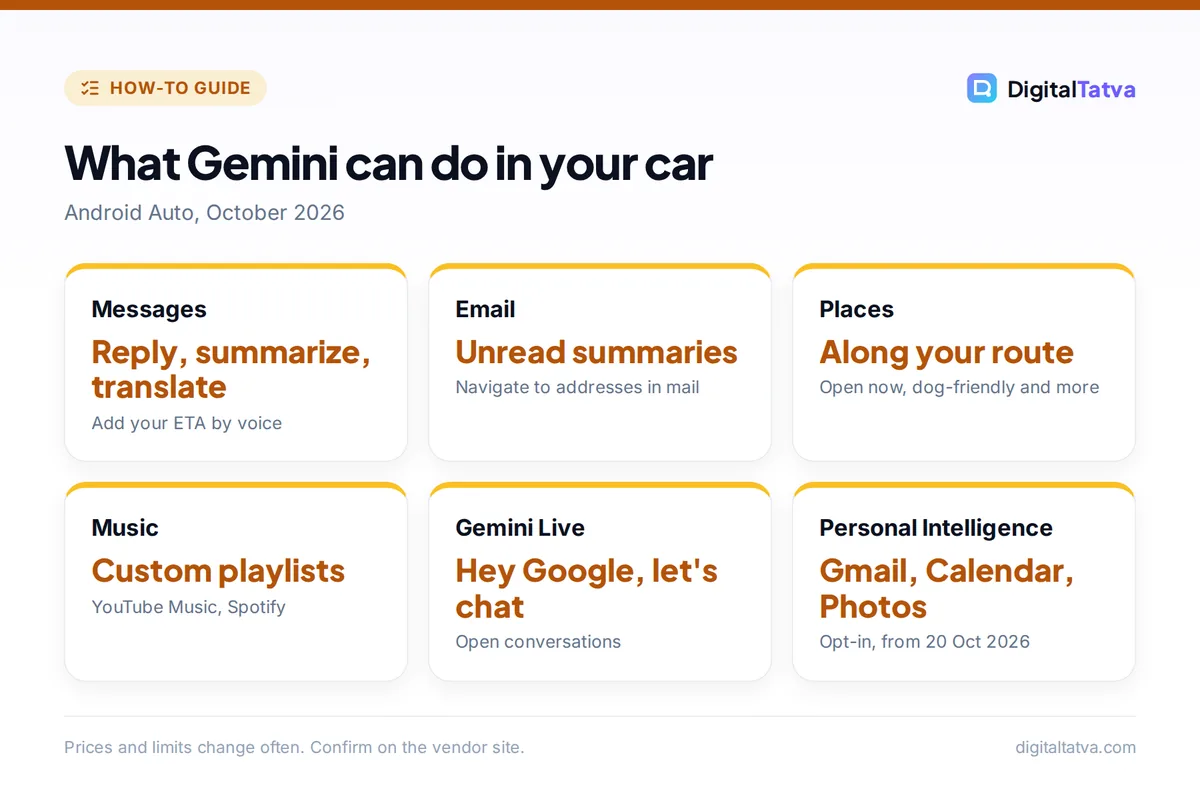
You can ask Gemini in Android Auto to handle messages, email, places, music and conversations using normal sentences. Here are useful commands to try, based on what Google demonstrated.
| Task | Say this |
|---|---|
| Reply to a message | “Hey Google, reply to Priya that I’m 10 minutes late and add my ETA.” |
| Translate a message | “Reply to Carlos in Spanish: running late, see you at the restaurant.” |
| Summarize messages | “Summarize my unread messages from the family group.” |
| Check email | “Summarize my unread emails” or “Navigate to the address in the email from my dentist.” |
| Find places | “Is there a dog-friendly cafe open along my route?” |
| Music | “Make a 90s Bollywood road trip playlist on YouTube Music.” |
| Open conversation | “Hey Google, let’s chat” to start Gemini Live and brainstorm or learn while driving. |
Gemini Live is great for long drives, for example practicing a presentation or learning about places you pass. Compare voice assistants in AI voice assistants compared, and find more useful apps for the road in our list of the best AI apps for Android and iPhone.
What is Personal Intelligence in Android Auto?
Personal Intelligence is a Gemini feature that lets the assistant use information from your Google apps, including Gmail, Google Calendar, Google Photos, Google Maps, YouTube and Search, to give personal answers. It started rolling out to Android Auto on 20 October 2026.
With it switched on, you can ask questions that depend on your own data:
- “What’s my flight gate? And is my flight on time?”
- “Take me to my doctor’s appointment.”
- “Find me an indoor restaurant along my route that matches my usual vibe.”
- “Find the car wash from the photo I took last week and navigate there.”
- “Take me to the coffee shop we were talking about yesterday.”
How to turn on Personal Intelligence
- Open the Gemini app on your phone and go to settings.
- Find Personal Intelligence and switch it on.
- Choose apps. Select which Google apps Gemini may use, such as Gmail and Calendar.
- Drive. The setting carries over to Android Auto automatically and can be turned off any time.
Personal Intelligence works only for personal Google accounts of users aged 18 and over, and not for Workspace business, enterprise or education accounts. As of October 2026 it is not available in the European Economic Area, Switzerland, the UK or Nigeria. Google first brought Personal Intelligence to free Gemini users in the US in March 2026 and expanded it to all Gemini languages in April 2026, according to Engadget and Dataconomy. The same personal context also powers Google AI Mode in Search, and paid plans can pair it with the newer Gemini 4 Argon model on the phone.
Is Gemini in Android Auto safe and private?
Gemini in Android Auto is designed for hands-free use, and Personal Intelligence is off by default, so Gemini only reads your emails, calendar and photos if you turn it on and choose those apps. You can switch it off at any time in Gemini settings.
- Keep eyes on the road: use voice only and let Gemini read summaries aloud.
- Limit apps: connect only the apps you need in the car, such as Calendar and Maps.
- Shared cars: in cars with Google built-in, personal answers will work only while your phone is connected, so other drivers do not see your emails.
- Review activity: check and delete Gemini activity in your Google account if you prefer.
To understand what Gemini remembers about you, read AI memory explained.
Why is Gemini not showing in Android Auto?
Gemini usually does not appear in Android Auto because the phone is still set to Google Assistant, an app is out of date, or the rollout has not reached your account yet. Personal features may also be unavailable in your region or account type.
- Switch to Gemini on the phone first; Android Auto follows your phone’s assistant.
- Update the Gemini app, Android Auto and Google Maps.
- Restart the phone and reconnect to the car.
- Check your account: Workspace work or school accounts do not get Personal Intelligence.
- Check your region: Personal Intelligence is not offered in the EEA, UK, Switzerland or Nigeria yet.
- Wait for rollout: Google rolls features out gradually over days or weeks.
Gemini in cars with Google built-in
Cars with Google built-in run Android Automotive directly, without needing a phone for basic features, and Gemini is replacing Google Assistant in these cars too, including on GM vehicles. Google says Personal Intelligence will reach cars with Google built-in “in the coming months”, and personal answers there will require your phone to be connected.
If you use Gemini heavily on the road, Google AI Pro adds features such as tasks and Gemini 4 Argon on your phone; compare plans in Gemini Free vs Google AI Pro and see Gemini tasks. For trip planning before you leave, try planning a trip with AI.
Frequently asked questions
Is Gemini free in Android Auto?
Yes. Gemini in Android Auto is free for core features such as messages, navigation help, music and Gemini Live. Personal Intelligence is also available to free users in supported regions. Paid Google AI plans add extras on your phone, such as background tasks, but are not required in the car.
How do I activate Gemini in my car?
Say “Hey Google”, tap the microphone button on the car screen, or long-press the voice control button on your steering wheel. Your phone must use Gemini as its assistant. To start an open conversation, say “Hey Google, let’s chat.”
Does Gemini in Android Auto work in India?
Yes. Gemini began rolling out to Android Auto worldwide from 20 November 2025 in 45 languages, and Personal Intelligence is excluded only in the EEA, UK, Switzerland and Nigeria. Availability of specific features can still vary by language and rollout timing.
Can Gemini read my emails while driving?
Yes, if you allow it. Gemini can summarize unread Gmail messages and navigate to addresses in emails. With Personal Intelligence turned on, it can also use your Calendar, Photos and Maps history. These features are off until you enable them.
Can I go back to Google Assistant in Android Auto?
Google is replacing Google Assistant with Gemini across devices, and Android Auto uses the assistant set on your phone. Where your phone still offers the option, switching back to Assistant changes the car experience too, but Google is phasing Assistant out.
Drive smarter with Gemini
Set Gemini as your phone’s assistant, learn three commands (reply with ETA, find places on your route and “let’s chat”), and turn on Personal Intelligence only for the apps you really need in the car. Features roll out gradually and differ by region and account type, so check Google’s help pages if something is missing.
Sources
- Gemini starts rolling out to Android Auto globally, TechCrunch, 20 November 2025, checked 22 October 2026
- Gemini Personal Intelligence rolls out on Android Auto, Chrome Geek, 21 October 2026, checked 22 October 2026
- Android Auto: Gemini is going personal, but not in the EU, Basic Tutorials, October 2026, checked 22 October 2026
- Google makes Gemini personalization available to free users, Engadget, 17 March 2026, checked 22 October 2026
Pricing and features are checked at the time of writing and can change. Some links may be affiliate links, which never affect our verdicts.