Best Sora Alternatives in 2026 After Sora Shut Down
Sora is discontinued. These are the best Sora alternatives in 2026, including Google Veo 3.1, Kling, Runway, Luma, Hailuo, Pika and Adobe Firefly, with prices and free plans.

On this page
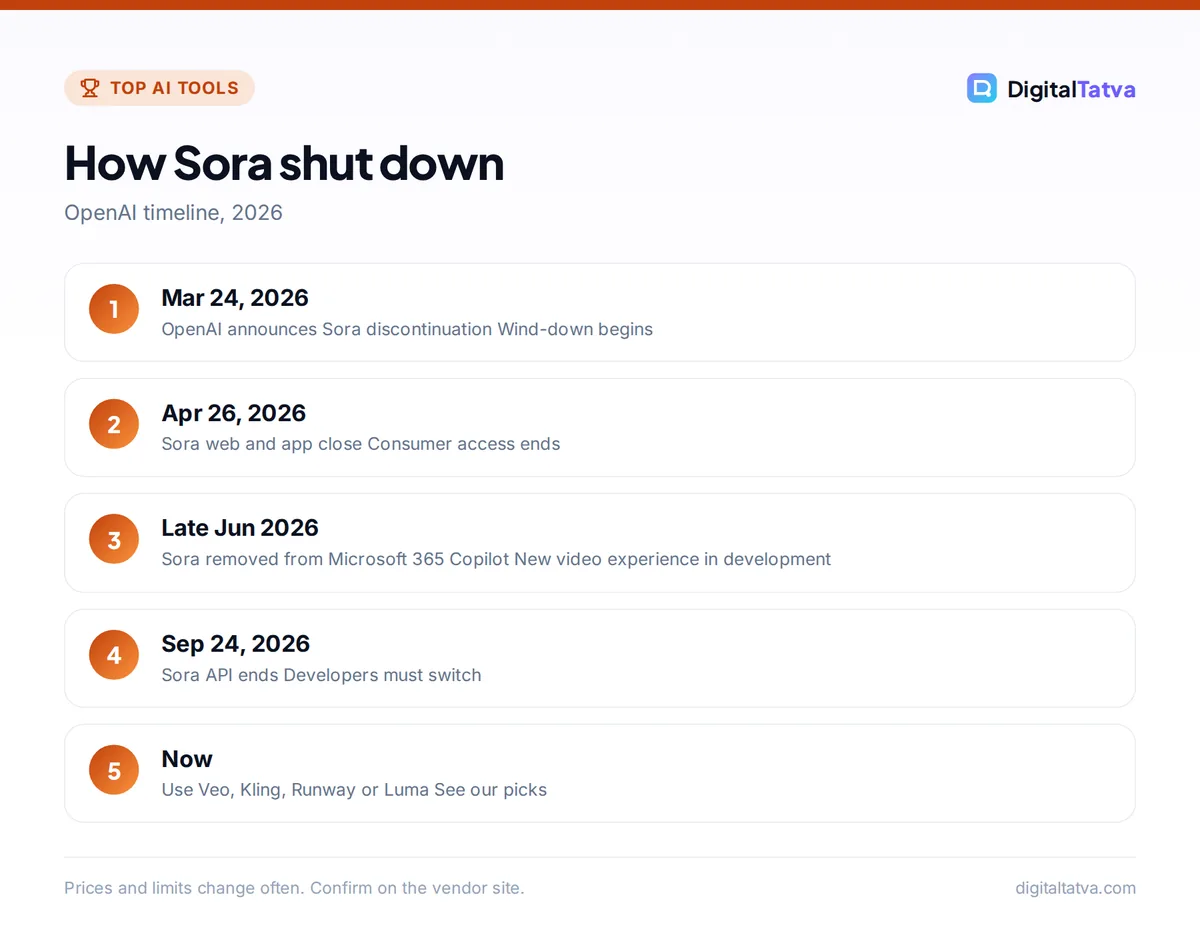
The best Sora alternatives in 2026 are Google Veo 3.1 (through Gemini and Google Flow), Kling, Runway, Luma Dream Machine, Hailuo, Pika and Adobe Firefly, because OpenAI shut Sora down this year. OpenAI announced the discontinuation on March 24, 2026, closed the Sora web and app experiences on April 26, 2026 and ended the Sora API on September 24, 2026, so anyone who relied on Sora now needs a new text-to-video tool.
Here are the best Sora alternatives ranked by quality, price and ease of use, with free plans, a quick comparison table, and tips for moving your Sora workflow to a new tool.
Key takeaways
- Sora is fully discontinued: no app, no website and no API since September 24, 2026.
- Google Veo 3.1 is the closest all-round replacement, starting at $19.99 a month with Google AI Pro.
- Kling and Runway are the top picks for cinematic quality and control; Kling 4.0 began a limited rollout in late September 2026.
- Luma, Hailuo and Pika have free plans, usually with watermarks and limited resolution.
- Adobe Firefly is the safest choice for commercial work inside Adobe tools.
What happened to Sora?
OpenAI announced on March 24, 2026 that it was discontinuing Sora. The Sora web and app experiences closed on April 26, 2026, and the Sora API stopped on September 24, 2026. Sora cannot be bought or used as a standalone product anymore, and Microsoft also retired the Sora video experience inside Microsoft 365 Copilot by late June 2026. If you still see tutorials or price lists for Sora, they are out of date.
The good news is that the AI video market moved fast. Several tools now match or beat what Sora offered in 2025, with longer clips, native audio and better control over characters and camera moves.
Best Sora alternatives compared
| Tool | Best for | Free plan | Paid from |
|---|---|---|---|
| Google Veo 3.1 (Gemini, Flow) | All-round quality with audio | No Veo on the free Gemini plan | Google AI Plus $4.99/month (limited), Pro $19.99/month |
| Kling | Cinematic, realistic motion | Limited free credits | About $7 to $10/month Standard (third-party prices) |
| Runway | Creative control and editing tools | Limited | Pro $35/month or $28/month yearly |
| Luma Dream Machine | Fast, dreamy, stylized clips | About 250 draft credits a day, watermark | Lite about $9.99/month |
| Hailuo (MiniMax) | Cheap realistic clips | Daily free credits, 720p, watermark | About $7.99/month |
| Pika | Short social clips and effects | No monthly credits, no watermark | Starter $10/month, commercial use from $35 |
| Adobe Firefly | Commercially safe video in Adobe apps | Limited | Firefly Pro $19.99/month |
| Midjourney video | Animating Midjourney images | No | Midjourney subscription |
Third-party prices are marked as approximate because some vendors do not publish clear pricing pages. Always check the official page before you buy.
The best Sora alternatives in detail
1. Google Veo 3.1: Best overall Sora replacement
- Starting price: Google AI Plus $4.99/month; Pro $19.99/month
- Free plan: No Veo on free Gemini
- Best for: High-quality clips with sound
Google’s Veo models generate realistic video with synchronized audio, and you can use them in the Gemini app or in Google Flow, a filmmaking tool for building scenes from clips. Google AI Pro includes video generation with Veo 3.1 Lite and 1,000 Flow credits a month, while Ultra plans include 10,000 to 25,000 credits. For most former Sora users, this is the easiest switch. Our guide to Google Flow and Veo shows the workflow.
2. Kling: Best for cinematic realism
- Starting price: About $7 to $10/month (third-party)
- Free plan: Limited free credits
- Best for: Realistic people, motion and multi-shot scenes
Kling 3.0, launched in February 2026, makes 3 to 15 second clips, supports multi-shot generation from script-like prompts and adds native audio with lip sync in several languages. Kling 4.0 began reaching a limited group of subscribers on September 28, 2026, with clips up to 30 seconds and up to 4K output, and a wider release was planned for October. Generation can take several minutes. Read our Kling AI review.
3. Runway: Best for creators who want control
- Starting price: Pro $35/month or $28/month yearly
- Free plan: Limited
- Best for: Editing, camera control and mixing models
Runway combines its own Gen-4.5 model with third-party models such as Kling 3.0 and Seedance 2.5 in one workspace, plus editing tools like upscaling. Pro includes 2,250 credits a month, enough for about 187 seconds of Gen-4.5 or 375 seconds of Gen-4 Turbo. It suits creators who iterate a lot. See Runway pricing and Runway vs Kling.
4. Luma Dream Machine: Best for fast stylized clips
- Starting price: Lite about $9.99/month (third-party)
- Free plan: About 250 credits a day, draft quality, watermark
- Best for: Experimental and artistic video
Luma’s Ray 3 and Ray 3.14 models are known for smooth, dreamy motion and fast drafts. The free plan is generous for testing but limited to draft quality, watermarked and personal use only; commercial use starts on the Plus plan at about $29.99 a month.
5. Hailuo (MiniMax): Best budget option
- Starting price: About $7.99/month (third-party)
- Free plan: Daily free credits, 720p, watermark
- Best for: Cheap realistic short clips
Hailuo gives a few free generations a day at 720p with a watermark, which is enough to learn prompting. Paid plans are among the cheapest for good realism. MiniMax’s models are also available inside other tools such as Pika.
6. Pika: Best for social media effects
- Starting price: Starter $10/month; Creator $35/month with commercial license
- Free plan: No monthly credits, credit packs only
- Best for: Short, playful clips and effects
Pika focuses on quick, fun clips with effects, and offers its own Pika 2.5 model plus third-party models such as Seedance 2.5, MiniMax and Wan 3.0. Note that the Starter plan does not include a commercial license.
7. Adobe Firefly: Best for commercial safety
- Starting price: Firefly Pro $19.99/month (4,000 credits)
- Free plan: Limited
- Best for: Brands and agencies already on Adobe
Firefly Pro allows up to about 40 five-second videos a month, and higher plans go up to unlimited Firefly Video Model generations. Adobe’s Premiere now lets you generate video in the timeline with Firefly and partner models including Veo, Kling, Runway and Luma. Compare it in Canva vs Adobe Firefly.
8. Midjourney video: Best for animating your art
- Starting price: Included in Midjourney plans
- Free plan: No
- Best for: Turning Midjourney images into motion
All Midjourney tiers can make video in Fast mode, with clips up to 21 seconds using extensions. It is ideal if you already make images in Midjourney and want consistent style. See Midjourney pricing.
Prompt tips for better AI video
Whichever tool you pick, the same prompt structure gets better results. Describe the shot the way a director would brief a camera operator.
| Element | Example |
|---|---|
| Subject | A young woman in a yellow raincoat |
| Action | walks slowly across a busy Mumbai street |
| Setting and time | during monsoon rain at dusk, neon shop signs reflecting on wet roads |
| Camera | handheld tracking shot at eye level, shallow depth of field |
| Style | cinematic, warm color grade, 35mm film look |
| Audio (if supported) | rain, distant traffic, soft background music |
Keep each prompt to one shot, avoid asking for readable text in the video, and generate a few variations before choosing. When a tool supports reference images, use the same character image across shots to keep faces and clothes consistent. Our AI image prompts are a good source of style and lighting phrases that also work for video.
How to choose a Sora alternative
- Want the simplest switch? Google Veo through Gemini or Flow.
- Want the most realistic people and motion? Kling.
- Want editing and model choice in one place? Runway.
- On a tight budget? Hailuo or Luma free plans to start.
- Making client or brand work? Adobe Firefly or a paid plan with a clear commercial license.
Watch out: free plans usually add watermarks, cap resolution at 720p and often forbid commercial use. Read the license before you post client videos.
How to move your Sora workflow
- Save your best prompts. Sora prompts transfer well; most tools respond to the same structure of subject, action, setting, camera and style.
- Test three tools on the same prompt. Try Veo, Kling and one free option, and compare results side by side.
- Adjust for clip length. Many tools make 5 to 15 second clips; plan scenes as short shots and join them in an editor.
- Use image-to-video for consistency. Generate a key frame image first, then animate it; see image to video AI tools.
- Edit and add sound. Finish in an editor; our list of AI video editors helps.
For a complete walkthrough, read how to make an AI video from text and our ranking of the best AI video generators.
Frequently asked questions
Is Sora shut down?
Yes. OpenAI announced the discontinuation of Sora on March 24, 2026. The Sora website and app closed on April 26, 2026, and the Sora API ended on September 24, 2026. Sora is no longer available as a product.
What is the best free alternative to Sora?
Luma Dream Machine and Hailuo have the most useful free plans, with daily credits, though clips are watermarked and limited to draft or 720p quality. Kling also offers limited free credits. Google’s Veo is not included on the free Gemini plan.
Is Google Veo better than Sora?
Veo 3.1 is one of the strongest video models available in 2026 and generates synchronized audio, which makes it the closest replacement for Sora. Since Sora is discontinued, Veo through Gemini or Google Flow is the easiest choice for most former Sora users.
Can I use AI video alternatives for commercial work?
Usually on paid plans only. Many free plans forbid commercial use, and some starter plans, such as Pika Starter, exclude a commercial license. Adobe Firefly and paid Runway, Luma Plus and Pika Creator plans are common choices for client work. Always read the license.
Does ChatGPT still make videos without Sora?
OpenAI’s help page does not say any Sora video generation remains inside ChatGPT, so treat ChatGPT as not offering Sora video. ChatGPT still creates images, which you can animate with tools like Kling, Runway or Veo.
Our pick
For most people, Google Veo 3.1 through Gemini or Flow is the best Sora alternative, with Kling for maximum realism and Runway for creative control. Start with free credits on Luma or Hailuo if you are just experimenting. AI video pricing changes often, so confirm current plans on Google’s Gemini subscriptions page and Runway’s pricing page before you subscribe.
Pricing and features are checked at the time of writing and can change. Some links may be affiliate links, which never affect our verdicts.