9 Best AI Project Management Tools in 2026 (Compared)
The 9 best AI project management tools in 2026, including ClickUp, Asana, monday.com, Notion, Jira, Wrike and Motion, compared on AI features, pricing, AI credits and best use.

On this page
The best AI project management tools in 2026 are ClickUp for all-in-one teams, Asana for structured cross-team work, monday.com for flexible visual workflows, Notion for docs-first teams, Jira for software teams, Wrike for enterprise portfolios, Motion for AI scheduling, Taskade for small teams that want AI agents on a budget, and Breeze as a simple low-cost option. Most now include AI that writes task descriptions, summarizes projects, answers questions about status, automates updates and, increasingly, runs agents that complete work on their own.
This guide compares the nine tools on AI features, pricing per user, how AI usage is charged, and who each suits best, then explains how to choose and how to get real value from AI in project management.
Key takeaways
- AI in project management now covers writing tasks, summarizing progress, status Q&A, risk spotting, automatic scheduling and AI agents.
- Pricing models differ: some tools include AI in plans, others sell an AI add-on per user, and several now charge AI credits on top of seats.
- ClickUp and monday.com offer the broadest AI features; Asana is strong for cross-team goals; Jira leads for software teams; Motion is best for auto-scheduling.
- Small teams can get capable AI project tools for about $10 per user per month.
- AI works best when your projects are well organized; clean task data produces better summaries and predictions.
Quick picks: best AI project management tools
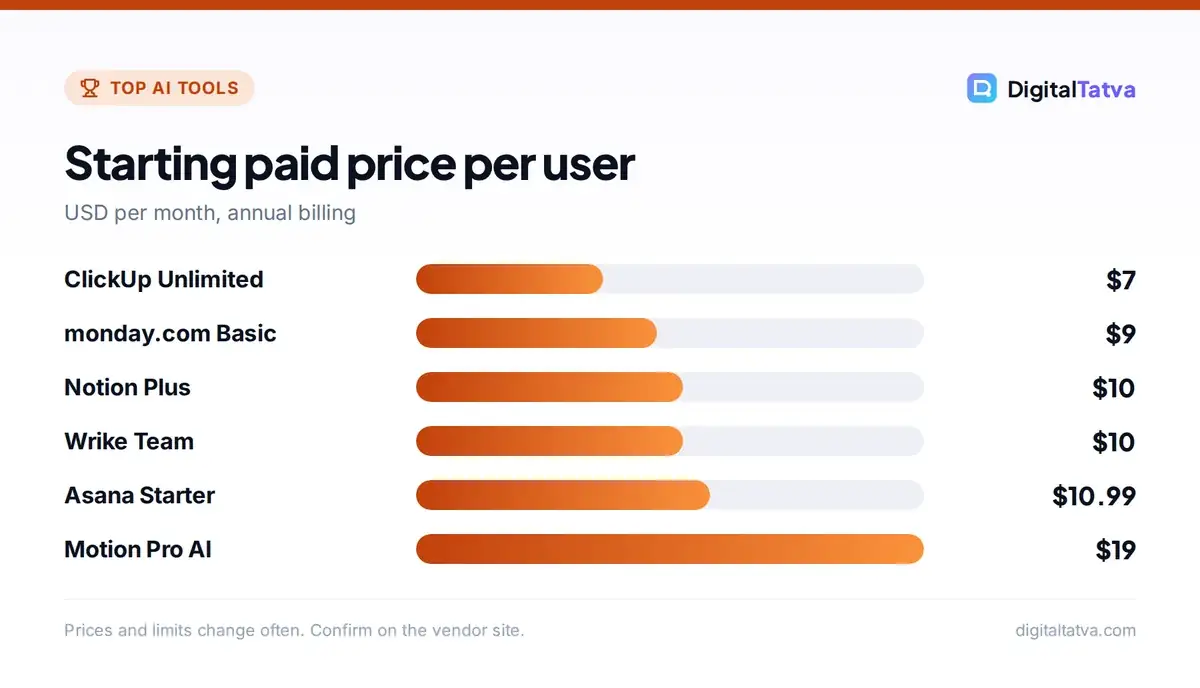
| Tool | Best for | Starting paid price (per user/month, annual) | Free plan |
|---|---|---|---|
| ClickUp | All-in-one work hub | $7 (Unlimited); AI add-on extra | Yes |
| Asana | Cross-team goals and workflows | $10.99 (Starter) | Yes |
| monday.com | Visual, customizable boards | $9 (Basic, often sold in seat bundles) | Yes |
| Notion | Docs, wikis and projects together | $10 (Plus) | Yes |
| Jira | Software and agile teams | About $9.70 (Standard, monthly) | Yes |
| Wrike | Enterprise portfolio management | $10 (Team) | Yes |
| Motion | AI auto-scheduling | $19 (Pro AI) | Trial |
| Taskade | Budget AI agents for small teams | $10 per workspace (Pro) | Yes |
| Breeze | Simple, low-cost project tracking | $9 | Trial |
Prices are from a 2026 vendor-published comparison and each tool’s pricing page; they change often, so confirm before buying. Monthly billing usually costs 15% to 40% more than annual.
The 9 best AI project management tools
1. ClickUp: Best all-in-one AI work hub
ClickUp combines tasks, docs, chat, whiteboards, goals and dashboards, and its AI, called ClickUp Brain, can write and summarize tasks, answer questions across your workspace like “What is blocking the website launch?”, generate standups and progress reports, and run AI agents for routine updates. The Unlimited plan costs $7 per user per month annually ($10 monthly), Business $12 ($19 monthly), and the Brain AI add-on is about $9 per user per month annually ($14 monthly) with a monthly credit allowance. It suits teams that want one tool for everything and do not mind a learning curve.
2. Asana: Best for cross-team goals and workflows
Asana is strong at connecting projects to company goals and coordinating work across departments. Asana AI drafts project plans, summarizes status, flags risks and lets you build AI workflows with AI Studio. Starter costs $10.99 per user per month annually ($13.49 monthly) and Advanced $24.99 ($30.49 monthly). AI usage on Starter and Advanced is limited, with AI Studio credits for heavier automation. It is a good fit for marketing, operations and PMO teams.
3. monday.com: Best for flexible, visual workflows
monday.com is easy to customize with colorful boards, automations and dashboards for almost any process, from sales pipelines to content calendars. Its AI can create boards from a prompt, write updates, categorize and extract data from items and power AI agents. Plans start at $9 per seat per month annually for Basic, $12 for Standard and $19 for Pro, usually sold in seat bundles. Since May 2026, new accounts have used AI credits, with monthly minimums and extra credits sold at about $10 per 1,000. Great for business teams that want visual tracking.
4. Notion: Best for docs-first teams
Notion combines notes, wikis, databases and project boards. Notion AI and the Notion Agent can write and edit, answer questions across your workspace, take AI meeting notes and update databases for you. Plus costs $10 per user per month annually ($12 monthly) and Business $20 ($24 monthly), with Business including the richest AI features; custom agents use credits. It works best for startups and knowledge teams that live in documents. See our Notion AI review and Notion AI pricing.
5. Jira: Best for software teams
Jira remains the standard for agile software teams with sprints, backlogs and issue tracking. Atlassian’s Rovo AI can write and break down issues, summarize long threads, search across Jira and Confluence and run agents. Standard starts at about $9.70 per user per month on monthly billing, with AI usage through Rovo credits. Developers who also use AI coding tools can link Jira issues to agents; see our best AI coding assistants.
6. Wrike: Best for enterprise portfolio management
Wrike handles complex portfolios with resource planning, approvals and cross-project reporting. Its AI predicts project risks, writes summaries, suggests task breakdowns and helps with intake. Team costs $10 per user per month and Business $25, with AI Essentials included. It suits large organizations and agencies managing many clients.
7. Motion: Best for AI scheduling
Motion’s standout feature is automatically planning your day: it puts tasks onto your calendar based on deadlines, priorities and meetings, and reschedules when things change. It also includes AI project management and AI-generated docs. Pro AI costs $19 per user per month annually ($29 monthly) and Business AI $29 ($49 monthly). It is ideal for busy professionals and small teams who struggle with prioritizing.
8. Taskade: Best budget AI agents for small teams
Taskade combines tasks, mind maps and docs with AI agents you can train on your projects to brainstorm, write, research and automate steps. Its Pro plan is priced per workspace rather than per user, around $10 annually or $20 monthly, which makes it very affordable for small teams.
9. Breeze: Best simple, low-cost option
Breeze is a straightforward project tool with boards, time tracking and invoicing at about $9 per user per month annually ($10 monthly). AI features are lighter than the leaders, but it is a good choice for freelancers and small agencies that value simplicity.
How AI is changing project management
- Writing and planning: turn a short brief into a full project plan with tasks, owners and dates.
- Status without meetings: ask “What changed this week?” and get a summary instead of chasing updates.
- Risk detection: AI flags overdue dependencies, overloaded people and slipping milestones.
- Meeting to tasks: AI notes turn discussions into assigned action items; see our best AI meeting assistants.
- Agents: AI teammates that triage requests, update fields, write reports and nudge owners. Read what AI agents are.
The shift from AI that writes to AI that acts is the big story of 2026. If you want to connect your project tool to other apps and build your own agents, see AI automation tools and Zapier vs Make vs n8n.
How to choose the right tool
| If you are | Consider |
|---|---|
| A small business wanting one tool for everything | ClickUp or Notion |
| A marketing or operations team | Asana or monday.com |
| A software team | Jira |
| An enterprise or agency with many projects | Wrike or Asana Advanced |
| An individual struggling with time | Motion |
| A small team on a tight budget | Taskade, Breeze or a free plan |
Beyond features, check three things: how AI is billed (included, add-on or credits), whether AI respects permissions so people only see what they should, and integrations with your email, chat and calendar. Our guide to the best AI tools for small business covers complementary apps.
Hidden costs to watch
AI pricing in project tools has become more complicated. Several vendors moved from unlimited AI to credit systems in 2025 and 2026, so a team that uses AI agents heavily can spend more on credits than on seats. Before committing, estimate how many AI actions your team will run per month, check the included credits on your plan, and set spending limits. Annual billing saves money but locks you in. For general ways to cut AI spending, read how to save money on AI subscriptions and annual vs monthly AI plans. Official pricing is on ClickUp’s pricing page and Asana’s pricing page.
Getting value from AI project management
- Clean up first: archive old projects and standardize fields so AI has good data.
- Start with summaries: weekly AI status reports are the easiest, safest win.
- Add templates: let AI generate project plans from your best past projects.
- Automate updates: use AI to update statuses and notify owners.
- Pilot one agent: for intake triage or reporting, with human review.
- Measure: track meeting time saved, on-time delivery and hours spent on reporting. Our AI ROI guide helps.
Benefits
- Less time on status updates
- Faster project planning
- Earlier warning of risks
- Better meeting follow-through
- Agents handle routine admin
Drawbacks
- AI credits can raise costs
- Summaries are only as good as task data
- Learning curve for complex tools
- Over-automation can hide problems
Frequently asked questions
What is the best AI project management tool?
ClickUp is the best all-round choice for teams that want one tool with strong AI, while Asana suits cross-team workflows, monday.com suits visual business workflows, Notion suits docs-first teams and Jira suits software teams. The best tool depends on how your team works.
Is there a free AI project management tool?
ClickUp, Asana, monday.com, Notion, Jira, Wrike and Taskade all have free plans, though AI features are limited or require upgrades and credits. Free plans work well for small teams testing a tool before paying.
How much do AI project management tools cost?
Most cost about $7 to $25 per user per month on annual billing. Some charge extra for AI, such as ClickUp’s Brain AI add-on, and several use AI credits, such as monday.com, Notion custom agents and Asana AI Studio. Motion’s AI plans start at $19 per user per month.
Can AI replace project managers?
AI can automate status reports, scheduling, task creation and reminders, but project managers still handle priorities, stakeholder alignment, trade-offs, team motivation and judgment calls. AI frees project managers from admin so they can focus on leading.
Which AI project tool is best for small teams?
Small teams often do well with ClickUp, Notion or Taskade because they combine tasks and docs at low prices. Taskade prices per workspace, which keeps costs very low, while Motion is best if your biggest problem is planning the day.
The bottom line
Every major project tool now has AI, so choose based on how your team works and how AI is billed. ClickUp and monday.com lead on AI breadth, Asana on cross-team structure, Notion on docs, Jira on software and Motion on scheduling. Start with AI summaries and planning, clean up your data, and add agents once the basics deliver.
Pricing and features are checked at the time of writing and can change. Some links may be affiliate links, which never affect our verdicts.