How to Move Your ChatGPT History and Memory to Gemini (Step by Step)
Step by step: export your ChatGPT chats, import memory and chat history into Gemini, file limits, privacy, troubleshooting and the Claude method.
On this page
- Key takeaways
- What you can and cannot move
- Before you start: requirements
- Part 1: Move your ChatGPT memory to Gemini
- Part 2: Export your chat history from ChatGPT
- Part 3: Import the chats into Gemini
- Moving from Claude instead?
- Troubleshooting
- How to delete imported chats
- Privacy: what Google does with imported chats
- Should you switch from ChatGPT to Gemini?
- What switching assistants means for businesses
- Related guides
- Frequently asked questions
Quick answer: You can now move both your memory and your full chat history from ChatGPT to Gemini. For memory, open Gemini Settings, choose Import memory to Gemini, copy the prompt Gemini gives you into ChatGPT, then paste ChatGPT’s reply back into Gemini. For chats, export your data from ChatGPT (Settings, Data controls, Export data), download the .zip file from the email, then upload it under Import chats in the same Gemini settings page. Imports can take up to a day. You need a personal Google account, must be 18 or older, and the feature is not available in the EEA, Switzerland or the UK.
Key takeaways
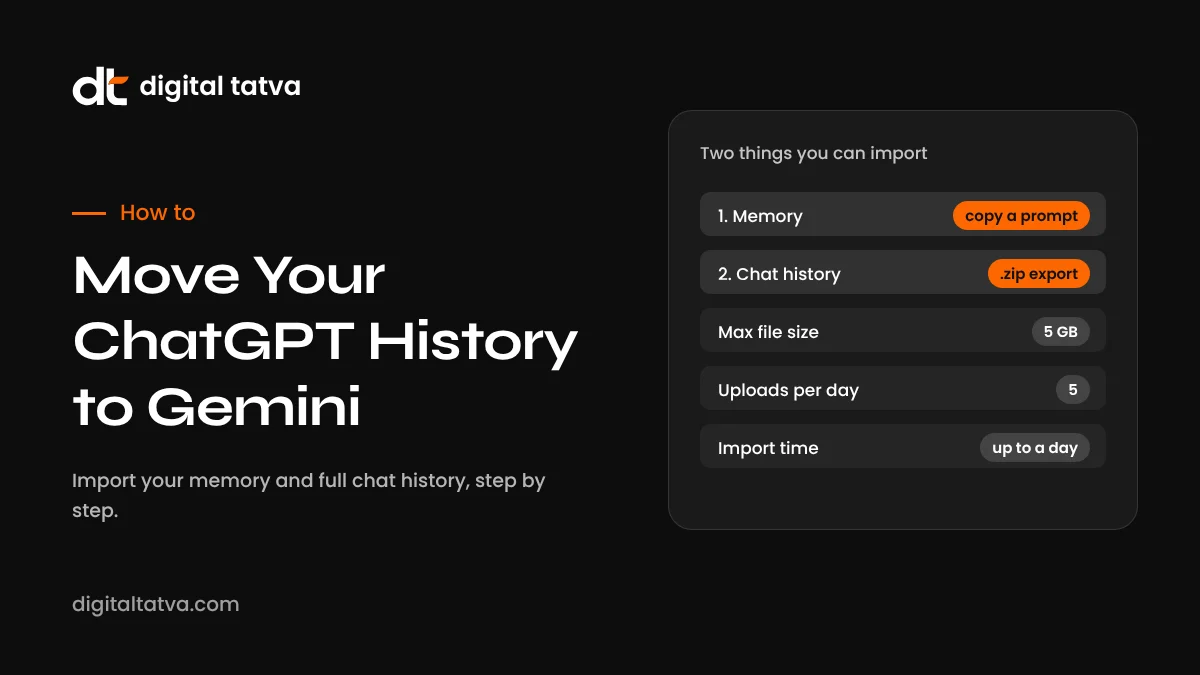
- Gemini can import two things: your memory (preferences and facts ChatGPT knows about you) and your full chat history.
- Memory moves by copying a prompt between the two apps. Chat history moves as a .zip export from ChatGPT.
- Limits: .zip files only, up to 5 GB each, and up to 5 uploads per day. An import can take up to a day.
- Requirements: a personal Google account, age 18 or older, and a location outside the EEA, Switzerland and the UK. Work and school accounts are not supported.
- The same process works for Claude, with an export from Claude’s Privacy settings.
- Imported chats are saved in your Gemini Activity and may be used to improve Google’s services, including model training, unless you manage that activity.
What you can and cannot move
| Memory import | Chat history import | |
|---|---|---|
| What moves | Preferences, remembered facts and general context about you | Your full past conversations, so you can continue them in Gemini |
| How | Copy a prompt into ChatGPT and paste the reply into Gemini | Export a .zip from ChatGPT and upload it to Gemini |
| Time needed | A few minutes | Export usually arrives by email; the import can take up to a day |
| Where it shows up | A new Gemini chat containing your imported memory | Under Chats in the Gemini menu, marked with an imported chat icon |
Custom GPTs, ChatGPT Projects settings, images you generated and files stored inside ChatGPT are not part of the Gemini import. Keep your ChatGPT export file as a personal backup of anything you might need later.
Before you start: requirements
- A personal Google account. Work, school and supervised accounts cannot use the import.
- You must be 18 or older.
- You must be outside the EEA, Switzerland and the UK, where the feature is not available. It works in India, the US and most other countries.
- A personal ChatGPT account with access to your saved chats and memory.
- Use Gemini on the web at gemini.google.com. The import is not available in Gemini in Google Messages, Gemini in Chrome or Gemini on Android XR.
Part 1: Move your ChatGPT memory to Gemini
This is the quickest win. It gives Gemini the context ChatGPT has built up about you, such as your job, writing style and recurring projects.
- Go to gemini.google.com and open Settings.
- Select Import memory to Gemini.
- Copy the prompt Gemini shows you.
- Open ChatGPT, start a new chat and paste the prompt.
- Copy ChatGPT’s full response, which lists the memories and preferences it holds about you.
- Go back to Gemini, paste the response into the text field and click Add memory.
Tip: read ChatGPT’s reply before you paste it. Delete anything outdated or anything you would rather Gemini did not know. You are in control of what moves across.
Part 2: Export your chat history from ChatGPT
- In ChatGPT, click your profile name and open Settings.
- Go to Data controls.
- Next to Export data, click Export, then Confirm export.
- Wait for the email or text from ChatGPT saying your export is ready.
- Download the .zip file. The download link expires after 24 hours, so do this promptly.
Do not unzip or edit the file. Gemini expects the export exactly as ChatGPT created it.
Part 3: Import the chats into Gemini
- In Gemini, open Settings and select Import memory to Gemini.
- Under Import chats, click Add.
- Choose the .zip file you downloaded from ChatGPT.
- Wait for the import to finish. It can take up to a day for large histories.
- Open the Gemini menu and look under Chats for the imported chat icon, or search your chat history for a topic you remember.
| Limit | Detail |
|---|---|
| File type | .zip only |
| Maximum file size | 5 GB per file |
| Uploads per day | 5 |
| Processing time | Up to one day |
| Uploading the same file again | Adds new conversations and overwrites the ones imported before |
Moving from Claude instead?
The process is almost the same. In Claude, click your name, open Settings, then Privacy. Next to Export data, click Export, choose a date range and confirm. Claude emails you a link that expires after 24 hours. Open the downloaded file in a text viewer, follow the export_url link listed under conversations to get the .zip files, then upload them to Gemini under Import chats. Claude exports are only available on the web and Claude Desktop, not in the mobile app.
Troubleshooting
| Problem | What to do |
|---|---|
| The import option is missing | Check that you are signed in with a personal Google account, are 18 or older and are not in the EEA, Switzerland or the UK. Use gemini.google.com on the web. |
| The upload is rejected | Make sure the file is the original .zip from ChatGPT and under 5 GB. Do not unzip and re-zip it. |
| The import stopped halfway | Gemini notifies you if an import is interrupted. Delete that import entry and upload the file again. |
| Some chats are missing | Large imports can take up to a day. If chats are still missing after that, delete the import and try again. |
| The ChatGPT download link expired | Request a new export from ChatGPT; links last 24 hours. |
| You hit the upload limit | Gemini allows 5 .zip uploads per day. Try again the next day. |
How to delete imported chats
- One chat: open the Gemini menu, find the chat under Chats, click More, then Delete.
- A whole import: find the import entry in the import settings and click Delete. Every chat from that .zip is removed.
Privacy: what Google does with imported chats
Imported chats, and any conversations you continue from them, are saved in your Gemini Activity. Google says it uses this data to improve its services, including training generative AI models, and that imported information is covered by the Google Privacy Policy. You can review and delete your Gemini Activity at any time in your Google account.
Before you import: search your ChatGPT history for client names, passwords, financial details or health information. If you would not want that data in another company’s systems, delete those chats in ChatGPT and export again, or skip the chat import and move only your memory.
Should you switch from ChatGPT to Gemini?
Importing your history makes switching much easier, but it is still worth comparing what you get. Google AI Pro costs $19.99 a month and includes Gemini 4 Neon, a 1M token context window, Gemini in Gmail and Docs, and 5 TB of storage. ChatGPT Plus costs $20 a month and includes GPT-6.2, ChatGPT Work and Codex, which now share one usage allowance. Many people keep the free tier of one and pay for the other.
| If you mainly… | Gemini may suit you better | ChatGPT may suit you better |
|---|---|---|
| Work in Gmail, Docs and Google Drive | Yes, Gemini is built in | |
| Need lots of cloud storage | Yes, AI Pro includes 5 TB | |
| Run long agent tasks across many business apps | Yes, ChatGPT Work connects to Slack, Teams, CRMs and more | |
| Code every day | Yes, Codex is included from Plus | |
| Use a Mac and want desktop automation | Yes, Gemini on Mac (US first) | ChatGPT desktop also has computer use |
See our ChatGPT vs Gemini comparison, Gemini Free vs Google AI Pro and ChatGPT’s new shared usage limits for the details.
What switching assistants means for businesses
Features like chat import make it easy for people to move between AI assistants, and many people now use two or three. For a business, that means you cannot optimise for one assistant alone. Your buyers might ask ChatGPT on Monday, Gemini on Tuesday and Perplexity on Wednesday, and each one draws on different sources.
Digital Tatva’s AI visibility audit checks how ChatGPT, Gemini, Perplexity and Copilot each describe your brand, then gives you one prioritised plan to improve all of them. We never guarantee AI placement; we make your information easier to find and cite. Try our free AI visibility checker first.
Related guides
- ChatGPT vs Gemini
- Gemini Free vs Google AI Pro
- How to use Gemini
- ChatGPT shared usage limits explained
- Perplexity Multiagent vs ChatGPT Work vs Gemini on Mac
Frequently asked questions
Can I transfer my ChatGPT chats to Gemini?
Yes. Export your data from ChatGPT as a .zip file, then upload it in Gemini under Settings, Import memory to Gemini, Import chats. Your conversations appear under Chats so you can continue them in Gemini.
How do I export my ChatGPT history?
In ChatGPT, open Settings, then Data controls, and click Export next to Export data, then Confirm export. ChatGPT emails or texts you a download link that expires after 24 hours.
How do I import memory from ChatGPT to Gemini?
In Gemini settings, choose Import memory to Gemini and copy the prompt shown. Paste it into ChatGPT, copy ChatGPT’s reply, then paste it back into Gemini and click Add memory.
How long does it take to import chats into Gemini?
Google says importing chat history can take up to a day, depending on the size of your export.
What is the file size limit for Gemini chat imports?
Each .zip file can be up to 5 GB, and you can upload up to 5 .zip files per day.
Is Gemini chat import available in India?
Yes. The feature is not available in the EEA, Switzerland or the UK, but it works in India for personal Google accounts of people aged 18 or older.
Can I import ChatGPT chats into a work Google account?
No. Work, school and supervised Google accounts are not supported. You need a personal Google account.
Can I import my Claude chats into Gemini?
Yes. Export your data from Claude under Settings, Privacy, Export data, download the .zip files from the export_url link, and upload them to Gemini under Import chats.
Where do imported chats appear in Gemini?
Open the Gemini menu and look under Chats for conversations marked with the imported chat icon. You can also search your chat history.
Will my custom GPTs move to Gemini?
No. The import covers your memory and conversations, not custom GPTs, project settings or files stored in ChatGPT. You can recreate a custom GPT as a Gem in Gemini.
What happens if I upload the same ChatGPT export twice?
Gemini adds any new conversations and overwrites the chats it imported from that file before.
What should I do if a Gemini import fails?
If an import is interrupted, Gemini notifies you and some chats may be partly imported. Delete the import entry and upload the file again.
Does Google use imported chats to train AI?
Imported chats are saved in your Gemini Activity, and Google says it uses this data to improve its services, including training generative AI models. You can manage or delete your activity at any time.
How do I delete imported chats from Gemini?
Delete a single chat from the Chats menu using More, then Delete, or delete the whole import entry to remove every chat from that .zip file.
Do I need to unzip the ChatGPT export before uploading?
No. Upload the original .zip file exactly as ChatGPT created it. Gemini only accepts .zip files.
Does importing delete my chats from ChatGPT?
No. Exporting copies your data. Your chats stay in ChatGPT until you delete them there.
Can I use the Gemini app on my phone to import chats?
Use Gemini on the web at gemini.google.com for the import settings. The feature is not available in Gemini in Google Messages, Gemini in Chrome or Gemini on Android XR.
Is it worth switching from ChatGPT Plus to Google AI Pro?
It depends on your work. AI Pro suits people who live in Gmail, Docs and Drive and want 5 TB storage, while ChatGPT Plus suits people who rely on ChatGPT Work across business apps or Codex for coding.
Should I check my ChatGPT history before importing it?
Yes. Look for client names, passwords, financial or health details and delete anything you do not want stored in Google’s systems before exporting.
Can I keep using both ChatGPT and Gemini?
Yes. Importing does not close your ChatGPT account, and many people use the free tier of one assistant alongside a paid plan of the other.
Product details, prices and features are checked at the time of writing and can change. Sources are linked in the text so you can check them yourself.
How does your brand appear in AI answers?
We test the questions your buyers ask across the major AI assistants and search engines, then show you what to fix first.
Get an AI Visibility Audit