How to Make a Song With Suno AI, Step by Step
How to make a song with Suno AI: step-by-step guide to Simple and Custom mode, style prompts and lyric tags, Suno Studio editing, plans and commercial rights.

On this page
- Key takeaways
- What is Suno AI?
- How do you make a song with Suno, step by step?
- How do you write a good Suno style prompt?
- How to write lyrics for Suno Custom mode
- Editing songs in Suno Studio
- Which Suno plan should you choose?
- Can you use Suno songs commercially and own them?
- Frequently asked questions
- Make your first song today
- Sources
Last updated: 22 October 2026
Quick answer: To make a song with Suno AI, sign up at suno.com, click Create, choose Simple mode and describe the song (genre, mood, topic), or use Custom mode to paste your own lyrics and a style prompt, then generate and pick the best version. The free plan gives 50 credits a day but no downloads or commercial rights; Pro costs about $10 a month and allows 20 downloads.
Suno is the most popular AI music generator, with about 82 million visits in June 2026 according to Exploding Topics. Its v6 models, launched on 9 September 2026, create full songs with vocals, instruments and structure from a short text prompt, and Suno Studio lets paid users edit stems, extend songs and add vocals to their own recordings.
This guide walks you through making your first song step by step, writing better style prompts and lyrics, editing in Suno Studio, choosing a plan, and the copyright rules you need to know before you publish.
Key takeaways
- Simple mode turns one sentence into a song; Custom mode gives you control over lyrics, style and title.
- Write your own lyrics and describe styles with genre, tempo, instruments and vocal type, not artist names.
- Free users get 50 credits a day and the v6-mini model, but cannot download songs or use them commercially.
- Pro (about $10 a month, $8 billed yearly) adds v6 and v6-wild, 20 downloads a month and commercial use rights.
- Universal Music and Sony sued Suno again in September 2026, so check the latest terms before using songs commercially.
What is Suno AI?
Suno AI is a music generator that creates complete songs, including vocals, lyrics, instruments and arrangement, from a text description or your own lyrics. It runs in a web browser and on mobile apps, and anyone can try it free.
| Key fact | Detail |
|---|---|
| Developer | Suno, Inc. |
| Latest models | v6, v6-wild and v6-mini (v6 launched 9 September 2026) |
| Free plan | 50 credits a day, v6-mini only, no downloads, no commercial rights |
| Pro | About $10/month ($8 billed yearly), 2,500 credits, 20 downloads a month |
| Premier | About $30/month ($24 billed yearly), 10,000 credits, 60 downloads, Suno Studio |
| Licensing deals | Warner Music Group (settled November 2025), BMG and Believe (2026) |
Suno says v6 was “trained entirely from scratch”. If you are weighing other options, compare Suno vs Udio and the full list of best AI music generators.
How do you make a song with Suno, step by step?
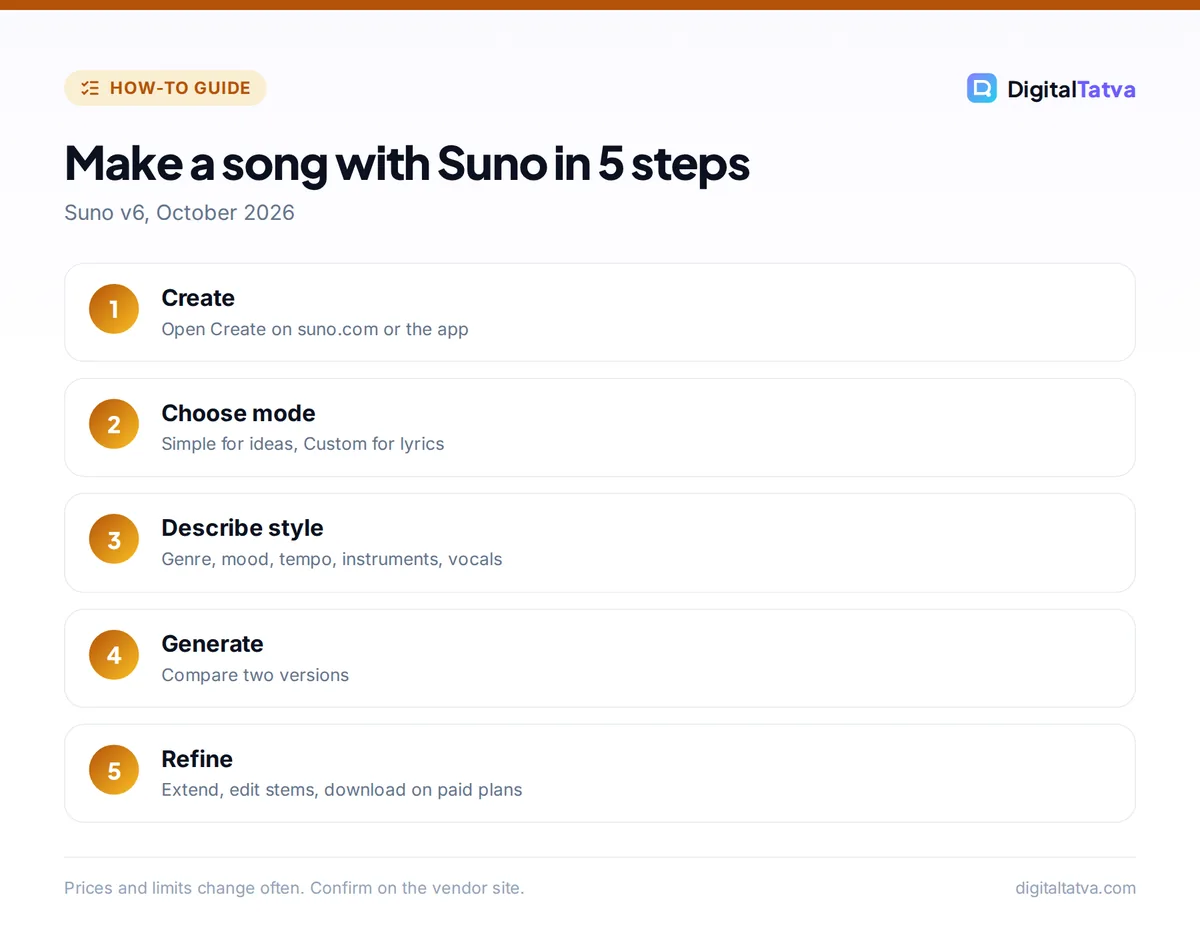
You make a song with Suno by opening Create, describing the song or pasting lyrics, picking a model and generating, then choosing and refining the best take. Your first song takes about two minutes.
- Sign up. Go to suno.com or open the Suno app and create a free account.
- Open Create. Click Create in the left menu.
- Choose Simple or Custom. Simple mode needs one description; Custom mode has separate boxes for lyrics, style and title.
- Describe the song. In Simple mode, write something like “An upbeat Bollywood-style pop song about a monsoon road trip with friends, female vocals, catchy chorus.”
- Pick the model. Free accounts use v6-mini; Pro and Premier can choose v6 or the more experimental v6-wild.
- Generate. Click Create. Suno usually returns two versions to compare.
- Refine. Keep the best version, then extend it, remix it, change the style or edit sections (editing tools depend on your plan).
- Download and share. Paid plans can download within their monthly download cap; free songs can be shared on Suno but not downloaded.
Tip: if the first two takes are not right, change one thing at a time (tempo, vocal type or instruments) rather than rewriting the whole prompt. That shows you what each word does.
How do you write a good Suno style prompt?
A good Suno style prompt names the genre, mood, tempo, key instruments and vocal type in a short comma-separated list. Suno does not let you name real artists, so describe the sound instead.
| Goal | Style prompt |
|---|---|
| Lo-fi study track | lo-fi hip hop, mellow, 80 bpm, vinyl crackle, soft piano, no vocals |
| Wedding song | romantic acoustic pop, warm, slow tempo, guitar and strings, male and female duet |
| Brand jingle | bright jingle, energetic, 120 bpm, claps, synth bass, cheerful female vocals, 30 seconds |
| Indian fusion | Indian classical fusion, tabla, sitar, electronic beat, soulful male vocals in Hindi |
| Rock anthem | stadium rock, powerful, distorted guitars, big drums, raspy male vocals, sing-along chorus |
| Kids song | playful children’s song, simple melody, ukulele, xylophone, happy group vocals |
Need help with words? AI writing tools are great for drafting lyrics you then edit; our Claude writing prompts include songwriting ideas, and ChatGPT prompts cover brainstorming.
How to write lyrics for Suno Custom mode
Suno Custom mode works best with original lyrics split into labeled sections such as [Verse], [Chorus] and [Bridge], with short lines that are easy to sing. Section tags tell Suno where the song’s structure changes.
[Intro]

[Verse 1]
Rain on the window, coffee gone cold
Old songs playing, stories retold

[Chorus]
Let it pour, let it pour tonight
We'll dance in the street till the morning light

[Verse 2]
...

[Bridge]
...

[Outro]- Keep lines short: 6 to 10 syllables per line sing more naturally.
- Repeat the chorus: repetition makes songs catchy and helps Suno build structure.
- Use your own words: never paste copyrighted lyrics from existing songs.
- Mixed languages work: Suno can sing in many languages, including Hindi lines within an English song.
- Instrumentals: turn on the instrumental option or write “no vocals” in the style.
Editing songs in Suno Studio
Suno Studio is Suno’s editing workspace, included with the Premier plan, where you can work with stems, rearrange sections and build songs from your own recordings. Pro users get some editing tools, including two stem separation types and uploading their own voice.
- Extend: continue a song from any point to make it longer.
- Stem separation: split vocals, drums and other parts (2 types on Pro, 3 on Premier).
- Add vocals or instrumentals to an existing song (Premier).
- Upload audio: up to 8 minutes on Free and 30 minutes on Premier, to build on your own humming or recordings.
- Personas: save a voice and style to reuse across songs (Premier).
Export stems into a video editor to score your content; see the best AI video editors for options.
Which Suno plan should you choose?
Choose Suno Free to experiment, Pro if you want to download songs and use them commercially, and Premier if you produce music regularly or need Suno Studio. Credits reset monthly and do not roll over.
| Plan | Price | Credits | Downloads | Commercial use |
|---|---|---|---|---|
| Free | $0 | 50 a day | None | No |
| Pro | About $10/month or $8/month yearly | 2,500 a month | 20 a month | Yes |
| Premier | About $30/month or $24/month yearly | 10,000 a month | 60 a month | Yes |
Watch out: since September 2026, paid plans have monthly download caps that are separate from credits, so you can generate more songs than you can download. Pick your favorites before downloading.
To turn a track into a short video, follow how to make YouTube Shorts with AI or try the free AI video generators. Creators using music in videos should also read our guides for YouTubers and Instagram Reels.
Can you use Suno songs commercially and own them?
You can use Suno songs commercially only if you made them on a paid plan with commercial rights, such as Pro or Premier; songs made on the free plan cannot be used commercially. Owning the copyright is a separate question, because many countries, including the US, do not grant copyright to purely AI-generated music.
The legal picture is still moving. Universal Music Group and Sony Music filed a second lawsuit against Suno on 18 September 2026, alleging v6 relies on the same disputed training, while Warner Music Group settled with Suno in November 2025 and BMG and Believe signed licensing deals in 2026. Adding your own lyrics, melodies and production strengthens your claim to the human parts of a song. Read can you copyright AI content for the details.
Frequently asked questions
Is Suno AI free?
Yes, Suno has a free plan with 50 credits a day and the v6-mini model. Free songs can be shared on Suno but not downloaded, and they come with no commercial rights. To download and use songs commercially, you need Pro (about $10 a month) or Premier.
Can Suno use my own lyrics?
Yes. In Custom mode you paste your own lyrics, add a style description and a title. Label sections with tags like [Verse] and [Chorus] so Suno follows your structure. Only use lyrics you wrote or have the rights to use.
Can Suno sing in Hindi?
Yes, Suno can generate vocals in Hindi and many other languages. Write the lyrics in Hindi (Devanagari or romanized) in Custom mode and mention the language and style in your prompt, for example “soulful Hindi ballad, male vocals, piano.”
Can I make a song in the style of a famous singer?
Not by name. Suno blocks real artist names in prompts. Instead, describe the sound: genre, era, tempo, instruments and vocal qualities such as “breathy female vocals” or “deep, raspy male voice.”
Do I own songs I make with Suno?
Suno grants commercial use rights to songs made on paid plans, but copyright ownership of purely AI-generated music is limited in many countries, including the US. Your own lyrics and creative edits can be protected. Check Suno’s current terms and local law before releasing music.
Make your first song today
Start on Suno’s free plan with Simple mode, then switch to Custom mode with your own lyrics once you like a style. Upgrade to Pro only when you need downloads or commercial use. Plans, models and legal terms are changing quickly in AI music, so check Suno’s pricing and terms pages before you publish or sell songs.
Sources
- Suno pricing, Suno, checked 22 October 2026
- Universal and Sony sue Suno for a second time, Music Business Worldwide, 18 September 2026, checked 22 October 2026
- Suno launches v6, v6-wild and v6-mini, DataNorth AI, checked 22 October 2026
- Most popular AI tools ranked, Exploding Topics, October 2026, checked 22 October 2026
Pricing and features are checked at the time of writing and can change. Some links may be affiliate links, which never affect our verdicts.