Claude Haiku 5.5: Price, Features and When to Use It
Claude Haiku 5.5 explained: $0.10 / $0.50 per million tokens, 1M context, effort levels, benchmarks vs Sonnet 5.5 and GPT-6 Luna, and the breaking changes for developers.


On this page
- Key takeaways
- Claude Haiku 5.5 at a glance
- Claude Haiku 5.5 pricing explained
- What’s new in Claude Haiku 5.5
- Claude Haiku 5.5 benchmarks
- Haiku 5.5 vs Sonnet 5.5 vs Opus 5.5 vs GPT-6 Luna
- How to use Claude Haiku 5.5
- Pros and cons of Claude Haiku 5.5
- Frequently asked questions
- Our verdict: who should use Claude Haiku 5.5
Claude Haiku 5.5 is Anthropic’s newest small, fast model, released on October 7, 2026. It costs $0.10 per million input tokens and $0.50 per million output tokens for prompts up to 100K tokens, which is 90% less per token than Haiku 4.5, and it is the first Haiku model with adjustable effort and adaptive thinking. Free Claude users can chat with it in the Claude apps, and developers can call it as claude-haiku-5-5 on the Claude API, Amazon Bedrock, Google Cloud and Microsoft Foundry.
The short version: Claude Haiku 5.5 is the model to pick when you run the same well-defined task thousands of times, such as tagging tickets, extracting invoice fields or powering a subagent, and you care about cost and speed more than the last few points of quality. This guide covers its price, features, benchmarks, how it compares with Sonnet 5.5 and GPT-6 Luna, the breaking changes for developers, and when you should still pay for a bigger model.
Key takeaways
- Claude Haiku 5.5 launched October 7, 2026 at $0.10 input and $0.50 output per million tokens for prompts up to 100K tokens, and $0.50 / $2.50 above that.
- Anthropic says real workloads cost about 75% less than on Haiku 4.5, not 90%, because the new tokenizer produces about 30% more tokens.
- It gets a 1M token context window, 128K max output, effort levels from low to max (default medium) and browser and computer use tools.
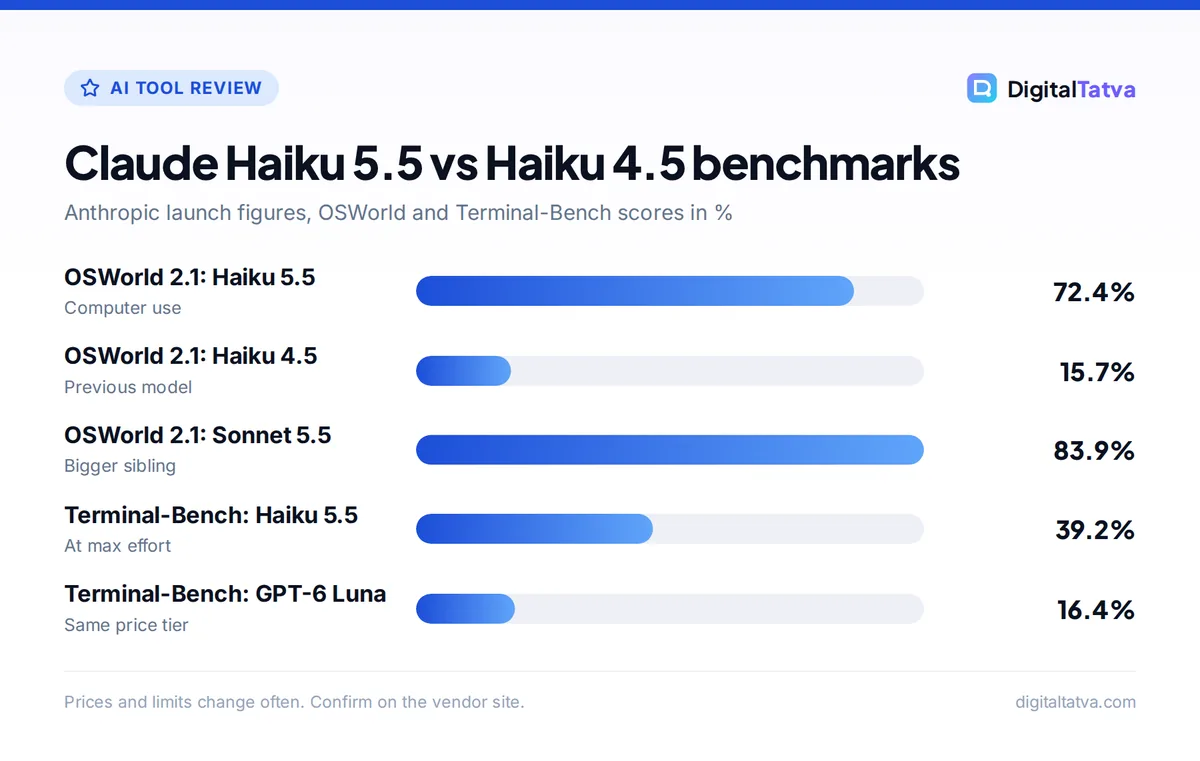
- Benchmarks jump sharply over Haiku 4.5 (OSWorld 2.1: 72.4% vs 15.7%), but it still trails Sonnet 5.5 on every published test.
- Migrating from Haiku 4.5 needs code changes: manual thinking budgets, custom temperature and assistant prefill now return errors.
Claude Haiku 5.5 at a glance
Here is the quick spec sheet, compared with the model it replaces. All prices are per million tokens on the Claude API at standard rates.
| Spec | Claude Haiku 5.5 | Claude Haiku 4.5 |
|---|---|---|
| Release date | October 7, 2026 | October 2025 |
| Model ID | claude-haiku-5-5 | claude-haiku-4-5-20251001 |
| Input price | $0.10 (up to 100K prompt), $0.50 above | $1.00 |
| Output price | $0.50 (up to 100K prompt), $2.50 above | $5.00 |
| Cache read | $0.01 ($0.05 above 100K) | $0.10 |
| Cache write (5 minute) | $0.125 ($0.625 above 100K) | $1.25 |
| Context window | 1M tokens | 200K tokens |
| Max output | 128K tokens | 64K tokens |
| Thinking | Adaptive, effort low to max (default medium) | Fixed thinking token budget |
| Guaranteed availability | Not retired before October 7, 2027 | Still available |
The Batch API takes another 50% off input and output, which makes Haiku 5.5 one of the cheapest capable models you can run in bulk. If you are new to how these prices work, our explainer on what tokens are in AI shows how words turn into billable units.
Claude Haiku 5.5 pricing explained
The headline price of $0.10 in and $0.50 out is real, but two details change what you actually pay.
The 100K token threshold
Haiku 5.5 has two price bands. If a request’s prompt is up to 100K tokens, you pay the low rates. If the prompt is longer, the whole request is billed at $0.50 input and $2.50 output, five times higher. Anthropic says about 90% of earlier Haiku requests fit under 100K tokens, so most chat, classification and extraction jobs stay in the cheap band. Long document analysis is where the higher band bites.
The new tokenizer
The 5.5 family uses a tokenizer that produces roughly 30% more tokens for the same text. So a prompt that was 1,000 tokens on Haiku 4.5 is about 1,300 tokens on Haiku 5.5. That is why Anthropic quotes an average saving of about 75% rather than the 90% per-token cut.
Worked example: a support ticket router
Say you route 100,000 support tickets a month. Each ticket plus your instructions is 2,000 tokens in, and the model writes 300 tokens out. That is 200M input tokens and 30M output tokens on Haiku 4.5.
- Haiku 4.5: 200 x $1.00 = $200 input, plus 30 x $5.00 = $150 output. Total: $350 a month.
- Haiku 5.5: add about 30% for the tokenizer, so 260M input and 39M output. 260 x $0.10 = $26, plus 39 x $0.50 = $19.50. Total: about $45.50 a month.
- Haiku 5.5 on the Batch API: half of that, about $22.75, if the tickets can wait a few hours.
Cache the shared instructions and the bill falls further, since a cache read costs $0.01 per million tokens. Our guides to prompt caching and the Batch API walk through both savings step by step, and our AI API cost estimator guide helps you plug in your own numbers.
Save money: Keep prompts under 100K tokens. If you are feeding long documents, split them into chunks or summarize first, so each request stays in the cheaper band.
What’s new in Claude Haiku 5.5
Effort levels and adaptive thinking
Haiku 4.5 let you set a fixed budget of thinking tokens. Haiku 5.5 replaces that with an effort setting from low to max, with medium as the default. The model decides how much to think within that level. Use low for simple routing and yes or no decisions, medium or high for extraction and multi-step answers, and max only for hard reasoning, because more effort means more output tokens.
1M token context and 128K output
Haiku 5.5 matches the rest of the 5.5 family with a 1M token context window and 128K tokens of output, up from 200K and 64K on Haiku 4.5. Remember the price band, though: anything over 100K tokens of prompt costs five times more. Our context window explainer covers when a huge context helps and when it just burns money.
Browser and computer use
Anthropic shipped a browser use tool and updated Python and TypeScript SDKs alongside Haiku 5.5. Computer use works on the Claude API and Google Cloud through the new computer_toolset_20260801 tool. Combined with the low price, this makes Haiku 5.5 a practical engine for cheap agent steps, such as checking a web page or filling a simple form, inside larger workflows. If agents are new to you, start with what AI agents are and how they work.
Tighter safety rules
Because Haiku 5.5 is much more capable, Anthropic applied stronger cybersecurity safeguards than on Haiku 4.5. Some security testing requests that Haiku 4.5 answered may now be refused under standard safeguards, with broader access available through Anthropic’s verification programs.
Claude Haiku 5.5 benchmarks
These are Anthropic’s launch figures, so treat them as vendor-reported. They show a big leap over Haiku 4.5 and a clear gap to Sonnet 5.5.
| Benchmark | Haiku 5.5 | Haiku 4.5 | Sonnet 5.5 | GPT-6 Luna |
|---|---|---|---|---|
| GDPval-AA v2.1 (knowledge work, Elo) | 1620 | 735 | 1840 | 1437 |
| OSWorld 2.1 (computer use) | 72.4% | 15.7% | 83.9% | 48.9% |
| Terminal-Bench 4.0 (agentic coding) | 39.2% | 0.0% | 70.6% | 16.4% |
| Humanity’s Last Exam (with tools) | 57.4% | 18.7% | 64.5% | Not reported |
Two caveats matter. First, the 39.2% Terminal-Bench score is at max effort; at the default medium effort it is about 20%. Second, the independent Artificial Analysis Intelligence Index gives Haiku 5.5 a score of 43, up from 17 for Haiku 4.5 and ahead of GPT-6 Luna, but still behind Opus 5.5 and Sonnet 5.5.
A third-party test by DataCamp gives a useful real-world signal: on 24 invoices that had to be paid, held or returned, both Haiku 5.5 at high effort and Haiku 4.5 got all 24 right, but Haiku 5.5 cost $0.0098 against $0.25. For simple, well-defined tasks, that is the story: same accuracy, a fraction of the price.
Haiku 5.5 vs Sonnet 5.5 vs Opus 5.5 vs GPT-6 Luna
| Model | Price (input / output per 1M) | Speed | Best for |
|---|---|---|---|
| Claude Haiku 5.5 | From $0.10 / $0.50 | Fastest | High-volume routing, tagging, extraction, subagents |
| Claude Sonnet 5.5 | $2 / $10 | Fast | Coding agents, everyday writing and analysis |
| Claude Opus 5.5 | $4 / $20 | Moderate | Hard reasoning, planning, long agent runs |
| GPT-6 Luna | $0.10 / $0.50 | Fast | OpenAI’s budget tier, similar price |
| Gemini 3.5 Flash-Lite | $0.30 / $2.50 | Fast | Google’s budget option |
GPT-6 Luna matches Haiku 5.5’s low-band price exactly, and its higher rates only start above 272K input tokens, so it is cheaper for very long prompts. On Anthropic’s published benchmarks, Haiku 5.5 scores well ahead of Luna on knowledge work and computer use. For a full price comparison across providers, see our breakdown of OpenAI API pricing and Claude API pricing, and our list of the cheapest AI model for each task.
The smartest setups use more than one model. A common pattern is an Opus 5.5 or Sonnet 5.5 orchestrator that plans the work and checks results, with several Haiku 5.5 subagents that read, summarize and extract. Our guide to model routing shows how to send each request to the cheapest model that can handle it, and our full Claude Opus 5.5 review covers the top of the family.
How to use Claude Haiku 5.5
In the Claude app (free)
- Sign in. Open claude.ai, the desktop app or the mobile app and log in with a free or paid account.
- Open the model picker. Click the model name under the message box.
- Choose Haiku 5.5. Pick it for quick answers, short rewrites and fast lookups. Switch to Sonnet 5.5 for longer writing or harder questions.
Free plan usage limits still apply. Our guide to Claude usage limits explains how the five-hour session window works, and our Claude pricing guide covers when Pro at $20 a month is worth it.
On the API
- Change the model ID. Use
claude-haiku-5-5(oranthropic.claude-haiku-5-5on Amazon Bedrock). - Set effort. Pass an effort level instead of a thinking budget. Start with low for classification and medium for extraction.
- Remove old parameters. Drop custom temperature, top_p and top_k, and any assistant prefill.
- Keep conversations append-only. Editing earlier turns invalidates the model’s thinking blocks.
- Test on your own data. Run a few hundred real examples and compare accuracy and cost with your current model before switching all traffic.
Watch out: Code that worked on Haiku 4.5 can break. Sending budget_tokens for manual thinking, a non-default temperature, or a prefilled assistant message now returns an error. Update and test before you switch.
Full details are on Anthropic’s official pricing page and models overview.
Pros and cons of Claude Haiku 5.5
Pros
- Very low price for prompts under 100K tokens, plus 50% off on Batch.
- Huge quality jump over Haiku 4.5 on knowledge work, coding and computer use.
- 1M context, 128K output and adjustable effort.
- Available free in the Claude apps.
Cons
- Five times higher rates once a prompt passes 100K tokens.
- New tokenizer means about 30% more tokens for the same text.
- Breaking API changes for anyone migrating from Haiku 4.5.
- Still clearly behind Sonnet 5.5 on hard coding and reasoning.
Frequently asked questions
Is Claude Haiku 5.5 free?
Yes, in the Claude apps. Free Claude accounts can use Haiku 5.5 alongside Sonnet 5.5, within the free plan’s usage limits. On the API there is no free tier: you pay $0.10 per million input tokens and $0.50 per million output tokens for prompts up to 100K tokens, with 50% off on the Batch API.
How much does Claude Haiku 5.5 cost in India?
The API is billed in US dollars, so Indian developers pay the same $0.10 input and $0.50 output rates per million tokens, plus any GST and card conversion charges. In the apps, Haiku 5.5 is available on the free plan, and Pro costs $20 a month or $17 a month billed annually.
Is Haiku 5.5 better than GPT-6 Luna?
On Anthropic’s published benchmarks, yes. Haiku 5.5 scores 1620 on GDPval-AA against 1437 for GPT-6 Luna, and 72.4% on OSWorld 2.1 against 48.9%. Both cost $0.10 input and $0.50 output, but Luna’s higher rates start above 272K tokens rather than 100K, so it can be cheaper for very long prompts.
Should I switch from Haiku 4.5 to Haiku 5.5?
For most workloads, yes, because Anthropic estimates about 75% lower cost and quality is much higher. Before switching, remove manual thinking budgets, custom temperature settings and assistant prefill from your code, then test on a few hundred real examples to confirm accuracy and token counts.
What is the context window of Claude Haiku 5.5?
Haiku 5.5 has a 1M token context window and can write up to 128K tokens in one response. Prompts above 100K tokens are billed at the higher rate of $0.50 input and $2.50 output per million tokens, so very long inputs cost five times more per token.
Our verdict: who should use Claude Haiku 5.5
Claude Haiku 5.5 is the easiest recommendation in Anthropic’s lineup for high-volume work. If you classify, tag, extract, route or summarize at scale, it gives you accuracy that matches or beats Haiku 4.5 on simple tasks at roughly a quarter of the cost, plus effort control and computer use. Keep prompts under 100K tokens, use caching and Batch, and save Sonnet 5.5 or Opus 5.5 for the hard steps. Free users get a faster everyday model at no cost. Pricing and limits change often, so confirm current rates on Anthropic’s pricing page before you build a budget around them.
Related reading: how to reduce token usage in ChatGPT and Claude, our full Claude review and DeepSeek API pricing for another budget option.
Pricing and features are checked at the time of writing and can change. Some links may be affiliate links, which never affect our verdicts.