How Google AI Overviews and AI Mode Pick Sources: Query Fan-Out Explained
How Google AI Overviews and AI Mode choose sources: query fan-out, eligibility, nosnippet, Google-Extended and the new Search generative AI control.
On this page
Quick answer: Google AI Overviews and AI Mode build answers from Google’s own search index. For each question they may run “multiple related searches across subtopics and data sources”, a technique Google calls query fan-out, then pick supporting pages to link. To be eligible, a page only needs to be indexed and eligible to show in Google Search with a snippet; Google says there are no extra requirements or special markup. You can limit what is used with nosnippet, max-snippet or noindex, and some site owners now have a Search Console setting to opt out of these AI features entirely.
Key takeaways
- AI Overviews and AI Mode use Google’s regular index, crawled by Googlebot. There is no separate AI crawler for them.
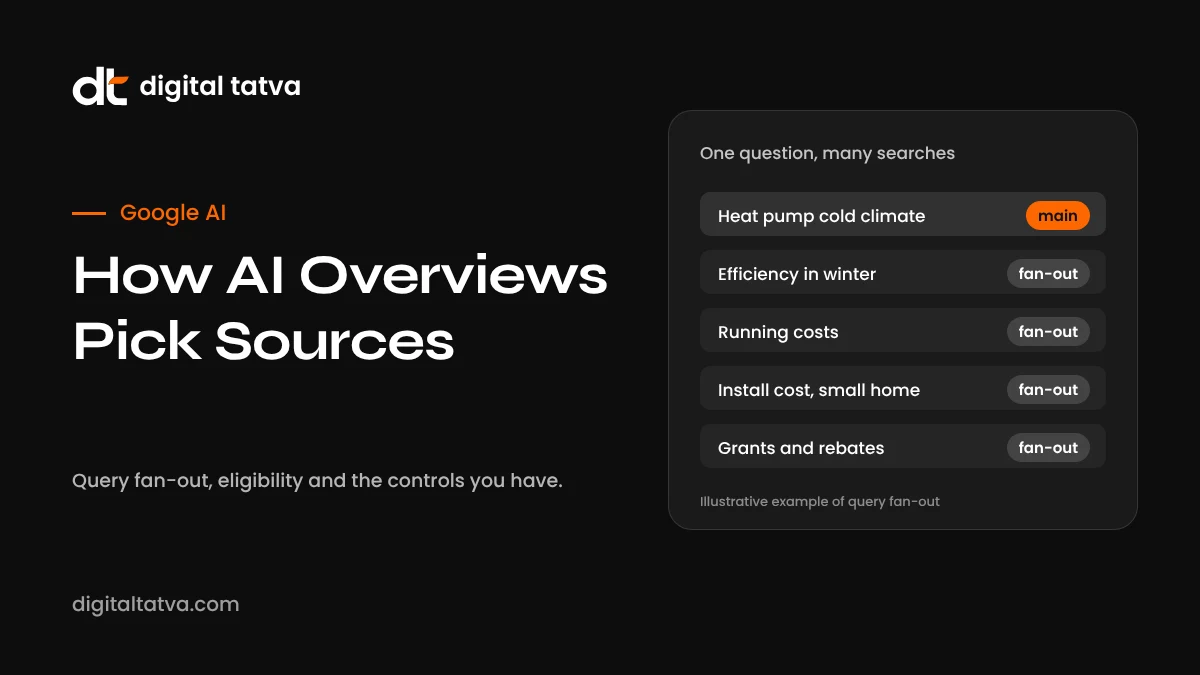
- Query fan-out means one question becomes many searches, so pages that rank for related subtopics can be cited, not just pages that rank for the main query.
- Google says AI Overviews appear only when they add something beyond classic results, so many queries never show one.
- Google-Extended controls Gemini model training and grounding in Gemini apps; it does not remove you from AI Overviews or Search.
- A newer Search Console setting, the Search generative AI control, lets some site owners exclude their site from AI Overviews, AI Mode and Discover’s AI features, without affecting rankings.
- Clicks and impressions from AI features are counted in Search Console’s Performance report under the Web search type.
AI Overviews vs AI Mode
| AI Overviews | AI Mode | |
|---|---|---|
| Where it appears | At the top of normal Google results, only for some queries | A separate conversational search tab |
| Best for | Quick summaries when they add value | Complex questions that need reasoning and comparisons |
| How it searches | Can use query fan-out | Uses query fan-out heavily, with follow-up questions |
| Index used | Google Search index | Google Search index plus other Google data such as shopping and maps |
For a deeper comparison, see Google AI Mode vs AI Overviews. This article focuses on how sources are chosen; for the optimisation checklist, read our AI Overviews optimization guide.
Query fan-out, explained simply
Imagine someone asks “is a heat pump worth it in a cold climate for a small house?”. Instead of one search, Google’s system may search several related questions at once: heat pump efficiency in cold weather, running costs, installation cost for small homes, grants and rebates, and comparisons with gas boilers. It then reads results from each, combines them and links the pages that support each part of the answer. This is an illustrative scenario, not a client story.
Google says this lets AI features “display a wider and more diverse set of helpful links” than classic search. For you, it means:
- A page can be cited for a subtopic even if it does not rank for the main query.
- Covering a topic in depth, with clear sections for each sub-question, gives you more chances to be picked.
- Pages built around one vague keyword are less useful than pages that answer specific questions clearly.
What Google requires to show your page
Google’s guidance for site owners is short: a page must be “indexed and eligible to be shown in Google Search with a snippet”, and “there are no additional requirements to appear in AI Overviews or AI Mode, nor other special optimizations necessary”. Google also says you do not need new machine-readable files, AI text files or special schema. Its best practices are the same as for Search:
- Allow crawling in robots.txt and at your CDN or host.
- Make content easy to find through internal links.
- Keep important content in text, supported by good images and video.
- Make sure structured data matches the visible page.
- Keep Merchant Center and Business Profile information current.
- Provide a good page experience and helpful, people-first content.
The controls you have
| Control | What it does | Effect on AI Overviews and AI Mode |
|---|---|---|
| Googlebot in robots.txt | Controls crawling for Google Search | Blocking it removes you from Search and AI features |
| noindex | Keeps a page out of Google’s index | Page cannot appear anywhere in Search, including AI features |
| nosnippet, data-nosnippet, max-snippet | Limit what text Google can show from a page | Limits or prevents use as input for AI features |
| Search generative AI control (Search Console) | Excludes your site from AI Overviews, AI Mode and Discover’s generative AI features | Removes you from those features without affecting regular ranking; rolling out to some site owners |
| Google-Extended | Controls use of your content to train Gemini models and ground answers in Gemini apps and Vertex AI | Does not affect Google Search or AI Overviews |
Search Engine Journal reported that Google began respecting the Search generative AI control from June 17 and that it was appearing on non-UK accounts from July. Google says it “isn’t used as a ranking or inclusion signal affecting other parts of Search”. Excluding your site also removes your links from those AI features, so think carefully before using it. Google has also said it intends to support a shared machine-readable training preference signal in early 2027; see our guide to the AI training opt-out token.
How to get cited in AI Overviews and AI Mode
- Get the basics right: crawlable, indexed, snippet-eligible pages.
- Cover the sub-questions. Map the related questions around each topic and answer each clearly under its own heading.
- Answer first. Put a direct, quotable answer near the top of each section.
- Show expertise and freshness. Name authors, cite data and update pages with dates.
- Use your Business Profile and Merchant Center. AI Mode draws on Google’s other data for local and shopping answers.
- Measure in Search Console and with dedicated AI Overview tracking tools.
Losing clicks to AI Overviews, or not being cited at all? Digital Tatva’s AEO audit shows which of your topics trigger AI Overviews and AI Mode, who gets cited and how to win those links. Request an AEO audit.
Related guides
- AI Overviews optimization guide
- Google AI Mode vs AI Overviews
- Where do LLMs get their data?
- What blocking each AI crawler really does
- AI Overviews traffic drop
Frequently asked questions
How does Google choose sources for AI Overviews?
It searches its own index, often running several related searches through query fan-out, and links the pages that best support each part of the answer. Pages must be indexed and snippet-eligible.
What is query fan-out?
A technique where Google splits one question into multiple related searches across subtopics and data sources, then combines the results into one AI answer.
Do I need special markup to appear in AI Overviews?
No. Google says there are no additional requirements or special optimizations; pages just need to be indexed and eligible for a snippet.
Does Google use a separate crawler for AI Overviews?
No. AI Overviews and AI Mode use Google’s regular search index, crawled by Googlebot.
Does blocking Google-Extended remove me from AI Overviews?
No. Google-Extended controls Gemini model training and grounding in Gemini apps and Vertex AI, not Google Search or AI Overviews.
How can I stop my content appearing in AI Overviews?
Use nosnippet or max-snippet to limit snippets, noindex to leave Search entirely, or, if available to you, the Search generative AI control in Search Console.
What is the Search generative AI control?
A Search Console setting that lets site owners exclude their site from AI Overviews, AI Mode and Discover’s generative AI features without affecting regular ranking. It is rolling out to some accounts.
Will opting out of AI Overviews hurt my rankings?
Google says the control is not used as a ranking or inclusion signal for other parts of Search, but you lose your links inside AI features.
Why don’t all searches show an AI Overview?
Google says AI Overviews appear only when its systems decide they add value beyond classic results.
What is the difference between AI Overviews and AI Mode?
AI Overviews are summaries at the top of normal results. AI Mode is a separate conversational search for complex questions, with heavier use of query fan-out.
Can a page be cited in AI Overviews without ranking first?
Yes. Because of query fan-out, a page that ranks for a related subtopic can be cited even if it does not rank for the main query.
How do I see AI Overview traffic in Search Console?
Clicks and impressions from AI features are included in the Performance report under the Web search type. They are not shown separately.
Does structured data help with AI Overviews?
It helps Google understand pages, but Google says special schema is not required. Make sure any structured data matches visible content.
Do AI Overviews send traffic?
They include links, and Google says clicks from AI Overview results are higher quality. Many sites report fewer clicks on queries where AI Overviews appear.
Does Google AI Mode use Business Profile data?
Google advises keeping Business Profile and Merchant Center information current, as AI features can draw on them for local and shopping answers.
How often do AI Overview citations change?
Often. Ahrefs found about half the sources cited in AI Overviews were gone the next day in its 20-day study.
Should I write differently for AI Overviews?
Write clearly for people: answer questions directly, cover related sub-questions under clear headings and keep facts current.
Does Gemini use the same sources as AI Overviews?
Gemini can ground answers in Google Search, but it is a separate product. Google-Extended controls some uses of your content in Gemini apps.
Is there a separate opt-out for AI training?
Yes. Google-Extended controls training of Gemini models. Google has also said it intends to support a shared training preference signal in early 2027.
How do I track my visibility in AI Overviews?
Use Search Console for overall trends and an AI Overview tracking tool to see which queries cite your pages.
Product details, prices and features are checked at the time of writing and can change. Sources are linked in the text so you can check them yourself.
How does your brand appear in AI answers?
We test the questions your buyers ask across the major AI assistants and search engines, then show you what to fix first.
Get an AI Visibility Audit