Perplexity Computer: What It Is and How to Use It
Perplexity Computer explained: what the AI agent does, credit costs on Pro and Max, how to run your first task, Personal Computer for Mac and how it compares.

On this page
- Key takeaways
- What is Perplexity Computer?
- How much does Perplexity Computer cost?
- How do you use Perplexity Computer?
- What is Perplexity Personal Computer?
- What is Perplexity Computer good and bad at?
- Perplexity Computer vs ChatGPT Work, Manus and Gemini tasks
- Frequently asked questions
- Should you try Perplexity Computer?
- Sources
Last updated: 22 October 2026
Quick answer: Perplexity Computer is Perplexity’s AI agent that turns one request into a finished deliverable, such as a research report, spreadsheet, dashboard or app, by running sub-agents in a cloud sandbox with 20+ AI models and hundreds of connectors. It works on Perplexity Pro ($20/month) and Max ($200/month) and is paid with credits, where 100 credits cost $1.
Perplexity launched Computer in February 2026 and opened it to Pro subscribers on 13 March 2026. Unlike Perplexity’s normal Ask search, which returns an answer with citations, Computer plans the work, browses, writes code, creates files and keeps going in the background until the job is done. A related product, Personal Computer, runs an always-on agent on your Mac with access to local files and apps.
This guide explains what Perplexity Computer is, what it costs in credits, how to run your first task, what it does well and badly, and how it compares with ChatGPT Work, Manus and Gemini tasks.
Key takeaways
- Perplexity Computer is available on Pro, Max and Enterprise plans, not on Free.
- Max includes 10,000 credits ($100 worth) a month; Pro has a weekly usage allowance plus a one-time 4,000-credit bonus.
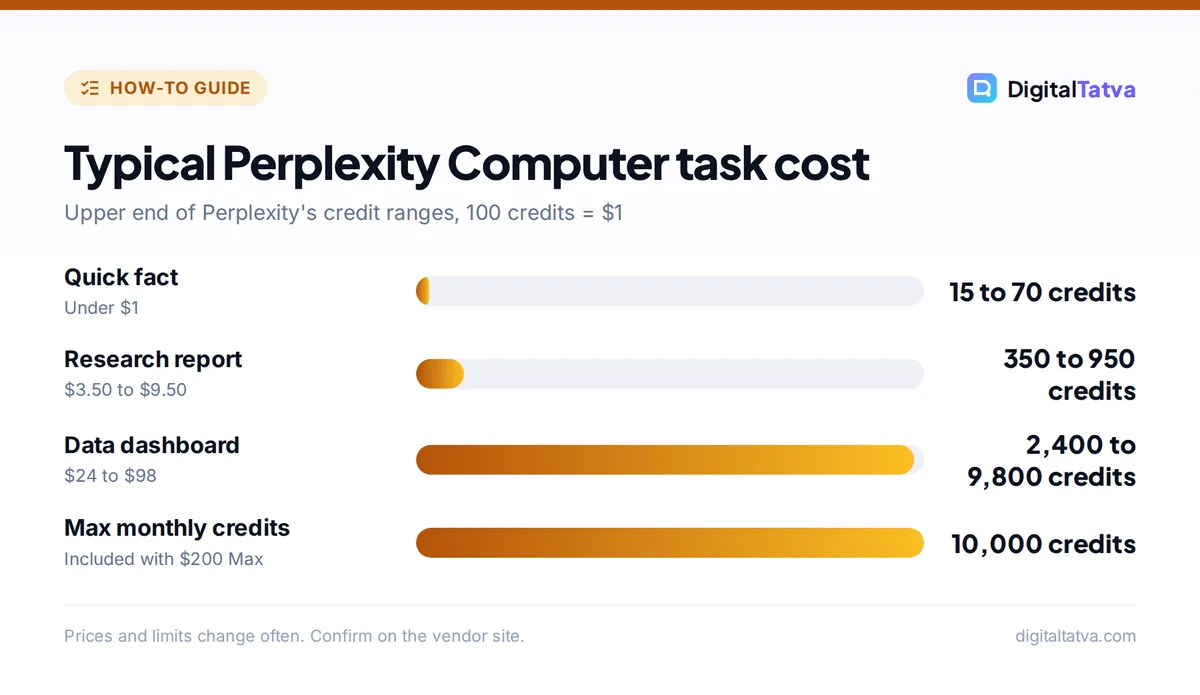
- A quick fact costs 15 to 70 credits, a research report 350 to 950 and a data dashboard 2,400 to 9,800, per Perplexity’s help center.
- It shows a plan and credit estimate before starting, and you can stop any sub-agent mid-task.
- Best for bounded research and document work; open-ended coding can burn through credits fast.
What is Perplexity Computer?
Perplexity Computer is a general-purpose AI agent from Perplexity AI that completes multi-step tasks and delivers finished outputs instead of single search answers. It breaks your request into a plan, then routes each step to specialized sub-agents that work in parallel inside an isolated cloud environment.
| Key fact | Detail |
|---|---|
| Developer | Perplexity AI |
| Launched | February 2026; Pro access from 13 March 2026 |
| Plans | Pro ($20/month), Max ($200/month), Enterprise Pro and Enterprise Max |
| Billing | Credits: 100 credits = $1 |
| Models | 20+ advanced models, chosen by an orchestrator |
| Where it runs | Web, iOS, Android, Mac app, Slack and Microsoft 365 |
| Outputs | Reports, tables, spreadsheets, dashboards, code and apps; PDF and DOCX export |
Its research sub-agent can run seven search types at once (web, academic, people, image, video, shopping and social) and read full pages rather than snippets. For how normal Perplexity search compares, see our Perplexity review and how to use Perplexity.
How much does Perplexity Computer cost?
Perplexity Computer costs credits on top of a Pro or Max subscription, with 100 credits equal to $1. Max includes 10,000 credits a month, while Pro relies on a weekly allowance that resets and does not roll over, plus any credits you buy.
| Plan | Price | Monthly credits | One-time bonus |
|---|---|---|---|
| Free | $0 | No Computer access | None |
| Pro | $20/month or $200/year | Weekly usage allowance, no monthly credits | 4,000 credits (about 30 days) |
| Max | $200/month or $2,000/year | 10,000 | 35,000 credits (about 30 days) |
| Enterprise Pro | $40/seat/month | 500 per user | 8,000 credits |
| Enterprise Max | $325/seat/month | 15,000 per user | 40,000 credits |
What tasks cost in credits
Perplexity’s help center gives typical ranges: a quick fact or definition uses 15 to 70 credits ($0.15 to $0.70), a multi-step research report 350 to 950 ($3.50 to $9.50), a data dashboard 2,400 to 9,800 ($24 to $98) and a whole app or multi-day build 15,000 or more ($150+). In a DataCamp test, researching eight AI coding tools and writing a comparison table and memo took about 8 minutes and 225.71 credits, roughly $2.26.
Save money: Ask searches and Deep Research do not use credits, so use them for simple questions and save Computer for real deliverables. Monthly credits do not roll over, and Max has a default monthly spending cap of $200 that you can adjust up to $5,000. Full plan details are in our Perplexity pricing guide.
How do you use Perplexity Computer?
You use Perplexity Computer by opening the Computer panel, describing a clear deliverable, approving the plan and credit estimate, and then watching the sub-agents work. A first task takes about five minutes to set up.
- Open Computer. On the web, open the Computer panel from the home page; on iPhone use the Computer tab; on Mac use the Perplexity desktop app.
- Connect your tools (optional). Link connectors such as Gmail, Outlook, Slack, Notion, GitHub or Salesforce if the task needs your data. Test any connector on a low-stakes task first.
- Write a specific prompt. Name the targets, fields and format. Example: “Compare 8 AI SEO tools on price, free plan, AI search tracking and India pricing. Build a table with sources and a 200-word recommendation.”
- Review the plan. Computer shows its sources, order of work and a credit estimate. Edit the plan if it misunderstood you, then approve.
- Monitor and steer. A live credit counter and activity panel show each sub-agent. You can stop a single sub-agent or send a follow-up instruction mid-task.
- Check and export. Verify facts and citations, then export to PDF or DOCX or copy the table into a spreadsheet.
Tip: bounded prompts with fixed fields cost fewer credits and give more consistent results than open-ended ones like “research the AI market”. The same prompt can produce different plans on different runs.
What is Perplexity Personal Computer?
Perplexity Personal Computer is an always-on agent for Mac that works across your local files, native apps such as Mail, Calendar and Messages, and cloud tools like Gmail, Slack and GitHub. It launched on 16 April 2026 for Max subscribers and expanded to Pro and Enterprise with Perplexity’s new Mac app in May 2026.
- Requirements: a Mac running macOS 14 Sonoma or later. Perplexity suggests a Mac mini as a dedicated always-on machine.
- Safety controls: confirmation before actions, a kill switch and an audit trail.
- Processing: heavy reasoning runs on Perplexity’s servers, so you do not need a powerful Mac. In October 2026, reports said Computer on Mac can also run locally on Apple silicon Macs, using the cloud only when you allow it.
Windows users can use cloud Computer through the browser. If you mainly want an AI browser, compare Perplexity Comet and the other best AI browsers.
What is Perplexity Computer good and bad at?
Perplexity Computer is strongest at research-heavy deliverables with citations, such as market scans, comparison tables and briefing documents. It is weakest at open-ended coding and at tasks that depend on flaky connectors.
Pros
- Excellent multi-source research with citations
- Produces finished files, not just chat answers
- Plan preview and live credit counter
- Runs in the background and on schedules
- Works from Slack, email and Microsoft 365
Cons
- Credit costs are hard to predict for broad tasks
- Pro has no monthly credit pool
- Connector reliability is uneven
- Coding tasks have no live preview and can loop expensively
- Consumer users must opt out of training in settings
DataCamp’s reviewer found the comparison table needed little editing, but the written memo needed about 30 minutes of cleanup. Always check figures and quotes yourself, as with any deep research tool.
Perplexity Computer vs ChatGPT Work, Manus and Gemini tasks
Perplexity Computer, ChatGPT Work, Manus and Gemini tasks are all general AI agents, but they differ in pricing model and home ecosystem. Perplexity stands out for research quality and per-task credit visibility.
| Agent | Company | Entry plan | Billing | Strength |
|---|---|---|---|---|
| Perplexity Computer | Perplexity | Pro $20/month | Credits (100 = $1) | Cited research, reports |
| ChatGPT Work | OpenAI | Plus $20/month | Included usage limits | Documents, web tasks, plugins |
| Manus | Manus (independent again since September 2026) | Free tier and paid plans | Credits | Autonomous web and build tasks |
| Gemini tasks | Google AI Pro $19.99/month | Plan usage limits | Gmail, Calendar, Docs |
Read our guides to Manus AI, Gemini tasks and ChatGPT Work, or browse the best AI agents of 2026.
Frequently asked questions
Is Perplexity Computer free?
No. Perplexity Computer requires a Pro, Max or Enterprise subscription and uses credits, where 100 credits cost $1. Pro ($20 a month) includes a weekly usage allowance and a one-time 4,000-credit bonus, while Max ($200 a month) includes 10,000 credits every month.
How many credits does a Perplexity Computer task use?
It depends on complexity. Perplexity’s help center lists 15 to 70 credits for a quick fact, 350 to 950 for a multi-step research report, 2,400 to 9,800 for a data dashboard and 15,000 or more for an entire app. You see a credit estimate before approving each plan.
What is the difference between Perplexity Computer and Personal Computer?
Perplexity Computer runs in Perplexity’s cloud sandbox and works from the web, mobile and Slack. Personal Computer is an always-on agent on your Mac that can use local files and native apps like Mail and Calendar, with confirmations, a kill switch and an audit log.
Is Perplexity Computer safe for work data?
It can be, with care. Give connectors only the permissions a task needs, review actions before they send or change anything, and turn off training on your data in settings if you use a consumer plan. Enterprise plans exclude training by default and add admin controls.
Is Perplexity Computer worth it?
For frequent research and report work, yes, especially on Max with its 10,000 monthly credits. Casual users should try Pro with the bonus credits first, since a few large tasks can cost more than the subscription itself.
Should you try Perplexity Computer?
Try Perplexity Computer if you regularly produce research reports, comparison tables or briefs and want citations you can check. Start on Pro with the bonus credits, run three bounded tasks and compare the credit cost with the time you saved before considering Max. Credit prices, allowances and plans change often, so confirm current terms on Perplexity’s help center before you buy.
Sources
- How credits work on Perplexity, Perplexity Help Center, checked 22 October 2026
- Perplexity Computer review: hands-on test, DataCamp, checked 22 October 2026
- Perplexity Computer: features, credits and alternatives, The Rundown AI, checked 22 October 2026
- Perplexity Computer now available for Pro, Perplexity on X, 13 March 2026, checked 22 October 2026
Pricing and features are checked at the time of writing and can change. Some links may be affiliate links, which never affect our verdicts.