How to Use Manus AI: The General AI Agent Explained
How to use Manus AI step by step: what the general AI agent does, Manus 2.0 features, free and paid credits, prompts that work and how it compares with ChatGPT Work.


On this page
Last updated: 22 October 2026
Quick answer: Manus AI is a general AI agent that completes whole tasks for you, such as research reports, slide decks, websites, apps and spreadsheets, by planning steps and working in its own cloud computer. To use it, sign up at manus.im, describe the result you want, review the plan and let it run. The free plan gives 300 credits a day; paid plans start at about $20 a month.
Manus launched in March 2025 and became one of the most visited AI tools of 2026, with Manus 2.0 released on 28 September 2026. After Meta agreed to buy Manus in December 2025, Chinese regulators blocked the deal in April 2026, and Manus returned to independent operation under its founding team on 1 September 2026.
This guide shows how to use Manus step by step, what each feature does, what tasks cost in credits, prompts that work well, and when to choose Manus over ChatGPT Work or Perplexity Computer.
Key takeaways
- Manus works like a remote assistant with its own computer: it browses, codes, builds files and delivers finished outputs.
- Free users get 300 credits that refresh daily; paid tiers were listed at $20, $40 and $200 a month for 4,000, 8,000 and 40,000 credits (third-party, mid-2026).
- Manus 2.0 added a desktop app (Manus Studio), video editing, game development, event-triggered automations and computer use.
- Use Plan Mode to review steps before complex tasks, and keep tasks specific to save credits.
- Manus is independent again; the Meta acquisition was withdrawn after China’s regulator prohibited it.
What is Manus AI?
Manus AI is an autonomous AI agent that turns a goal into a finished deliverable by planning tasks, browsing the web, running code and creating files in a cloud workspace. Unlike a chatbot that only replies, Manus keeps working until it hands back a report, deck, website or app.
| Key fact | Detail |
|---|---|
| Developer | Manus (founded by the team behind the Monica assistant) |
| Launched | 6 March 2025 (invite-only); public sign-up from 13 May 2025 |
| Latest version | Manus 2.0, released 28 September 2026 |
| Ownership | Independent since 1 September 2026, after the Meta deal was withdrawn |
| Free plan | Yes, 300 credits refreshed daily |
| Paid plans | From about $20 a month (17 percent off yearly) |
| Apps | Web, desktop (Windows and Apple silicon Mac), mobile, Telegram |
If agents are new to you, read what AI agents are and what agentic AI means first.
How do you use Manus AI step by step?
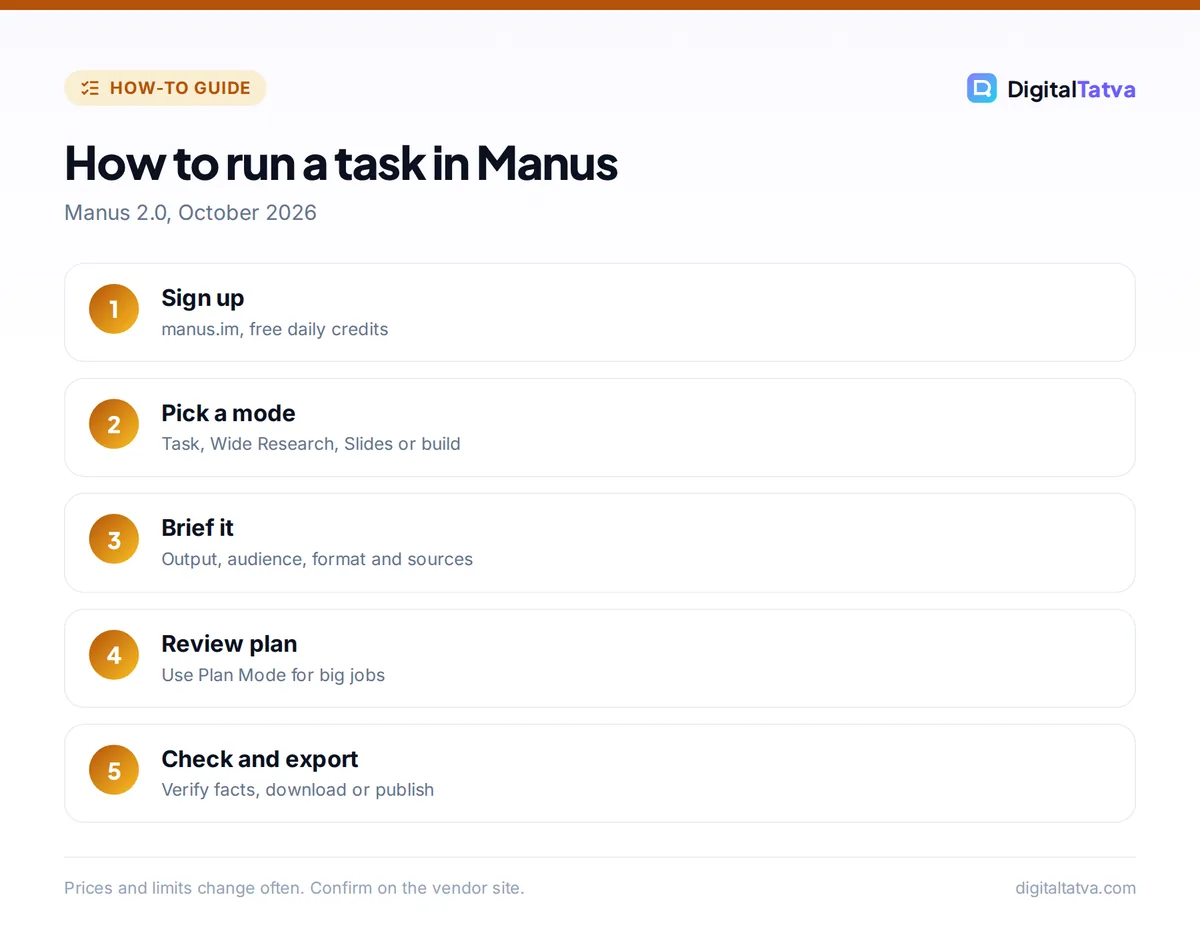
You use Manus by signing up, typing a goal that describes the finished output, reviewing the plan, and letting the agent work while you watch or do something else. Here is the full process.
- Create an account. Go to manus.im or download the app and sign up with your email or a supported social login. Free accounts start with daily credits.
- Pick a mode. Choose a general task, Wide Research for many parallel items, Slides, a website or app build, or another template on the home screen.
- Describe the deliverable. Say what you want, who it is for and the format. Example: “Create a 10-slide pitch deck for a cloud kitchen in Ahmedabad with market size, competitors and a 12-month plan, as an editable PowerPoint.”
- Attach context. Upload files or add a Project, which keeps reusable instructions and knowledge across related tasks.
- Turn on Plan Mode for big jobs. Manus shows a reviewable plan before it starts; edit steps that look wrong.
- Watch or leave. Manus shows its browser, terminal and files as it works. You can step in, take over the browser or send corrections.
- Review and export. Download the files, publish the website, or ask for revisions in the same task.
Tip: Manus spends credits on every step. A tight brief with format, length and sources reduces wasted steps. Our prompt engineering guide explains how to write briefs that agents follow.
What can Manus do? Key features in 2026
Manus can research, build, design, code, automate and now edit video, all inside one agent. These are the main features as of October 2026.
- Wide Research: runs many sub-agents in parallel, for example to profile 50 companies at once.
- Slides: generates native, editable .pptx files (since July 2026). Compare with the best AI presentation makers.
- Websites and apps: builds and hosts web apps, with Auto-Publish and hosting options; mobile app development arrived with Manus 1.6. See our list of AI app builders.
- Browser Operator and My Computer: work in your own browser sessions or approved local folders through the desktop app.
- Cloud Computer: a persistent cloud machine that keeps files and running services between tasks.
- Scheduled tasks and Automations: run tasks on a schedule or when an event happens.
- Agent Skills: reusable, file-based workflow packages for repeat jobs.
- Manus 2.0 additions: the Manus Studio desktop app, a Video Editor with timeline tracks, Game Dev, Remote Control and Computer Use.
- Manus Flex: connect your own model provider key through OpenRouter, Fireworks or Modal.
How much does Manus cost?
Manus has a free plan with 300 daily credits and paid plans that third-party trackers listed at $20, $40 and $200 a month in July 2026. Credits pay for each step the agent takes, so heavier tasks cost more.
| Plan | Monthly price | Credits | Concurrent tasks |
|---|---|---|---|
| Free | $0 | 300 a day (no rollover) | 5 |
| Entry paid tier | $20 | 4,000 a month plus daily credits | 20 |
| Mid paid tier | $40 | 8,000 a month | 20 |
| Top paid tier | $200 | 40,000 a month | 20 |
| Team | From about $20 per seat | Shared pool | Varies |
According to Manus’s own documentation, plan credits reset monthly and purchased add-on credits never expire. User reports suggest a simple question uses 10 to 50 credits, web research 100 to 300, deep research 500 to 900 and a web app build 500 to 1,000 or more. Plan names and prices changed with Manus 2.0, so check the pricing page before you subscribe.
Save money: use the free daily credits to test prompts, then upgrade. For simple questions, a normal chatbot is far cheaper; our list of the best free AI tools has options.
10 Manus prompts that work well
Manus prompts work best when they name the output format, scope and audience. Copy and adapt these.
| Use | Prompt |
|---|---|
| Market research | “Research the top 15 D2C skincare brands in India. Table with founding year, price range, channels and Instagram followers, with sources.” |
| Pitch deck | “Build a 12-slide investor deck for [startup] as editable PowerPoint, using the attached notes.” |
| Landing page | “Create and publish a one-page website for a yoga studio in Pune with class times, prices and a WhatsApp button.” |
| Lead list | “Use Wide Research to find 40 interior design firms in Bengaluru with website, services and public contact page.” |
| Data analysis | “Analyze this sales CSV, find the top 10 products by margin and create charts in a report.” |
| Trip plan | “Plan a 5-day Kerala itinerary for a family of four under Rs 80,000 with hotels and travel times.” |
| Competitor audit | “Compare the pricing pages of five project management tools and summarize who each suits.” |
| Course outline | “Design a 6-week beginner course on Excel for small business owners with lesson plans and quizzes.” |
| Simple app | “Build a web app that tracks daily expenses with categories and a monthly chart.” |
| Video edit | “Cut this 10-minute talk into three 60-second clips with captions.” |
Is Manus safe and reliable?
Manus is reasonably safe for research and content tasks, but like any agent it can make mistakes, misread pages or take wrong actions, so review its work and limit what it can access. Treat it like a new assistant: helpful, fast and in need of checking.
- Check facts and sources in reports before you publish or send them.
- Limit access: connect only the folders and accounts a task needs, and approve sign-ins yourself.
- Avoid sensitive data such as client contracts or ID documents unless your company has approved the service.
- Watch credits: long tasks and failed loops can consume a lot of credits.
Our guide to AI agent security covers prompt injection and permission risks in more depth.
Manus vs ChatGPT Work vs Perplexity Computer
Manus, ChatGPT Work and Perplexity Computer all deliver finished work, but Manus offers the widest range of build features (apps, games, video), ChatGPT Work fits best if you already pay for ChatGPT, and Perplexity Computer leads on cited research.
| Feature | Manus | ChatGPT Work | Perplexity Computer |
|---|---|---|---|
| Free option | Yes, 300 daily credits | No (paid ChatGPT plans) | No (Pro and above) |
| Entry price | About $20/month | $20/month (Plus) | $20/month (Pro) plus credits |
| Best for | Apps, sites, decks, video | Documents and web tasks in ChatGPT | Research with citations |
| Local computer access | Desktop app with approved folders | Desktop app, Chrome extension | Personal Computer on Mac |
Compare in detail with Perplexity Computer and ChatGPT Work, or see the full list of best AI agents.
Frequently asked questions
Is Manus AI free?
Yes, Manus has a free plan with 300 credits that refresh every day and up to 5 tasks at once. That is enough for small research tasks and testing. Larger builds and long research jobs need a paid plan, which third-party trackers listed from about $20 a month in 2026.
Does Meta own Manus?
No, not anymore. Meta announced a deal to acquire Manus in December 2025, but China’s National Development and Reform Commission prohibited the acquisition in April 2026. Manus announced its return to independence in August and formally resumed independent operations on 1 September 2026.
What is Manus 2.0?
Manus 2.0 is the major update released on 28 September 2026. It added a new agent harness called Cascade, the Manus Studio desktop app, a Video Editor, Game Dev, event-triggered Automations, Remote Control and Computer Use, plus Manus Flex for bringing your own model API key.
Is Manus better than ChatGPT?
For finished multi-step deliverables like websites, decks and parallel research, Manus is often more capable than standard ChatGPT chat. For everyday questions, writing and quick help, ChatGPT is faster and cheaper. Many people use both: ChatGPT for chat and Manus for big jobs.
How many credits does a Manus task use?
It varies by complexity. User reports suggest 10 to 50 credits for a simple question, 100 to 300 for web research, 500 to 900 for deep research and 500 to 1,000 or more for a web app build. The dashboard shows usage per task.
Should you use Manus?
Manus is worth trying for anyone who regularly produces research tables, decks, simple websites or apps and wants an agent to do the legwork. Start with the free daily credits, test three real tasks with clear briefs and compare the results with your current tools before paying. Plans, credit costs and features change quickly, so confirm current details on Manus’s pricing page.
Sources
- Plans and credits, Manus documentation, checked 22 October 2026
- Manus AI timeline: release dates and major updates, ScriptByAI, checked 22 October 2026
- Manus AI pricing, Fast.io, July 2026, checked 22 October 2026
- Meta buys Manus, TechRadar, December 2025, checked 22 October 2026
Pricing and features are checked at the time of writing and can change. Some links may be affiliate links, which never affect our verdicts.