Google Ads AI Max for Search: How It Works and How to Use It
Google Ads AI Max explained: search term matching, text customization and final URL expansion, how to turn it on, guardrails to set and whether it is worth it.

On this page
- Key takeaways
- What is Google Ads AI Max?
- What does AI Max actually change in your campaign?
- How do you turn on AI Max in Google Ads?
- How do you control AI Max so it does not waste budget?
- Is AI Max worth using?
- What happens to Dynamic Search Ads?
- AI Max best practices for small businesses
- Frequently asked questions
- Next steps
- Sources
Last updated: 22 October 2026
Quick answer: Google Ads AI Max for Search is a one-click set of AI features inside Google Search campaigns that expands your ads to new relevant searches, writes headlines and descriptions from your website, and sends each click to the best landing page. It is free to turn on, left beta in April 2026, and works best with conversion tracking and Smart Bidding.
Google’s AI Max is now the default for new Search campaigns, and Dynamic Search Ads are being retired in its favor, so most advertisers will use it whether they plan to or not. The good news is that AI Max gives you more control than older automation, including brand exclusions, URL exclusions and text guidelines.
This guide explains what Google Ads AI Max does, how to turn it on step by step, the settings that protect your budget, and how to tell if it is working for your account.
Key takeaways
- AI Max bundles three features: search term matching, text customization and final URL expansion.
- Google says advertisers using search term matching see an average 7% more conversions or conversion value at a similar CPA or ROAS after adding the other two features (Google data, 2026).
- It is on by default for new Search campaigns and can be switched on in Settings for existing ones.
- Use brand exclusions, URL exclusions and text guidelines to keep spend and messaging under control.
- Conversion-based Smart Bidding is needed for AI Max to work effectively.
What is Google Ads AI Max?
Google Ads AI Max for Search campaigns is a suite of AI targeting and creative features that you add to a standard Search campaign without rebuilding it. It uses your keywords, landing pages and existing ads as signals to find more converting searches and write more relevant ads.
| Key fact | Detail |
|---|---|
| Company | |
| Product | AI Max for Search campaigns (Google Ads) |
| Launched | 2025 beta; out of beta since April 2026 |
| Latest additions | AI Brief and text disclaimers (May 2026) |
| Cost | No extra fee; you pay for clicks as usual |
| Requirement | Conversion-based Smart Bidding recommended |
| Replaces | Dynamic Search Ads (being upgraded automatically) |
AI Max is part of a wider shift toward AI-managed advertising across Google, Meta and OpenAI’s new ad platform. If you advertise on Facebook too, read our guide to Meta Advantage+, and for ads inside ChatGPT see ChatGPT ads explained. For the rest of your toolkit, our best AI marketing tools list covers email, content and analytics, and how to use ChatGPT for SEO helps you build the organic side alongside paid search.
What does AI Max actually change in your campaign?
AI Max changes three things: which searches trigger your ads, what text your ads show, and which page each visitor lands on. Each feature can be controlled separately at campaign or ad group level.
1. Search term matching
Search term matching combines broad match with Google’s keywordless technology to find relevant queries you did not add as keywords. It must be enabled at campaign level first; you can then switch it off for individual ad groups that need tight keyword control, such as brand campaigns.
2. Text customization
Text customization generates new headlines and descriptions using your landing pages, existing ads, keywords and assets, and tailors them to each search. Text guidelines let you exclude terms and set tone rules, for example “never say cheapest” or “do not mention discounts”.
3. Final URL expansion
Final URL expansion sends a visitor to the most relevant page on your domain instead of the single URL you set. It requires text customization to be on, and pinned responsive search ad assets may not serve while it is active. URL inclusions and exclusions keep traffic away from pages such as careers, blog posts or login screens.
Note: Since May 2026, text disclaimers let regulated industries (finance, health, legal) make sure legally required text always appears, even with final URL expansion on.
How do you turn on AI Max in Google Ads?
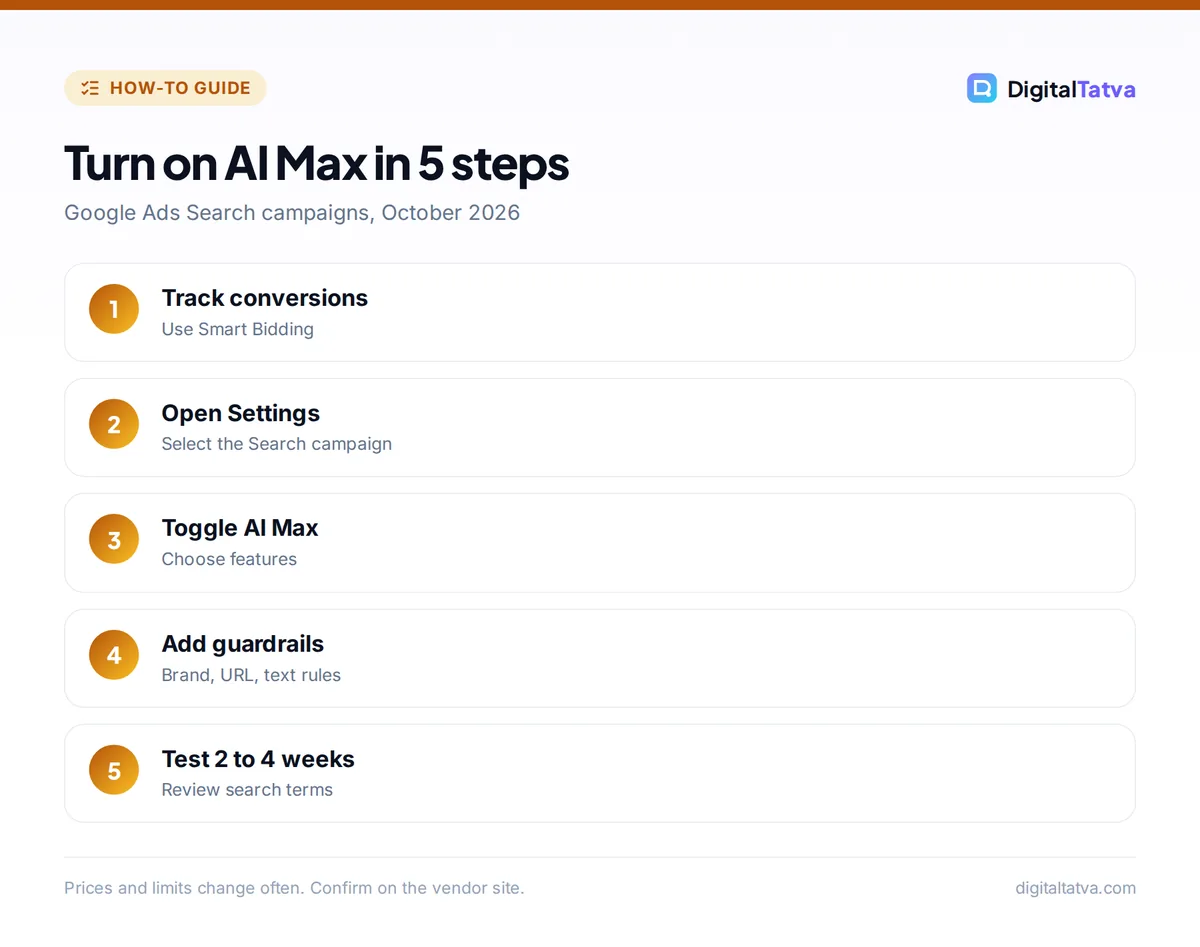
You turn on AI Max in Google Ads by opening a Search campaign’s Settings, finding the AI Max section and switching it on, then choosing which features to use. New Search campaigns have AI Max selected by default.
- Check conversion tracking. Make sure your key conversions (purchases, leads, calls) are recording correctly and the campaign uses a conversion-based Smart Bidding strategy such as Maximize conversions or Target CPA.
- Open the campaign. Go to Campaigns, select your Search campaign, then open Settings.
- Find AI Max. Expand the AI Max section and toggle it on.
- Choose features. Keep search term matching and text customization on. Turn on final URL expansion if your site has many relevant pages.
- Add guardrails. Add brand exclusions (campaign level), URL exclusions and text guidelines with words to avoid.
- Adjust ad groups. Under Keywords and ads, switch search term matching off for any ad group that must stay exact, such as competitor or brand terms.
- Save and monitor. Give the campaign two to four weeks to learn before judging results.
To update many campaigns at once, select them in Settings, choose Edit, then “Change AI Max settings”. In Google Ads Editor and the API, AI Max settings are also available for bulk changes.
How do you control AI Max so it does not waste budget?
You control AI Max with five guardrails: brand inclusions and exclusions, URL exclusions, text guidelines, negative keywords and ad group-level opt-outs. Set these before launch, not after a bad week.
| Control | Level | Use it to |
|---|---|---|
| Brand exclusions | Campaign | Stop showing on competitor or your own brand searches in non-brand campaigns |
| Brand inclusions | Campaign or ad group | Restrict a campaign to searches about your brands |
| URL exclusions | Campaign | Keep traffic away from blogs, careers, support or out-of-stock pages |
| URL inclusions | Ad group | Limit delivery to chosen pages |
| Text guidelines | Campaign | Block terms and set tone for AI-written text |
| Negative keywords | Campaign or ad group | Block irrelevant queries such as “free”, “jobs” or “DIY” |
Watch out: AI Max can match searches far from your keywords. Check the search terms report weekly for the first month and add negatives quickly.
Is AI Max worth using?
AI Max is worth testing for most advertisers with reliable conversion tracking and at least modest volume, because it often finds converting searches that keyword lists miss. It is less suitable for tiny budgets, accounts without conversion data, and highly regulated messaging where every word needs legal approval.
Google reports two figures: at launch in 2025 it claimed 14% more conversions or conversion value at a similar CPA or ROAS, and in 2026 it said advertisers already using search term matching gained an average 7% when they added text customization and final URL expansion. Both are Google’s internal data, so treat them as a starting expectation, not a promise.
Pros
- No extra fee and quick to enable
- Finds new converting searches
- Ad text matches each query more closely
- Better controls than older broad match automation
Cons
- Needs good conversion data
- Less control over exact ad wording
- Pinned assets may not serve with URL expansion
- Can drift into irrelevant searches without negatives
To measure the impact properly, use a campaign experiment that splits traffic between AI Max on and off. Our guide to measuring AI ROI explains how to set a fair baseline.
What happens to Dynamic Search Ads?
Google is retiring Dynamic Search Ads (DSA) in favor of AI Max, and legacy settings are being upgraded to AI Max automatically. Google’s help center says the upgrade is designed to cause no loss in traffic, because AI Max covers the same keywordless matching and landing page selection that DSA did.
If you still run DSA campaigns, review them now: copy your page feeds and exclusions into AI Max URL rules, check that conversion goals are set, and compare performance for a few weeks after the switch.
AI Max best practices for small businesses
Small businesses get the best results from AI Max by keeping campaigns simple, feeding Google clear landing pages and writing a strong base set of ads. AI Max can only remix what you give it.
- Write clear landing pages. Text customization reads your pages, so state prices, service areas and benefits plainly.
- Keep 10 or more strong headlines. Give AI good raw material; our ChatGPT prompts for marketing help you draft them.
- Consolidate. Fewer campaigns with more data learn faster than many tiny ones.
- Use local negatives. Exclude locations and services you do not offer.
- Pair with creative tools. For image assets, see our list of best AI ad generators.
Search behavior is also shifting toward AI answers. Alongside AI Max, make sure your site can appear in AI Overviews and chatbots by following how to rank in AI search. Ecommerce stores should also read AI for ecommerce, and local owners AI for small business.
Frequently asked questions
Is Google AI Max free?
Yes. Google charges no extra fee for AI Max for Search campaigns. You pay only for clicks as usual, although broader matching can increase total spend if you do not set budgets, negative keywords and exclusions carefully. Monitor costs closely during the first month.
Do I need Smart Bidding for AI Max?
Effectively yes. Google’s help center says conversion-based Smart Bidding is needed for search term matching, text customization and final URL expansion to work effectively. Without conversion data, AI Max cannot tell which new searches are valuable, so results are usually weaker.
Can I turn off AI-written ad text?
Yes. Text customization is a separate setting you can switch off while keeping search term matching. Turning it off stops AI-generated assets from serving, and final URL expansion will also stop because it requires text customization. You can instead keep it on and add text guidelines.
Does AI Max replace keywords?
No. Keywords remain important signals, and AI Max adds keywordless matching on top. Strong, well-organized keywords and negative keywords still guide what AI Max finds, and you can switch off search term matching for ad groups that need exact control.
How long does AI Max take to show results?
Plan on two to four weeks. AI Max needs time and conversion data to learn which new searches and text variations work, and early results can swing. Use a campaign experiment comparing AI Max on and off for a fair test before making permanent changes.
Next steps
Pick one Search campaign with solid conversion tracking, turn on AI Max with brand and URL exclusions in place, and run it as an experiment for a month. Review the search terms report weekly and keep your best human-written headlines in the asset set. Google updates AI Max features and policies often, so check the Google Ads help center for current settings before you launch.
Sources
- Optimize Google Ads with AI Max for Search campaigns, Google Ads Help, checked 22 October 2026
- AI Max for Search campaigns, Google, 13 May 2026, checked 22 October 2026
- About AI Max for Search campaigns, Google Ads Help, checked 22 October 2026
- Google to retire Dynamic Search Ads in favour of AI Max, Campaign Asia, checked 22 October 2026
Pricing and features are checked at the time of writing and can change. Some links may be affiliate links, which never affect our verdicts.